### [IMAP vs POP3 vs SMTP: The Differences Explained](https://wpmailsmtp.com/imap-vs-pop3-vs-smtp/)
**Published:** June 4, 2026
**Author:** Rachel Adnyana
**Excerpt:** SMTP, IMAP, and POP3 are easy to confuse, but the distinction is simple: SMTP sends your email, while IMAP and POP3 receive it. Learn how all three protocols work, which ports they use, and what it means for the emails your website sends.
**Content:**
IMAP, POP3, and SMTP are three of the most commonly confused terms in email. People often treat them as three competing options to choose between, but that is not how they work. Two of them handle receiving mail and one handles sending it, and a normal email account uses more than one at the same time.
This guide explains what each protocol does, how they differ, which ports they use, and what all of it means for the emails your own website sends.
**Short Answer:**
SMTP, IMAP, and POP3 are the three core protocols that move email across the internet. **SMTP** (Simple Mail Transfer Protocol) **sends** outgoing mail. **IMAP** (Internet Message Access Protocol) and **POP3** (Post Office Protocol 3) **retrieve** incoming mail. IMAP keeps your messages synced on the server across every device, while POP3 downloads them to a single device and typically deletes the server copy. In plain terms: SMTP is the outbox, and IMAP and POP3 are two different ways to manage the inbox.
> - [IMAP vs POP3 vs SMTP at a glance](#aioseo-imap-vs-pop3-vs-smtp-at-a-glance-7)
> - [What is SMTP?](#aioseo-what-is-smtp-11)
> - [How SMTP works](#aioseo-how-smtp-works-14)
> - [SMTP ports](#aioseo-smtp-ports-17)
> - [What is IMAP?](#aioseo-what-is-imap-21)
> - [How IMAP works](#aioseo-how-imap-works-24)
> - [IMAP ports](#aioseo-imap-ports-27)
> - [What is POP3?](#aioseo-what-is-pop3-29)
> - [How POP3 works](#aioseo-how-pop3-works-32)
> - [POP3 ports](#aioseo-pop3-ports-35)
> - [How SMTP, IMAP, and POP3 work together](#aioseo-how-smtp-imap-and-pop3-work-together-37)
> - [IMAP vs POP3: which should you use?](#aioseo-imap-vs-pop3-which-should-you-use-45)
> - [SMTP vs IMAP: why SMTP is in a different category](#aioseo-smtp-vs-imap-why-smtp-is-in-a-different-category-50)
> - [What this means for your website's email](#aioseo-what-this-means-for-your-websites-email-53)
## IMAP vs POP3 vs SMTP at a glance
Here is a side-by-side comparison of the three email protocols before we look at each one in detail.
SMTPIMAPPOP3**Full name**Simple Mail Transfer ProtocolInternet Message Access ProtocolPost Office Protocol v3**Main job**Sends emailRetrieves and syncs emailRetrieves and downloads email**Direction**OutgoingIncomingIncoming**Where mail lives**In transit between serversOn the mail server (synced)On your local device**Multi-device sync**Not applicableYesNo (by default)**Works offline**NoCached copies onlyYes (fully downloaded)**Secure default port**587 or 465993995**Best for**Any site or app that sends mailMost users and multiple devicesA single device or limited storageNotice that SMTP is not an alternative to IMAP or POP3. Every email account uses SMTP to send and either IMAP or POP3 to receive. The real “vs” decision is only ever IMAP vs POP3.
## What is SMTP?
**SMTP (Simple Mail Transfer Protocol) is the standard protocol used to send email across the internet.** Whenever you hit “send,” or whenever a website fires off a notification, SMTP is the protocol carrying that message from the sender to the recipient’s mail server.
SMTP works like a delivery service for outgoing mail. It does not store messages or let you read them. Its only job is to get an email from the sender to the recipient’s mail server.
### How SMTP works
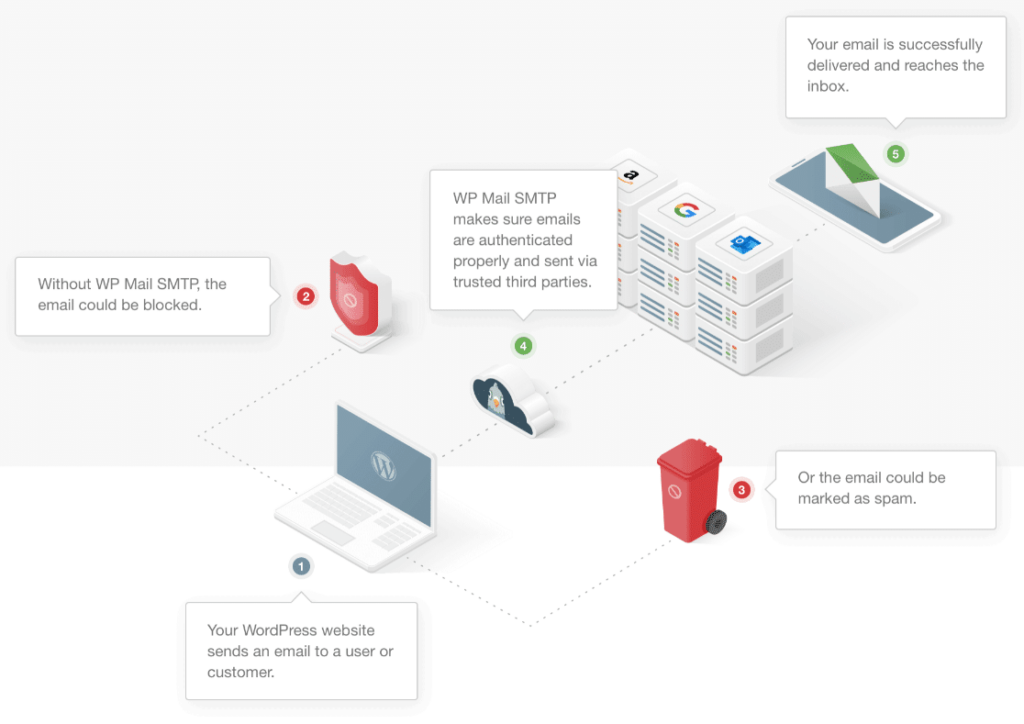
When an email is sent, the sending application connects to an SMTP server and passes along the message and its recipients. That SMTP server then relays the message, sometimes through several servers, until it reaches the recipient’s incoming mail server, where it waits to be picked up by IMAP or POP3.
A critical part of this process is **SMTP authentication**. This is the step where the sending server proves it is allowed to send on behalf of a given email address, usually with a username and password or a secure token (OAuth). Authentication is how mail servers tell legitimate mail from spam, and it has a major impact on whether your email reaches the inbox or the spam folder.
### SMTP ports
[SMTP uses a few standard ports](https://wpmailsmtp.com/smtp-port/) depending on how the connection is secured:
PortUse**25**Server-to-server relay (often blocked by hosts and ISPs for sending)**587**Modern message submission with STARTTLS encryption (recommended for sending)**465**SMTP over implicit SSL/TLS**2525**Common alternate port when others are blockedIf you are configuring an app or website to send email, port 587 is the modern default in almost all cases.
## What is IMAP?
**IMAP (Internet Message Access Protocol) is a protocol for retrieving email that keeps your messages stored on the mail server and synchronized across all your devices.** Read an email on your phone, and it shows as read on your laptop. Move a message to a folder, and that folder structure appears everywhere.
IMAP is the modern standard for receiving email, and it is the one most providers (including Gmail, Outlook, and Apple Mail) recommend today.
### How IMAP works
With IMAP, your email client does not fully download and remove your mail. Instead, it displays messages that live on the server and only downloads content as you open it. Because the server holds the master copy, every device connected to the account sees the same, up-to-date mailbox.
This makes IMAP ideal for anyone who checks email on more than one device. The trade-off is that your mail consumes storage on the mail server, and you need an internet connection to access messages you have not already cached.
### IMAP ports
PortUse**143**Unencrypted (or STARTTLS) IMAP**993**IMAP over SSL/TLS (recommended)## What is POP3?
**POP3 (Post Office Protocol version 3) is a protocol for retrieving email that downloads messages from the server to a single device and, by default, deletes the server copy.** Once mail is pulled down, it lives on that one computer or phone.
POP3 is the older of the two receiving protocols. It dates back to the 1980s and is now considered a legacy approach for most everyday email. In fact, Gmail has removed support for POP3 from 2026, which was a method used by many users to fetch email from third-party accounts and have it delivered to their Gmail inbox.
### How POP3 works
A POP3 client connects to the mail server, downloads any new messages, and (in its default configuration) removes them from the server. After that, the messages exist only on the device that downloaded them. Most clients let you change a setting to “leave a copy on the server,” but the original design assumed one device and one mailbox.
POP3 still has a couple of legitimate uses. It works well if you only ever use one device, if you want a complete offline archive, or if your mail server has very limited storage and you need to clear it out regularly. For everyone else, IMAP is the better fit.
### POP3 ports
PortUse**110**Unencrypted (or STARTTLS) POP3**995**POP3 over SSL/TLS (recommended)## How SMTP, IMAP, and POP3 work together
The clearest way to understand these three protocols is to follow a single email on its journey from sender to reader:
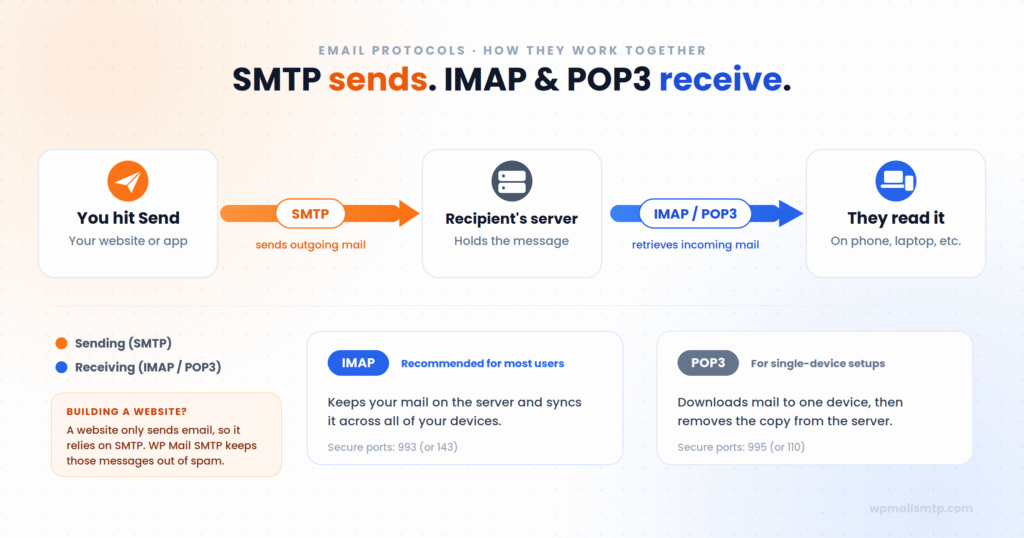1. **Sending (SMTP).** You write an email and click send. Your email client hands the message to an SMTP server, which authenticates you and relays the message toward its destination.
2. **In transit (SMTP).** The message travels server to server using SMTP until it reaches the recipient’s incoming mail server.
3. **Storage.** The recipient’s mail server holds the message until they are ready to read it.
4. **Receiving (IMAP or POP3).** When the recipient opens their email app, it connects to that server using IMAP (to view and sync the mail) or POP3 (to download it).
A full round trip uses SMTP on the way out and IMAP or POP3 on the way in. You always need both halves: a protocol to send and a protocol to receive.
## IMAP vs POP3: which should you use?
Because SMTP handles all sending, the only real choice you make when setting up an email account is IMAP vs POP3 for receiving. The two protocols compare like this:
IMAPPOP3**Mail stored on**The serverYour local device**Syncs across devices**YesNo**Read/unread and folders synced**YesNo**Good for limited server storage**NoYes**Offline access**Cached messagesFull archive (downloaded)**Recommended today**✅ For most usersOnly for niche casesFor almost everyone, IMAP is the better choice. Most people check email on more than one device, such as a phone, a laptop, and sometimes a work computer, and IMAP keeps all of them in sync. POP3 makes sense only when you deliberately want mail tied to a single device, or when you are managing tight storage limits.
The industry has been moving in the same direction. In January 2026, Google began phasing out POP-based “Check mail from other accounts” fetching in Gmail and retired the Gmailify feature, pointing users toward IMAP instead. POP3 still works in many places, but it is increasingly treated as a legacy protocol.
## SMTP vs IMAP: why SMTP is in a different category
SMTP vs IMAP is not really a fair comparison, because the two protocols do different jobs. SMTP sends mail and IMAP receives it. You need both for email to work: one to send your messages and one to read the messages you receive.
If you ever see a setting asking you to enter both an SMTP server and an IMAP server for the same account, that is the reason. One is your outgoing path and the other is your incoming path.
## What this means for your website’s email
**If you run a website, only one of these three protocols really affects you, and it is SMTP.**
Your website sends a lot of email, and all of it relies on SMTP. Contact form notifications, new user registrations, password resets, purchase receipts, WooCommerce order confirmations, and abandoned cart reminders are all outgoing messages, so they all depend on SMTP working correctly. IMAP and POP3 never come into it, because a website does not sit down to read an inbox. It only sends.
So why do so many website emails end up in spam or never arrive at all? It usually comes down to how they are sent.
By default, WordPress sends mail using the built-in PHP `mail()` function rather than a properly authenticated SMTP connection. That creates two problems:
- Many hosts disable or limit PHP `mail()`, so messages fail before they ever leave the server. This is also where the common [“Could not instantiate mail function” error](https://wpmailsmtp.com/how-to-fix-could-not-instantiate-mail-function-in-wordpress/) comes from.
- Mail sent this way usually lacks proper authentication, the SPF and DKIM records that prove a message is legitimate. Inbox providers like Gmail and Outlook treat unauthenticated mail with suspicion and send it to spam, or reject it outright.
The fix is to stop relying on PHP `mail()` and route your WordPress emails through a real, authenticated SMTP connection instead. That is exactly what the WP Mail SMTP plugin does.
[Fix Your WordPress Emails Now](https://wpmailsmtp.com/pricing/)
WP Mail SMTP reconfigures WordPress’s `wp_mail()` function to send through a proper SMTP provider, so your messages are authenticated and far more likely to reach the inbox. It is the most popular plugin of its kind, with more than 3 million active installations, and a guided Setup Wizard connects your site to a mailer without any code.
It supports a wide range of email services, including:
- **SendLayer**, **SMTP.com**, and **Brevo** (the recommended options)
- **Google Workspace / Gmail** and **Microsoft 365 / Outlook**
- **Mailgun**, **SendGrid**, **Amazon SES**, and **Zoho Mail**
- Any other provider, through a generic **Other SMTP** option
The free version (WP Mail SMTP Lite) is enough to fix deliverability for most sites. Upgrading to WP Mail SMTP Pro adds tools for sites that depend on email getting through:
- **Email Logs** to see which messages were sent and which failed
- **Open and Click Tracking** plus weekly email summaries
- A **Backup Connection** that automatically takes over if your primary mailer goes down
- **Smart Routing** to send different email types through different providers
- **Email failure alerts** so you know the moment a message does not go out
If a contact form submission never arrives, the cause is almost always SMTP, and setting it up correctly is the best way to make your website’s email reliable. If only one type of message is failing, we have step-by-step fixes for [Contact Form 7 emails](https://wpmailsmtp.com/contact-form-7-not-sending-emails/), [user registration emails](https://wpmailsmtp.com/wordpress-user-registration-email-not-sending/), and [emails that send but never arrive](https://wpmailsmtp.com/troubleshooting-wordpress-emails-not-arriving/).
### Frequently asked questions about SMTP, POP3, and IMAP
#### What are the four main email protocols?
The three core email protocols are **SMTP** (for sending) and **POP3** and **IMAP** (for receiving). When people refer to a “fourth” email protocol, they usually mean **HTTP/HTTPS**, which is what webmail interfaces like Gmail’s website use to display mail in a browser. Some lists instead include **Exchange/MAPI**, Microsoft’s proprietary protocol. SMTP, POP3, and IMAP remain the universal standards.
#### How do I know if my email is using POP3 or IMAP?
Check your email account’s incoming server settings in your mail app. The incoming server port tells you which protocol is in use: port 993 or 143 means IMAP, while port 995 or 110 means POP3. You can usually find this under the account’s “server” or “advanced” settings. Your SMTP settings (port 587, 465, or 25) appear separately as your outgoing server.
#### Is SMTP still used?
Yes. SMTP is the universal standard for sending email and remains in active use everywhere. Every email sent across the internet still relies on SMTP for delivery, including messages from websites, apps, and email marketing platforms. Unlike POP3, which is in decline, SMTP has no real replacement for its job.
#### Why is Gmail discontinuing POP3?
Gmail has not fully removed POP3. You can still connect to Gmail itself from other apps using POP or IMAP. What Google retired, starting in January 2026, is Gmail’s ability to fetch mail from external accounts via POP3 (the “Check mail from other accounts” feature), along with the Gmailify feature. The move is part of a broader security push that also includes requiring OAuth instead of basic passwords and enforcing email authentication. It reflects the wider industry shift away from POP3 toward IMAP for everyday email.
#### Can I use IMAP and SMTP at the same time?
Yes, and in fact you almost always do. IMAP and SMTP serve opposite functions: IMAP receives your mail and SMTP sends it. A standard email account is configured with both an incoming server (IMAP or POP3) and an outgoing server (SMTP) so it can do both.
#### What is the difference between SMTP and IMAP in simple terms?
SMTP sends email and IMAP receives it. SMTP moves a message out from the sender to the recipient’s server, while IMAP lets the recipient read that message and keeps it synchronized across all their devices.
#### Does WP Mail SMTP work with Gmail and Outlook?
Yes. WP Mail SMTP includes dedicated, secure (OAuth-based) integrations for [Google Workspace / Gmail](https://wpmailsmtp.com/how-to-send-wordpress-emails-through-gmail-1-click-setup/) and [Microsoft 365 / Outlook](https://wpmailsmtp.com/features/microsoft-365-outlook-com/), along with many other mailers. The Setup Wizard walks you through connecting whichever provider you choose.
To recap: SMTP sends email, while IMAP and POP3 receive it. SMTP is your outbox, and IMAP and POP3 are two ways to handle your inbox. For most people today, IMAP is the better choice.
For your website, only one of these really matters. Since a site only ever sends email, its reliability comes down to SMTP being configured correctly, with proper authentication so messages reach the inbox instead of the spam folder.
[Fix Your WordPress Emails Now](https://wpmailsmtp.com/pricing/)
Ready to fix your emails? [Get started today](https://wpmailsmtp.com/pricing) with the best WordPress SMTP plugin. If you don’t have the time to fix your emails, you can get full White Glove Setup assistance as an extra purchase, and there’s a 14-day money-back guarantee for all paid plans.
If this article helped you out, please follow us on [Facebook](https://facebook.com/wpmailsmtp) and [Twitter](https://twitter.com/wpmailsmtp) for more WordPress tips and tutorials.
**Categories:** Research
**Tags:** wordpress email, WordPress email deliverability, wordpress smtp
---