### [Email Validation for Forms: Protect Your Sender Reputation](https://wpmailsmtp.com/wordpress-email-validation/)
**Published:** June 18, 2025
**Author:** Rachel Adnyana
**Excerpt:** High email bounce rates are costing you money and hurting your sender reputation. While most people focus on cleaning up bounces after they happen, the smarter approach is preventing invalid emails from entering your WordPress database in the first place.
Learn how to implement email validation on contact forms, registration pages, and checkout forms to stop bad emails at the source.
**Content:**
When someone types the wrong email address into a form on your site, that mistake doesn’t just disappear.
One of two things happens. Either the address bounces and you lose your chance to reach that person. Or it belongs to a real inbox that wasn’t theirs, and a stranger gets an email from you, has no idea who you are, and marks it as spam.
That second scenario is the one most people miss. Spam complaints count against your sender reputation, and a damaged reputation means your legitimate emails start landing in junk folders too. So a handful of typos on your contact form can quietly drag down delivery for your whole site.
The answer is email validation: checking that an address is real and able to receive mail before it ever enters your database. In this guide I’ll explain how bad addresses hurt you, then walk through the practical ways to stop them at the source on your WordPress forms.
## **The short version**
Email validation checks that an email address is correctly formatted, uses a real domain, and can actually receive mail. It protects two things at once: the message you’re trying to send (a bounced email reaches nobody) and your sender reputation (misdirected mail gets marked as spam, which tells inbox providers you’re a spammer). You have a few ways to do it on WordPress forms:
**Email confirmation** (a click link, a one-time code, or a magic link) proves the person controls a working inbox.
**Frontend validation** catches typos and formatting mistakes before someone submits.
**Backend validation** re-checks the address on the server, where it can’t be bypassed.
**Real-time verification** uses an API to confirm the mailbox exists before the address is saved.
[Fix Your WordPress Emails Now](https://wpmailsmtp.com/pricing/)
Let’s start with why this matters more than it looks, then get into the how.
- [How invalid email addresses hurt your deliverability](#aioseo-how-invalid-email-addresses-hurt-your-deliverability)
- [Common email validation problems in WordPress](#aioseo-common-email-validation-problems-in-wordpress)
- [How to validate emails in WordPress](#aioseo-how-to-validate-emails-in-wordpress)
- [Frontend validation: catch mistakes before submission](#aioseo-frontend-validation)
- [Backend validation: a second line of defense](#aioseo-backend-validation)
- [Real-time email verification with an API](#aioseo-real-time-email-verification)
- [Email confirmation, codes, and magic links](#aioseo-email-confirmation-codes-and-magic-links)
- [How to track your email validation and bounces](#aioseo-how-to-track-your-email-validation-and-bounces)
- [How to validate different types of WordPress forms](#aioseo-how-to-validate-different-types-of-wordpress-forms)
- [Advanced email validation tools and plugins](#aioseo-advanced-email-validation-tools-and-plugins)
- [Your email validation action plan](#aioseo-your-email-validation-action-plan)
- [Email validation FAQ](#aioseo-email-validation-faq)
## How invalid email addresses hurt your deliverability
A few wrong addresses might not sound like a problem. But invalid emails work against you in two separate ways, and the second one is the reason this matters more than most people realize.
### They bounce, so your message never arrives
If an address is misspelled or the domain doesn’t exist, the email bounces. For a marketing campaign that means a lost subscriber. For a WooCommerce store it means a customer who never gets their order confirmation or receipt, which usually turns into a support ticket.
A high bounce rate is also a red flag to inbox providers. Gmail, Outlook, and the rest watch how your mail performs, and lots of bounces make your domain look careless or compromised. As a rule of thumb, keep your bounce rate below 2%.
### They generate spam complaints, which damage your reputation
This is the part that catches people out. When someone types an email they *think* belongs to them but doesn’t (maybe they use the handle “mrbrightside92” on their social media accounts but someone else owns the email account “mrbrightside92@gmail.com) that email doesn’t vanish. It often lands with a real person at a real domain who never signed up for anything. They don’t recognize you, so they hit “mark as spam.”
Those complaints count against your sender reputation. Google’s bulk sender guidelines tell senders to keep their spam complaint rate below 0.1% and never let it reach 0.3%. Those thresholds officially apply to high-volume senders, but spam complaints work against any domain’s reputation. Cross the line and Gmail starts sending your mail to [junk folders](https://wpmailsmtp.com/wordpress-emails-going-to-spam/), or refusing it outright. Multiply one typo across hundreds of submissions and you have a problem that affects every email your site sends, including password resets and order confirmations.
You can track your complaint rate for Gmail and Google Workspace addresses in [Google Postmaster Tools](https://wpmailsmtp.com/how-to-set-up-google-postmaster-tools/).
### They distort your data
Say 30% of your list is invalid. Your open rates, click rates, and conversion numbers are all skewed, and you can’t make good decisions on bad data.
The good news is that most of this is preventable.
## Common email validation problems in WordPress
WordPress is flexible, but when it comes to collecting email addresses, it’s a little too trusting.
If someone types “john@gmial.com” into your contact form, WordPress will accept it (unless you’ve set your forms up to catch it, which I’ll cover later), store it in your database, and give you no sign anything’s wrong until the email bounces.
And people mistype their addresses constantly, especially on mobile.
### Common types of invalid email addresses
- **Typos:** the classic “gmial.com” for “gmail.com,” or “yaho.com” for “yahoo.com.” These happen more than you’d expect, especially on phones where autocorrect has its own ideas.
- **Bad formats:** some people just don’t know how email addresses work. You’ll see entries like “john@” with no domain, or “john.doe” with no @ symbol at all.
- **Nonexistent domains:** the address can look fine while the domain doesn’t exist. Maybe they typed “john@mycompany.co” instead of “mycompany.com,” or used a domain that expired years ago.
- **Temporary or disposable addresses:** 10-minute mail services hand out throwaway addresses that self-destruct. People use them to grab a lead magnet and then disappear. They aren’t always invalid, but they’re useless for building a relationship.
- **Role-based emails:** addresses like “info@company.com” or “admin@business.org” look professional, but often nobody checks them, and some providers treat them as spam traps.
- **Spambot submissions:** bots flood forms with fake or malformed addresses. Even when the format is right, these are usually undeliverable or tied to spam traps.
- **Incorrect email addresses:** the scenario I outlined above where the email address might exist… but doesn’t belong to the person filling out the form.
Invalid addresses like these can creep into your system from all over:
- **Registration forms** where people rush the signup
- **Contact forms** that anyone (including bots) can fill in
- **Checkout forms** where customers are focused on buying, not spelling
- **List imports** from old spreadsheets or other platforms
- **Manual entries** where you or your team introduce a typo
WordPress has no built-in email validation, so these problem addresses pile up in your database waiting to cause trouble.
It gets harder if you run a multisite network or several plugins that all collect emails. Now you have bad addresses arriving from six different places and no easy way to keep track.
## How to validate emails in WordPress
There are a few ways to validate emails on a WordPress site, from quick frontend checks to full mailbox verification. Most sites use a combination, with each layer catching what the one before it misses.
### Frontend validation: catch mistakes before submission
This is your first line of defense. Most modern form plugins include some level of built-in validation, like typo suggestions (“Did you mean gmail.com?”) and format checking.
[WPForms](https://wpforms.com/), for example, includes smart email validation out of the box, with no code required. It runs the moment someone finishes the email field, so they can fix a mistake before they ever hit submit.
**Don’t forget mobile.** A large share of form submissions come from phones, where typos and autocorrect mistakes are even more common. Whatever validation you set up should work as smoothly on mobile as it does on desktop.
### Backend validation: a second line of defense
Frontend validation is helpful, but it isn’t foolproof. People can disable JavaScript, and bots can submit forms directly without ever loading your page. Backend validation re-checks the address on the server, where none of that can bypass it.
WordPress includes a function called filter\_var() that checks whether an address is formatted correctly. It catches obvious problems like a missing @ symbol, but it won’t tell you whether someone@fakerdomain123.com is a real, working address.
For stronger backend checks, you can:
- Confirm the domain actually exists
- Check that the domain is set up to receive mail
- Look for patterns that flag disposable or temporary addresses
### Real-time email verification with an API
Format checks can’t tell you whether a mailbox actually exists. Real-time verification services can. As someone submits your form, the service pings the address through an API and reports back whether it’s deliverable, disposable, role-based, or risky, before the address is saved.
These services charge per check, but they catch problems no other method can, which makes them worth it for high-value lists or high-volume signup forms. I’ve listed some options further down.
### Email confirmation, codes, and magic links
The methods above check whether an address looks valid. The strongest approach goes one step further and confirms the person actually controls the inbox, by making them prove it before the address counts.
There are three common versions:
- **Double opt-in:** the person clicks a confirmation link in an email before they’re added to your list. (More on this under registration forms below.)
- **One-time codes:** the form sends a short code to the address, and the person types it back in to continue. A fake or mistyped address never receives the code, so it never gets through.
- **Magic links:** instead of a password, the person clicks a sign-in link sent to their email. Same effect: no working inbox, no access.
This is where two-factor authentication usually comes up, and the distinction matters. Email-based verification like the methods above doubles as validation, because completing it requires a live, deliverable inbox. App-based or SMS two-factor authentication works differently. It protects an existing account from unauthorized logins, but does nothing to confirm the email address itself. If you want a clean list of real, reachable addresses, the email-based methods are the ones that help.
On WordPress, you’ll usually add these through your registration or login flow rather than a basic contact form. Double opt-in is built into most email and form tools, while codes and magic links typically come from a membership, login, or authentication plugin.
## How to track your email validation and bounces
Here’s a step most people skip: actually measuring whether their validation is working. If you don’t track it, you have no idea whether it’s helping.
### Email logging
Email logs record every email your WordPress site tries to send. Not just the ones that go through, but all of them: every attempt, every failure, every bounce.
That record is useful because it helps you:
- See patterns in bounce failures and their causes
- Identify which forms are letting problem addresses through
- Track your bounce rate over time
- Debug delivery problems when they come up
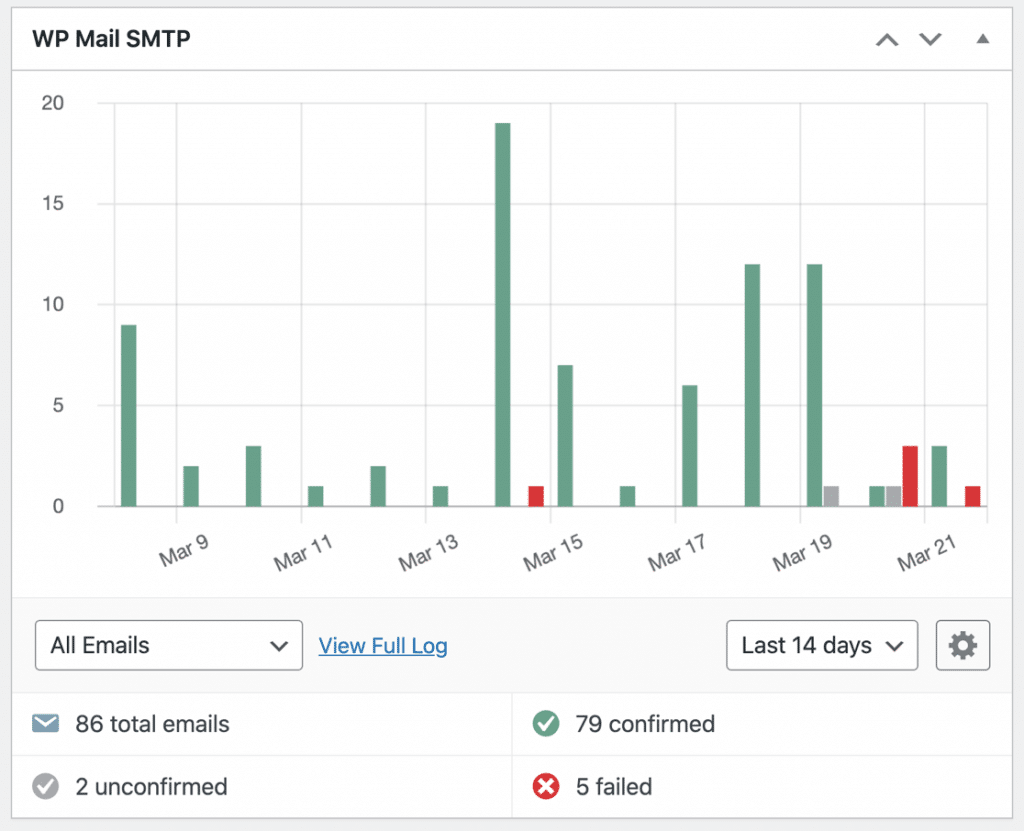The email log in WP Mail SMTP Pro tracks all your WordPress email attempts automatically. It doesn’t validate addresses itself, but it shows you exactly which emails are failing and why. As your validation improves, you’ll see fewer failed sends and bounces, which is how you know it’s working.
[Log Your WordPress Emails Now](https://wpmailsmtp.com/pricing/)
The WP Mail SMTP log isn’t the only place to look. Most tools you use to collect and send email have their own analytics:
**Your email service provider** (Mailchimp, ConvertKit, and the like) reports bounce rates over time. As your validation improves, those numbers should drop.
**Transactional email providers** like [SendLayer](https://sendlayer.com/) also track delivery and bounces. SendLayer automatically adds hard-bounced addresses to a suppression list to protect your reputation.
**Google Analytics** can show whether people abandon a form at the validation step, which can mean your error messages are confusing.
**[Google Postmaster Tools](https://wpmailsmtp.com/how-to-set-up-google-postmaster-tools/)** tracks bounces and spam complaints over time for Gmail and Google Workspace addresses, and helps you dig into the causes.
Check your stats regularly. If your bounce rate starts climbing, you can deal with it before it turns into a real problem.
## How to validate different types of WordPress forms
Not every form needs the same validation. A contact form has different needs than a checkout, and what suits registration might be overkill for a newsletter box. Here’s how to approach the main ones.
### Registration forms
Registration forms matter because these are people choosing to join your community or access your content. You want a smooth path for real users and a closed door for bad addresses.
Double opt-in is a simple, effective option here. After someone registers, send a confirmation email they have to click. Only confirmed addresses get added to your main list.
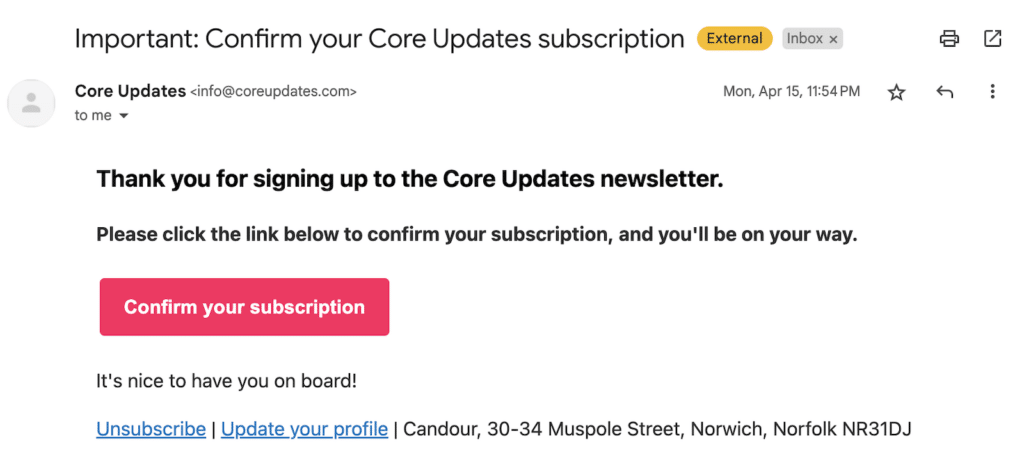That does a few things at once:
- Proves the email address actually works
- Confirms the person really wanted to sign up, with no accidental submissions
- Gives you a natural moment to send a welcome message
- Keeps your list clean from day one
For this to work, the confirmation email has to arrive right away, which is where reliable delivery matters. WP Mail SMTP helps make sure your double opt-in messages reach the inbox instead of the spam folder.
Nobody enjoys jumping through hoops, so keep the signup itself as smooth as you can:
- Use clear, helpful error messages (“Did you mean gmail.com?” instead of “Invalid email format”)
- Show a progress indicator if you have multiple steps
- Pre-fill fields when you can
- Make it obvious what happens after they register
### Contact forms
Contact forms tend to attract the widest mix of submissions, from genuine customers to spam bots.
Here you want validation that helps without getting in the way. Someone asking a question shouldn’t feel like they’re sitting an exam.
WPForms includes **built-in email validation** with [customizable messages](https://wpforms.com/docs/customize-wpforms-validation-messages/) that check format and suggest fixes for common typos, with no setup needed. It catches mistakes without slowing people down.
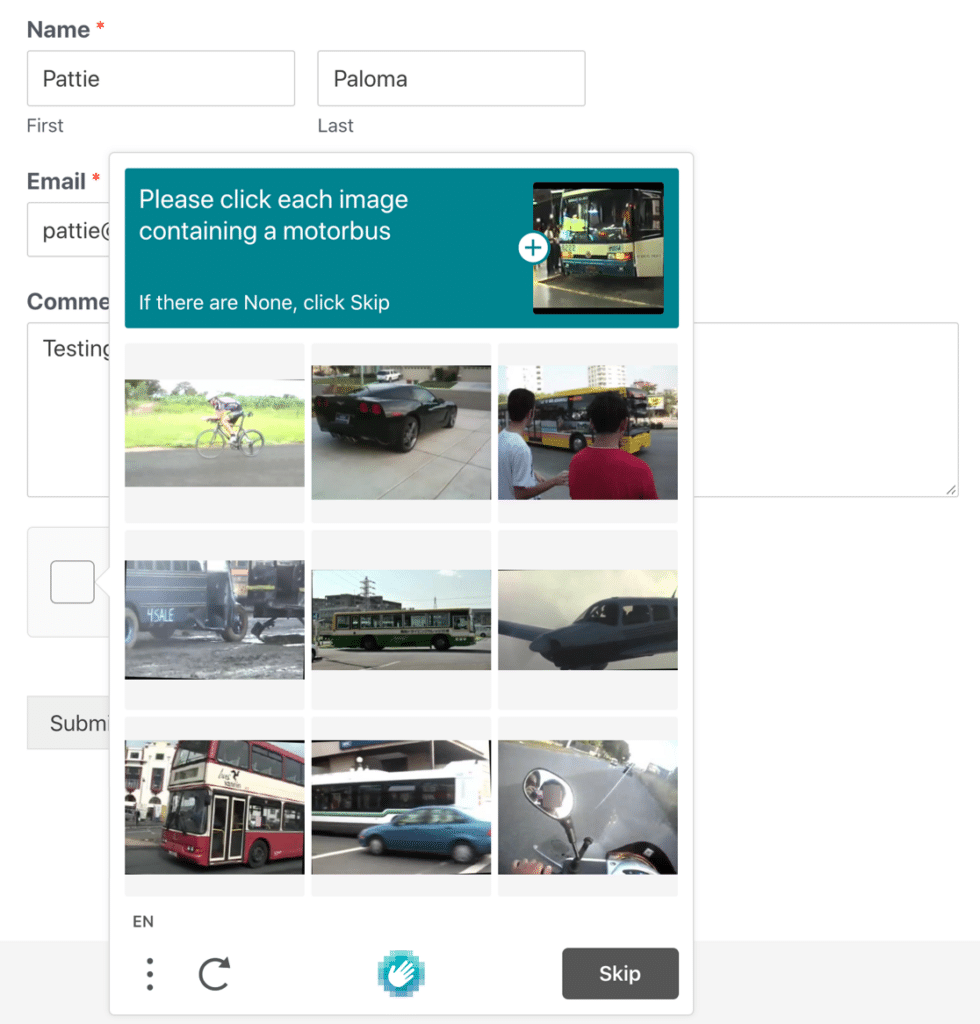
Contact forms also need [protection from automated spam](https://wpforms.com/features/spam-protection/). A few effective options:
- Honeypot fields (invisible fields that only bots fill out)
- Rate limiting (stopping rapid-fire submissions from the same IP)
- reCAPTCHA or hCaptcha
- Simple questions like “What’s 2+2?” (effective and user-friendly)
### Checkout forms
At checkout, people are in buying mode and focused on completing the purchase, not proofreading their email. But that address has to be right for order confirmations, shipping updates, and anything you send later.
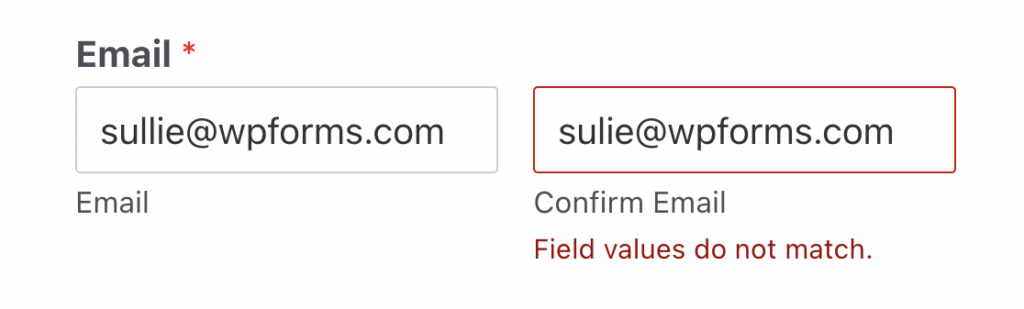
Consider asking customers to **type their email address twice** to confirm it, especially for digital products where email is the delivery method. It’s one extra step, and it heads off the “I never got my download” support tickets.
Guest checkout tends to bring in more throwaway addresses. To cut down on that, you can:
- Offer incentives for creating an account
- Add gentle reminders about the benefits of having an account
- Apply extra validation for guest purchases
## Advanced email validation tools and plugins
Basic frontend validation catches most typos, but it won’t stop someone from entering “test@tempmail.com” or confirm that “john@company.com” actually exists. For that, you need real-time verification services that check whether an address is deliverable before it enters your database.
### WordPress validation plugins
PluginWhat it does[DeBounce](https://debounce.io/)Works with most form plugins, including WooCommerce, Contact Form 7, Gravity Forms, and WPForms. Uses multi-layer checking, with SMTP verification and catch-all domain filtering.[MailboxValidator Email Validator](https://wordpress.org/plugins/mailboxvalidator-email-validator/)Blocks disposable, free, invalid, and role-based addresses, with domain blacklisting. Includes 300 free validations a month.[ZeroBounce Email Verification & Validation](https://wordpress.org/plugins/zerobounce/)Real-time validation that detects more than 30 address types and blocks invalid or risky emails automatically.### Third-party validation services
ServiceFree tierNotable[ZeroBounce](https://www.zerobounce.net/)100 verifications a month (with a business domain)Detects 30+ address types; single checks in about 3 seconds[Clearout](https://clearout.io/)Paid, from $35 for 5,000 credits (credits don’t expire)Fast response times[MailboxValidator](https://www.mailboxvalidator.com/)300 credits a monthFocuses on blocking disposable and role-based addresses## Your email validation action plan
Email validation can feel like a lot, but you don’t need to overhaul everything at once. Start with the highest-impact changes, then build from there.
**Step 1: Audit your WordPress forms**
Take inventory of every place people can enter an email address on your site:
- Contact forms
- Registration forms
- Checkout processes
- Newsletter signups
- Download forms
For each one, ask: “What happens if someone enters a bad email address?” If the answer is “nothing,” that’s your starting point.
**Step 2: Add basic frontend validation**
Start with simple validation that catches obvious typos and format errors. This alone prevents a big share of invalid submissions.
If you’re using WPForms, this is already built in and ready to go. For other form plugins, you might need custom code or a validation add-on.
**Step 3: Set up email logging**
Before you can improve validation, you need a picture of your current performance. Set up logging to track:
- How many emails you’re sending
- Which ones are bouncing
- Where the invalid addresses are coming from
WP Mail SMTP’s Email Log feature makes this easy. It tracks all email attempts automatically and gives you a clear dashboard to see what’s working and what isn’t.
**Step 4: Configure reliable email delivery**
This might seem backwards, but reliable email infrastructure is what makes validation work. If your confirmation messages don’t get delivered, the whole system breaks down.
WP Mail SMTP sends your WordPress emails through a professional SMTP provider instead of your web server, which improves deliverability.
[Fix Your WordPress Emails Now](https://wpmailsmtp.com/pricing/)
**Step 5: Strengthen your validation**
Once the basics are in place, you can add more:
- **Double opt-in workflows.** Confirmation emails for new subscribers, which validate the address and confirm the person wants to hear from you.
- **Email confirmation with codes or magic links.** The surest way to prove someone controls the inbox you’re about to send to.
- **Real-time verification.** If you collect a lot of addresses or run a high-value list, API verification is worth the cost.
**Step 6: Clean up existing invalid emails**
Even with perfect validation from here on, you’ll still have invalid addresses sitting in your current database. Those old addresses keep hurting your sender reputation every time you send a campaign.
For a step-by-step guide to finding and removing problem emails from your database, see our[ complete email bounce handling guide](https://wpmailsmtp.com/email-bounces/). It’s the companion to the prevention strategies here.
The most effective setup is reliable infrastructure first (WP Mail SMTP handles delivery), then smart form validation (WPForms catches errors before they reach your database). Together they give you both prevention and visibility into what’s working.
Prevention beats cleanup every time. The bad addresses you stop today are bounces you won’t have to deal with tomorrow.
## Email validation FAQ
### What is email validation?
Email validation is the process of checking that an email address is correctly formatted, uses a real domain, and can receive mail, before it’s saved to your database. It’s how you stop typos, fake addresses, and disposable inboxes from getting onto your list.
### What’s the difference between email validation and email verification?
Validation usually means checking that an address is formatted correctly and uses a real domain. Verification goes further and confirms the mailbox actually exists and can receive mail, often through a real-time API or a confirmation step the user completes. In practice, you want both.
### Does WordPress validate email addresses on its own?
Only at a basic level. WordPress includes a filter\_var() function that checks formatting, so it’ll reject an address with no @ symbol. It won’t tell you whether the domain exists or the mailbox is real, which is why most sites rely on a form plugin or a verification service for proper validation.
### How do invalid email addresses affect deliverability?
In two ways. Invalid addresses bounce, and a high bounce rate signals to inbox providers that your list is poor. Worse, mistyped addresses often reach real people who never signed up and mark the email as spam. Those complaints lower your sender reputation, which can push all your mail, including password resets and receipts, into junk folders.
### Can two-factor authentication validate an email address?
Email-based verification can, because the person has to receive a code or link at that address to continue, which proves the inbox is real and reachable. App-based or SMS two-factor authentication doesn’t validate the email. It secures an account against unauthorized logins, but says nothing about whether the email address works.
### What’s a good email bounce rate?
Aim to keep your bounce rate below 2%. A higher rate usually points to list-quality problems, like invalid addresses getting through your forms or old addresses that need cleaning out.
## Next, stop contact form spam
Spam bots are one of the biggest sources of invalid addresses. Our guide to [stopping contact form spam](https://wpmailsmtp.com/how-to-stop-contact-form-spam-in-wordpress/) walks through the easiest way to lock down every form on your site.
[Fix Your WordPress Emails Now](https://wpmailsmtp.com/pricing/)
Ready to fix your emails? [Get started today](https://wpmailsmtp.com/pricing) with the best WordPress SMTP plugin. If you don’t have the time to fix your emails, you can get full White Glove Setup assistance as an extra purchase, and there’s a 14-day money-back guarantee for all paid plans.
If this article helped you out, please follow us on [Facebook](https://facebook.com/wpmailsmtp) and [Twitter](https://twitter.com/wpmailsmtp) for more WordPress tips and tutorials.
**Categories:** WordPress Tutorials
**Tags:** contact forms, email validation, wordpress forms
---