### [What Is Sender Score? How to Check and Improve Your Email Reputation](https://wpmailsmtp.com/sender-score-email-reputation/)
**Published:** June 17, 2026
**Author:** Rachel Adnyana
**Excerpt:** Your emails keep landing in spam, and it's not your subject lines. Sender Score reveals the reputation of the infrastructure sending your mail. This guide explains what it measures, how to check it for free, and the specific steps to improve it.
**Content:**
You’ve rewritten the subject line three times. You’ve trimmed the images, dropped the salesy words, and tested every variation you can think of. The emails still land in spam.
Here’s the part nobody tells you when you’re staring at your open rates: mailbox providers barely care about your copy. They care about the reputation of the infrastructure your email comes from. And there’s a public number that summarizes it, called Sender Score.
In this guide, I’ll explain what Sender Score measures, what counts as a good one, how to look up yours for free, and the specific changes that raise it. If you run a WordPress site, the single biggest of those changes is moving your email off your host’s shared server, which is the job [WP Mail SMTP](https://wpmailsmtp.com/) was built for, and I’ll show you exactly where it fits.
**Quick answers**
- **What is Sender Score?** A free 0 to 100 rating of your sending IP’s reputation from Validity, based on a rolling 30 days of complaints, bounces, spam traps, and blocklist data.
- **What’s a good Sender Score?** 80 or above is good, 90 and up is excellent. Below 70, expect deliverability problems.
- **Does Gmail use it?** No. Gmail runs its own reputation system, visible in Google Postmaster Tools. Sender Score is the independent early-warning number.
- **How do you improve it?** Authenticate your domain, remove hard bounces, keep your volume steady, and stop sending from your web host’s shared IP.
[Fix Your WordPress Emails Now](https://wpmailsmtp.com/pricing/)
## What Is Sender Score?
Sender Score is a free email reputation rating from Validity that scores every sending IP address from 0 to 100. It’s based on a rolling 30-day sample of how mailbox providers and filters in Validity’s data network have treated mail from that IP: complaints, bounces, spam trap hits, and blocklist appearances. Higher is better, and the score updates daily.
- [What Is a Good Sender Score?](#what-is-a-good-sender-score)
- [How Sender Score Is Calculated](#how-sender-score-is-calculated)
- [How Much Does Sender Score Matter?](#how-much-does-sender-score-matter)
- [How to Check Your Sender Score](#how-to-check-your-sender-score)
- [What Drags a Sender Score Down](#what-drags-a-sender-score-down)
- [How to Improve Your Sender Score](#how-to-improve-your-sender-score)
- [How Long Does It Take to Improve a Sender Score?](#how-long-does-it-take-to-improve-a-sender-score)
- [Sender Score FAQs](#aioseo-sender-score-faqs-93)
The score is a percentile, which is the detail most explanations skip. A Sender Score of 90 doesn’t mean “90% good.” It means that IP’s reputation is stronger than 90% of all the IPs Validity measures. The scale gets steep at the top: climbing from 90 to 95 is a much bigger move than it looks.
Think of it the way lenders use a credit score. Mailbox providers each run their own private checks, but Sender Score is the public reference number that summarizes how your sending behavior looks from the outside.
Two boundaries worth knowing before you go look yours up. Sender Score rates IP addresses, not domains and not individual senders, so what you’re really checking is the reputation of whichever server transmits your mail. And IPs that send very little mail may not have a score at all, because there isn’t enough data to rate them.
### What Is a Good Sender Score?
A good Sender Score is 80 or above. Beyond that, the bands break down like this:
ScoreRatingWhat it means in practice90–100ExcellentYour mail is treated as trustworthy. Deliverability problems are rarely reputation-related.80–89GoodSolid standing. Most mail reaches the inbox, but there’s measurable room to improve.70–79At riskFilters are already throttling or junking some of your mail. Time to act.Below 70PoorExpect spam-folder placement and outright blocks. Reputation repair needed before anything else.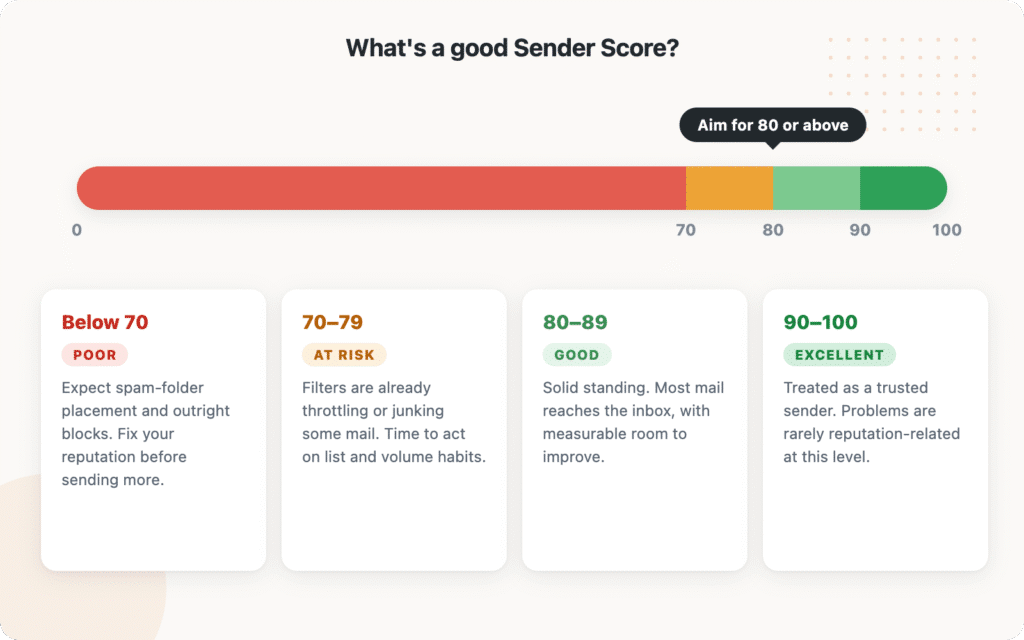Because the score is a percentile, average isn’t safe. An IP scoring 70 sounds passable until you remember it means nearly a third of measured senders look more trustworthy than you do. Filters grade on that curve.
### How Sender Score Is Calculated
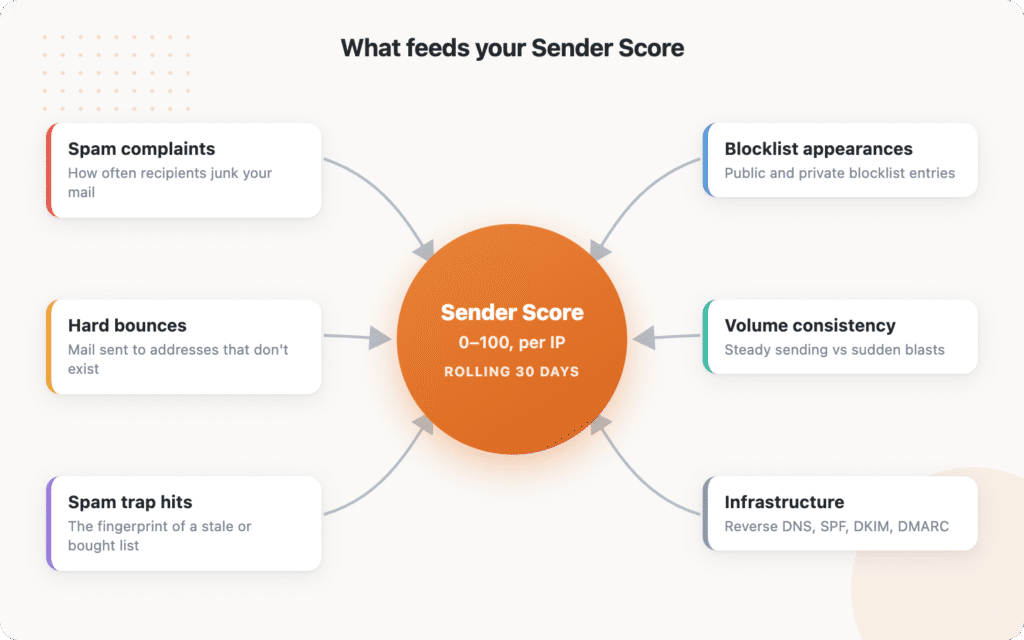
Validity doesn’t publish the exact formula or weighting, but it does publish the inputs. Six things feed the score:
- **Spam complaints.** How often recipients hit “mark as spam” on mail from your IP. This is the heaviest signal at most providers, and the [bulk sender rules Google and Yahoo introduced in 2024](https://wpmailsmtp.com/wp-content/uploads/2024/01/gmail-blocking-your-emails.png "Gmail blocking emails – how to fix it") set the ceiling at a 0.3% complaint rate.
- **Unknown user rate.** How often you mail addresses that don’t exist. Every [hard bounce](https://wpmailsmtp.com/hard-bounce-vs-soft-bounce/) you keep sending to tells the network your list is stale or scraped.
- **Spam trap hits.** Mail sent to addresses that exist only to catch senders with poor list hygiene. Even a handful of trap hits can drag a score down hard.
- **Blocklist appearances.** Whether your IP shows up on public and private blocklists.
- **Volume and consistency.** Steady, predictable sending reads as legitimate. Long silences followed by huge blasts read as suspicious.
- **Infrastructure.** Reverse DNS, valid HELO configuration, and authentication records that check out.
Notice what’s missing from that list: anything about your subject lines, your template design, or how many links you include. Content filters exist, but reputation decides whether your mail even gets a close look.
### How Much Does Sender Score Matter?
An honest answer, because most articles oversell this: Sender Score is an indicator, not the score mailbox providers check before delivering your email.
Gmail doesn’t look up your Sender Score. Neither does Outlook or Yahoo. The big providers run their own internal reputation systems built from their own data. Gmail even lets you see yours through [Google Postmaster Tools](https://wpmailsmtp.com/how-to-set-up-google-postmaster-tools/), which reports your domain and IP reputation as Gmail measures it.
So why check Sender Score at all? Three reasons.
First, it’s built from the same behaviors the internal systems measure. Complaints, dead addresses, and spam traps sink your Gmail reputation and your Sender Score alike, so the public number tracks the private ones reasonably well.
Second, it’s independent and historical. You get a 30-day trend line for any IP without needing access to anyone’s dashboard. A falling Sender Score is an early warning worth investigating even if Gmail hasn’t started junking you yet.
Third, it’s the fastest way to evaluate infrastructure you’re thinking of using, which leads to the caveat that matters most for WordPress users.
**Sender Score rates the IP, so on shared infrastructure you’re reading a shared grade.** If your WordPress site sends mail the default way, through your hosting server, the score you look up belongs to a server shared with hundreds of other websites, and their behavior is your reputation. If you send through a dedicated email service, the IP belongs to the provider’s pool, and what you’re really reading is how well that provider polices its customers. That’s exactly what you want a provider to do for you, and it’s why moving off hosting email is improvement step one for most sites.
### How to Check Your Sender Score
Checking takes about five minutes. The only part people get stuck on is the first step.
#### 1. Find Your Sending IP
Your sending IP is whichever server transmits your mail, and it’s probably not your domain.
Send yourself a test email from your website (a password reset or a form notification works). Open it in Gmail, click the three-dot menu, and choose **Show original**. Look for the `Received: from` lines and the IP address in the SPF result. That’s your sending IP.
If you use WP Mail SMTP with a sending service, you can skip the header reading: the IP belongs to your provider, and their dashboard or documentation lists their sending ranges. If you’ve never set up an SMTP plugin, the IP you find in those headers is your web host’s mail server, and that lookup is about to be educational.
#### 2. Look It Up at Senderscore.org
Go to [senderscore.org](https://senderscore.org/), create a free account, and enter the IP. Validity requires a sign-up to show full results, but the lookup itself costs nothing.
#### 3. Read the Trend, Not Just the Number
The report shows the current score plus the rolling 30-day history, with the complaint, infrastructure, and volume data behind it. A stable 85 and an 85 that was 95 two weeks ago are different situations. The trend tells you which one you’re in.
#### Other Free Reputation Checks Worth Running
Sender Score is one camera angle. These free tools cover the rest, and our guide to [monitoring your email sending reputation](https://wpmailsmtp.com/monitoring-your-email-sending-reputation/) walks through them in more detail:
ToolWhat it tells you[Google Postmaster Tools](https://wpmailsmtp.com/how-to-set-up-google-postmaster-tools/)Your domain and IP reputation as Gmail itself measures itMicrosoft SNDSHow Outlook and Hotmail see your sending IP[Cisco Talos](https://talosintelligence.com/)IP and domain reputation from Cisco’s filtering network[MXToolbox blacklist check](https://mxtoolbox.com/blacklists.aspx)Whether your IP or domain appears on major blocklists[Mail-Tester](https://www.mail-tester.com/)A one-shot grade of your authentication, content, and setup### What Drags a Sender Score Down
If your score is lower than expected, the cause is almost always on this list:
- **Spam complaints.** Recipients junking your mail because they don’t remember subscribing, can’t find the unsubscribe link, or get mailed too often.
- **Hard bounces you keep mailing.** A high unknown-user rate is the classic symptom of an old or purchased list. Our guide to [hard bounces vs soft bounces](https://wpmailsmtp.com/hard-bounce-vs-soft-bounce/) covers how to find and remove them.
- **Spam trap hits.** Traps arrive on lists through purchased data and through old addresses that providers recycled. You can’t see them directly; you prevent them with list hygiene.
- **Volume spikes.** A quiet IP that suddenly blasts 50,000 messages looks like a compromised server. This is the classic post-holiday-sale reputation hangover.
- **Blocklist appearances.** One listing can cascade into others. Check before assuming, using the [blocklist tools above](https://wpmailsmtp.com/how-to-check-if-your-sending-domain-is-blacklisted/).
- **Bad neighbors on a shared IP.** On cheap shared infrastructure, somebody else’s spam run becomes your problem.
### How to Improve Your Sender Score
Work through these in order. The early items stop the damage; the later ones rebuild the standing.
#### 1. Authenticate Your Domain
**How to check:** Run your domain through [Mail-Tester](https://www.mail-tester.com/) or look at the authentication results in any received email’s headers. You’re looking for SPF, DKIM, and DMARC all passing.
**How to fix:** Add the missing DNS records. Our [SPF, DKIM, and DMARC guide](https://wpmailsmtp.com/dmarc-spf-dkim/) walks through each one. Since 2024, Gmail, Yahoo, and Outlook all require authentication from bulk senders, so this step is no longer optional hygiene. It’s the entry fee.
#### 2. Remove Hard Bounces and Never Mail Them Again
**How to check:** Your sending service’s dashboard lists hard-bounced addresses under bounces or suppressions. WP Mail SMTP Pro users can switch on hard bounce alerts and get told the moment one happens.
**How to fix:** Suppress every hard bounce everywhere it lives, add email validation and double opt-in to your signup forms, and run dormant lists through a verification service like NeverBounce or ZeroBounce before mailing them. This single habit fixes your unknown-user rate and your spam trap exposure at the same time, because recycled traps start life as hard bounces.
#### 3. Make Unsubscribing Easy
**How to check:** Open your last campaign and count the seconds it takes to find the unsubscribe link. If it’s hidden in grey 9-point text, you’re farming complaints.
**How to fix:** Use a visible unsubscribe link and support one-click unsubscribe (your email service handles the technical headers). Every person who unsubscribes instead of hitting “mark as spam” is a complaint you didn’t take.
#### 4. Keep Your Sending Volume Steady
**How to check:** Look at your monthly sending pattern. Long quiet stretches punctuated by big blasts are the red flag.
**How to fix:** Spread large sends over hours or days, and [warm up gradually](https://wpmailsmtp.com/ip-warming/) when you’re starting on a new IP or returning after a quiet period. If a seasonal sale means triple volume, ramp up across the preceding weeks instead of jumping in one day.
#### 5. Send Mail People Expect
**How to check:** Compare your engagement on recent sends against three months ago. Falling opens and rising complaints mean your list has stopped wanting the mail.
**How to fix:** Set expectations at signup (what you’ll send and how often), then keep to them. Prune subscribers who haven’t engaged in months; mailing people who ignore you drags down every reputation metric at once.
#### 6. Get Off Any Blocklists
**How to check:** Run your IP and domain through MXToolbox and the blocklist lookup at senderscore.org. Our [blacklist guide](https://wpmailsmtp.com/how-to-check-if-your-sending-domain-is-blacklisted/) explains what each listing means.
**How to fix:** Fix the underlying cause first (the steps above), then follow each blocklist’s delisting process. Requesting removal without fixing the cause gets you relisted within days.
#### 7. Stop Sending From Your Web Host
**How to check:** If the sending IP you found in step one of the checking section belongs to your hosting server, this is your biggest single lever.
**How to fix:** Route your WordPress email through a dedicated sending service instead. [WP Mail SMTP](https://wpmailsmtp.com/) (free) connects your site to a provider like [SendLayer](https://sendlayer.com/) in a few minutes, which moves your mail onto infrastructure with managed reputation, proper authentication, and a team whose whole job is keeping those IPs clean. Your hosting server’s shared IP, with its hundreds of co-tenants, stops being your problem.
### How Long Does It Take to Improve a Sender Score?
Sender Score works on a rolling 30-day window, so improvement is measured in weeks, not hours. Expect the first visible movement one to two weeks after you fix the underlying behavior, and something close to your new steady state after a full month of clean sending. There’s no shortcut that skips the window: services promising overnight reputation repair are selling you a new IP, not a fix, and the problems travel with your list and your habits.
The encouraging flip side: the score forgets quickly. A bad month stops counting against you 30 days after it ends, as long as the behavior that caused it is gone.
[Fix Your WordPress Emails Now](https://wpmailsmtp.com/pricing/)
### Sender Score FAQs
#### What is a good Sender Score?
Aim for 80 or above; 90 and up is excellent. Because the score is a percentile, those numbers mean you’re outperforming 80% or 90% of measured senders. Below 70, reputation is actively costing you inbox placement and you should treat repair as the priority before sending more volume. Remember that the score belongs to the IP, so on shared infrastructure the number reflects everyone sending from it.
#### Is Sender Score free to check?
Yes. Validity offers Sender Score lookups free at senderscore.org, though you’ll need to create an account with a work email to see full results. Checking it monthly costs nothing and takes a couple of minutes once you know your sending IP. Pair it with Google Postmaster Tools, which is also free and shows Gmail’s own view of your reputation.
#### Does Gmail use Sender Score?
No. Gmail runs its own internal reputation system and reports it through Google Postmaster Tools, and the other major providers do the same with their own data. Sender Score is an independent measurement built from Validity’s network. It’s useful precisely because it correlates with the internal systems: the same complaints, bounces, and traps feed all of them. Treat it as an external health check rather than the number Gmail consults.
#### Why did my Sender Score drop suddenly?
Sudden drops usually trace to one event in the last few weeks: a send to an old or imported list (bounce and trap spike), a campaign that drew complaints, a volume blast from a normally quiet IP, or a new blocklist appearance. Check the detailed report at senderscore.org for which input moved, then match it against your sending log for the same window. If you can’t find anything you sent, and you’re on shared infrastructure, the cause may be another tenant on the IP.
#### Does Sender Score matter if I send through SendLayer, SendGrid, or Gmail?
Mostly it’s your provider’s score you’d be reading, since the sending IPs belong to their pools. Reputable providers maintain those pools carefully, which is a large part of what you’re paying for. Your individual behavior still matters: providers monitor each customer’s complaint and bounce rates and will throttle or suspend senders who damage the pool. So the division of labor is: the provider keeps the IP clean, and you keep your list clean.
#### How often does Sender Score update?
Daily, calculated over the trailing 30 days of data. That rolling window is why both damage and recovery show up gradually. One bad campaign won’t crater the score overnight, and one good week won’t repair a bad month.
### Fix the Infrastructure and the Score Follows
Sender Score puts a number on something WordPress site owners usually discover too late: deliverability lives or dies on the reputation of the server sending your mail, and by default that server is your web host’s shared box.
WP Mail SMTP moves your WordPress email onto infrastructure with a reputation worth having. The free plugin routes every email your site sends through a trusted provider like SendLayer. Pro adds the monitoring that keeps you off the reputation repair treadmill: an email log with per-message delivery statuses, hard bounce alerts the moment a dead address gets mailed, and weekly trend reports that surface a problem while it’s still small.
Over 4 million websites already send through WP Mail SMTP instead of hoping their host’s IP stays clean.
[Get WP Mail SMTP Free](https://wpmailsmtp.com/)
Want to keep going on reputation? Read our guide to [monitoring your email sending reputation](https://wpmailsmtp.com/monitoring-your-email-sending-reputation/) next, or start at the input that does the most damage: [hard bounces, and how to get rid of them](https://wpmailsmtp.com/hard-bounce-vs-soft-bounce/).
Ready to fix your emails? [Get started today](https://wpmailsmtp.com/pricing) with the best WordPress SMTP plugin. If you don’t have the time to fix your emails, you can get full White Glove Setup assistance as an extra purchase, and there’s a 14-day money-back guarantee for all paid plans.
**Categories:** Marketing
**Tags:** email deliverability, transactional email, WordPress email deliverability, WP Mail SMTP
---