### [Gmail Disabling Less Secure Apps (How to Fix WordPress Email)](https://wpmailsmtp.com/gmail-less-secure-apps/)
**Published:** May 11, 2022
**Author:** Rachel Adnyana
**Excerpt:** Google has announced that it's disabling the Less Secure Apps feature on September 30, 2024. This process started in 2022. Google Workspace is the last part of Google's product suite that will be impacted.
If you're using Gmail SMTP details with our Other SMTP mailer, you may have difficulty sending emails when this feature is disabled.
We know that many of our customers rely on Gmail to send emails from WordPress and we wanted to provide some information so that you can avoid deliverability problems.
**Content:**
Google removed the Less Secure Apps setting from Gmail. The toggle that let apps and devices sign in to your account with just your Google username and password is gone, and there’s no admin option to switch it back on.
If your WordPress site sent email by dropping your Gmail address and password into our Other SMTP mailer, **that connection stopped working**. The good news is that getting WordPress sending through Gmail again takes a few minutes, and you have three ways to do it.
Here’s the fix in one line: switch WP Mail SMTP to the Gmail mailer, or keep the Other SMTP mailer and swap your password for a Gmail app password. Both replace the old Less Secure Apps login.
- **Best for most sites:** switch to the WP Mail SMTP Gmail mailer (one click on any paid version).
- **If you want to stay on SMTP:** create a Gmail app password and use that instead of your account password.
- **If you’re not tied to Gmail:** connect a dedicated sending service like SendLayer.
- [What happened to less secure apps?](#aioseo-what-happened-to-less-secure-apps)
- [Why your WordPress emails stopped sending](#aioseo-why-your-wordpress-emails-stopped-sending)
- [How to send WordPress email now](#aioseo-how-to-send-wordpress-email-now)
- [Option 1: Switch to the Gmail mailer](#aioseo-option-1-switch-to-the-gmail-mailer)
- [Option 2: Use a Gmail app password](#aioseo-option-2-use-a-gmail-app-password)
- [Option 3: Switch to a different mailer](#aioseo-option-3-switch-to-a-different-mailer)
- [Which option should you pick?](#aioseo-which-option-should-you-pick)
- [How to get help with WP Mail SMTP](#aioseo-how-to-get-help-with-wp-mail-smtp)
- [FAQs about Gmail and less secure apps](#aioseo-faqs-about-gmail-and-less-secure-apps)
## What happened to less secure apps?
Less Secure Apps was a Google setting that let any app or device sign in to your account with only your username and password, with no extra security layer. For a while, that’s how a lot of people connected WordPress to Gmail SMTP.
Google decided that password-only access was too easy for attackers to exploit, so it phased the feature out in stages:
- Personal Gmail accounts lost the “Allow less secure apps” toggle on May 30, 2022.
- Google Workspace accounts had the feature wound down through 2024. Google paused that rollout late in the year and finished it across all Workspace accounts in 2025.
Either way, the setting is gone for good. There’s no way to re-enable it, so every account now needs a more secure connection method. App passwords, which we cover below, are a separate feature and still work.
## Why your WordPress emails stopped sending
If you set up WP Mail SMTP with the Other SMTP mailer, smtp.gmail.com, and your normal Gmail password, Google now rejects that login. You’ll usually see an SMTP connection or authentication error when you run a test email, or your site’s emails just fail quietly in the background.
The fix is to change how WP Mail SMTP signs in to Google. Here are your three options, easiest first.
## How to send WordPress email now
### Option 1: Switch to the Gmail mailer
WP Mail SMTP has a dedicated Gmail mailer that connects through Google’s API instead of the SMTP protocol. It’s more secure, and the Less Secure Apps change doesn’t affect it at all. For most sites, this is the option to pick.
The Gmail mailer is available in both the Lite and Pro versions of our plugin.
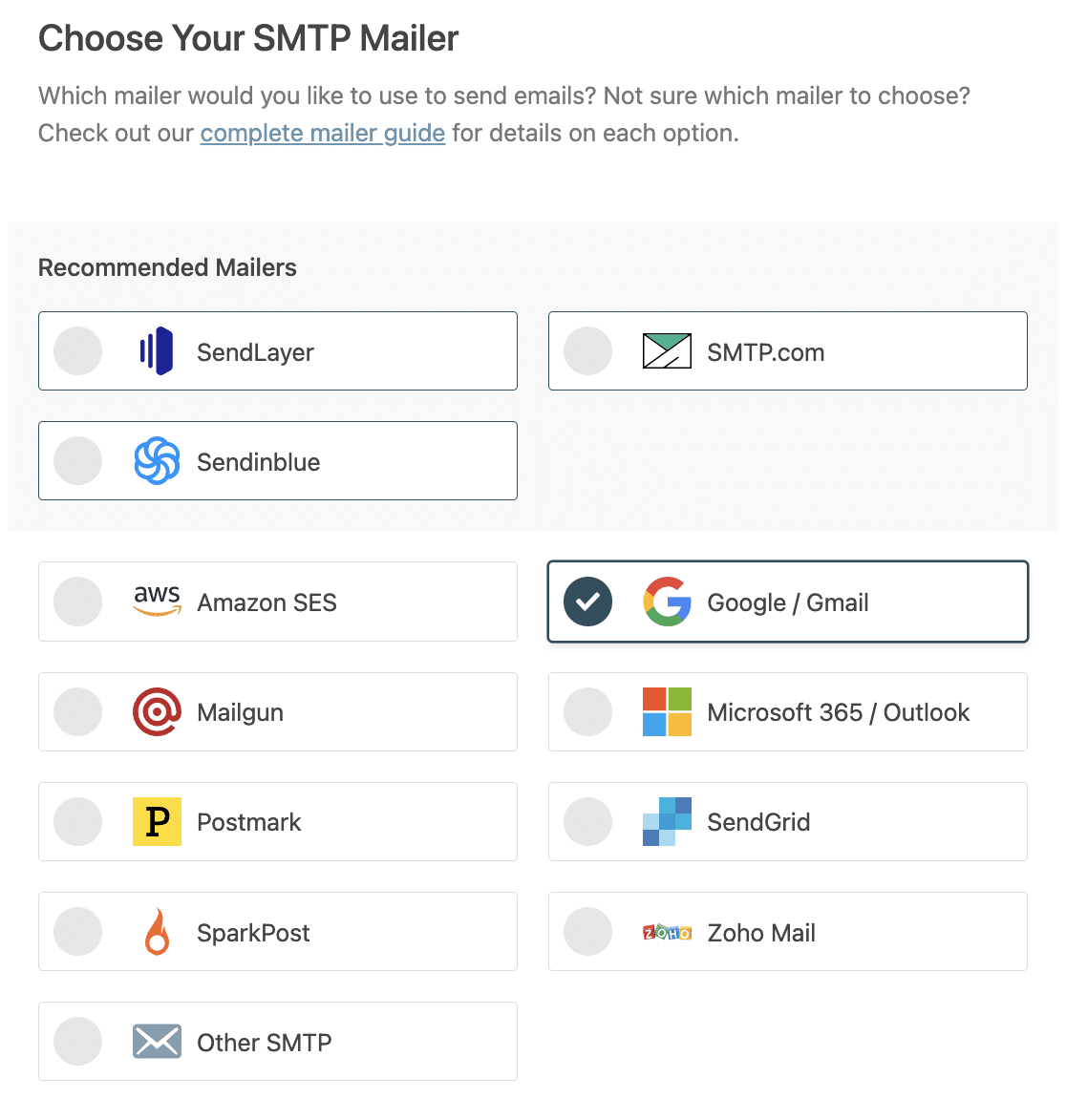In the free version, you’ll set up a free Google Cloud Console project and generate your own API credentials. You’ll find step-by-step instructions in our doc on [how to set up the Google Workspace / Gmail mailer in WP Mail SMTP](https://wpmailsmtp.com/docs/how-to-set-up-the-gmail-mailer-in-wp-mail-smtp/).
On any paid version, **you can [set up the Gmail mailer in one click](https://wpmailsmtp.com/how-to-send-wordpress-emails-through-gmail-1-click-setup/)**. It takes seconds and skips the Cloud Console process entirely.
### Option 2: Use a Gmail app password
If you’d rather keep using the Other SMTP mailer, you can swap your account password for an app password. An app password is a 16-character code that works only for the app you create it for, so it’s safer than handing over your main Google password.
Here’s how to create one:
1. [Turn on 2-Step Verification](https://support.google.com/accounts/answer/185839) for your Google account. App passwords aren’t available until you do.
2. Go to the App passwords page in your Google account security settings.
3. Type a name you’ll recognize later, such as WP Mail SMTP, then click Create.
4. Copy the 16-character password Google shows you. You won’t be able to see it again, so grab it now.
5. Paste it into the password field in WP Mail SMTP’s Other SMTP settings, then send a test email.
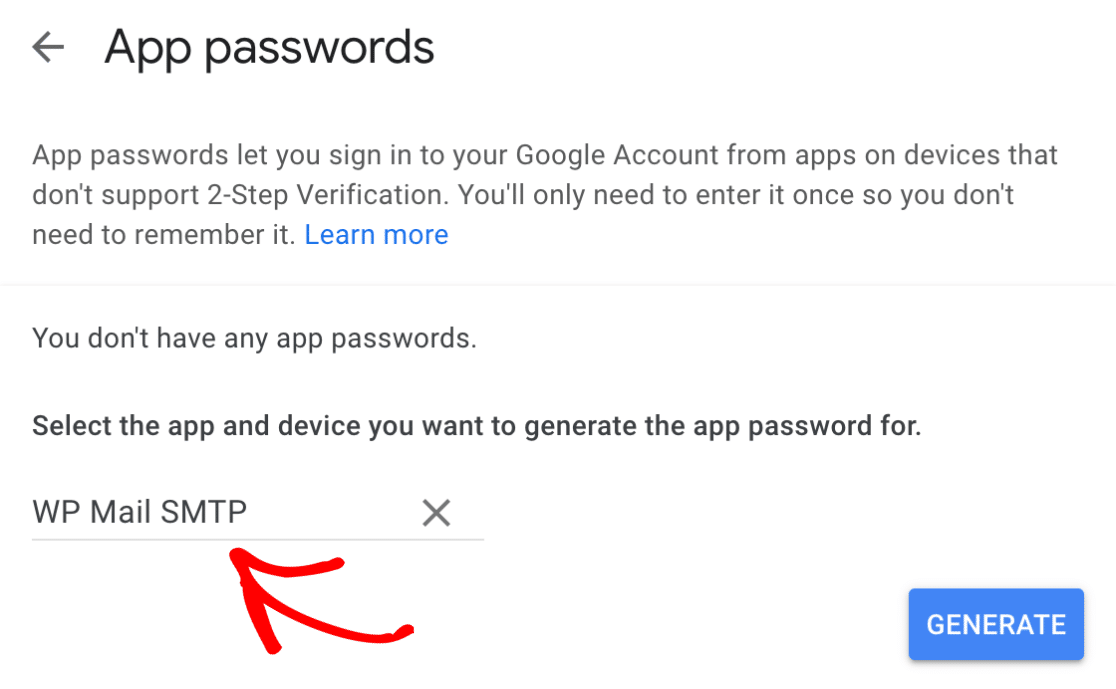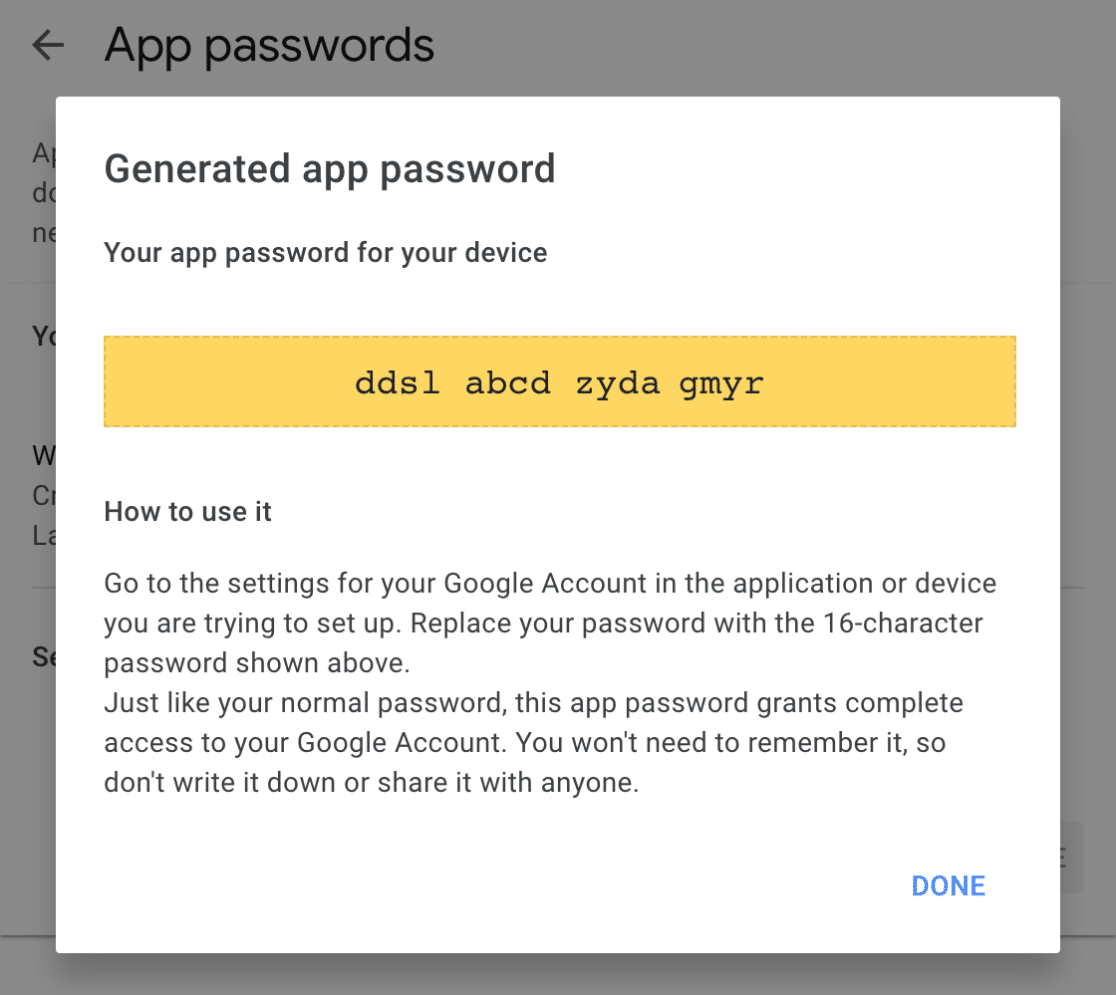For the full walkthrough, see our doc on [how to set up the Other SMTP mailer in WP Mail SMTP](https://wpmailsmtp.com/docs/how-to-set-up-the-other-smtp-mailer-in-wp-mail-smtp/#app-passwords).
One thing to know: changing your main Google account password cancels your app passwords too. If you update your password often, an app password may not be the most reliable choice, and the Gmail mailer is the steadier option.
### Option 3: Switch to a different mailer
If you’re not set on Gmail, or you keep [running into its sending limits](https://wpmailsmtp.com/gmail-how-many-emails-can-you-send-at-once/), WP Mail SMTP connects to plenty of other mailers that use secure API keys instead of your Google login.
Our recommended mailers are listed at the top of the Setup Wizard.
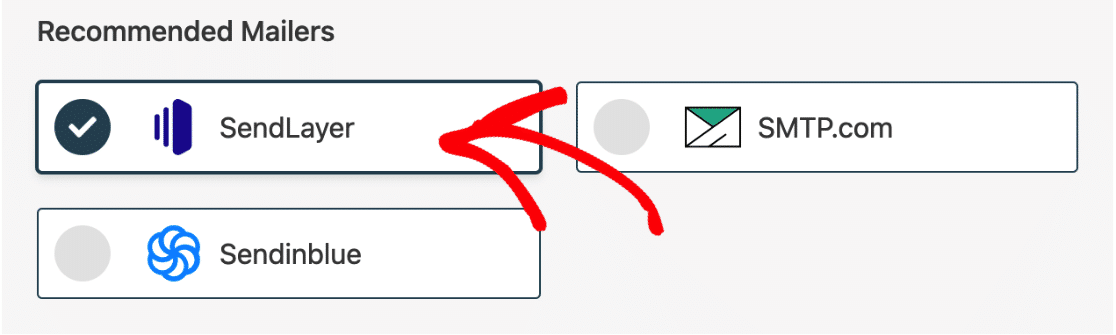A few of our top picks:
- [SendLayer](https://sendlayer.com/pricing/): our #1 recommended mailer and one of the easiest to set up. Once you’ve added a few DNS records to your domain, all you need is an API key.
- [SMTP.com](https://wpmailsmtp.com/go/smtp/ "SMTP.com"): an established provider with a track record on deliverability dating back over 20 years.
- [Brevo](https://wpmailsmtp.com/go/sendinblue/ "Brevo"): a solid Gmail alternative you can start using without a credit card, then scale up when you need more capacity.
To switch your mailer, head to your WP Mail SMTP settings and click the **Launch Setup Wizard** button.
The Setup Wizard will walk you through the connection steps. Here’s a [complete guide to all of our mailers](https://wpmailsmtp.com/docs/a-complete-guide-to-wp-mail-smtp-mailers/) to help you decide.
### Which option should you pick?
If you’re not sure, here’s the quick version. Most sites should use the Gmail mailer, especially on a paid plan where it’s a one-click connection. If you need to stay on the SMTP protocol for some reason, use an app password. And if you send more than a few hundred emails a day or want stronger deliverability, move to a dedicated service like SendLayer.
Mailers available in all versionsMailers in [WP Mail SMTP Pro](https://wpmailsmtp.com/pricing/)[SendLayer](https://wpmailsmtp.com/docs/how-to-set-up-the-sendlayer-mailer-in-wp-mail-smtp/)[Amazon SES](https://wpmailsmtp.com/docs/how-to-set-up-the-amazon-ses-mailer-in-wp-mail-smtp/)[SMTP.com](https://wpmailsmtp.com/docs/how-to-set-up-the-smtp-com-mailer-in-wp-mail-smtp/)[Microsoft 365 / Outlook.com](https://wpmailsmtp.com/docs/how-to-set-up-the-outlook-mailer-in-wp-mail-smtp/)[Brevo](https://wpmailsmtp.com/docs/how-to-set-up-the-sendinblue-mailer-in-wp-mail-smtp/)[Zoho Mail](https://wpmailsmtp.com/docs/how-to-set-up-the-zoho-mailer-in-wp-mail-smtp/)[Google Workspace / Gmail](https://wpmailsmtp.com/docs/how-to-set-up-the-gmail-mailer-in-wp-mail-smtp/)[Mailjet](https://wpmailsmtp.com/docs/how-to-set-up-the-mailjet-mailer-in-wp-mail-smtp/ "Mailjet")[Mailgun](https://wpmailsmtp.com/docs/how-to-set-up-the-mailgun-mailer-in-wp-mail-smtp/)[Postmark](https://wpmailsmtp.com/docs/how-to-set-up-the-postmark-mailer-in-wp-mail-smtp/)[SendGrid](https://wpmailsmtp.com/docs/how-to-set-up-the-sendgrid-mailer-in-wp-mail-smtp/)[SMTP2GO](https://wpmailsmtp.com/docs/how-to-set-up-the-smtp2go-mailer-in-wp-mail-smtp/ "SMTP2GO")[SparkPost](https://wpmailsmtp.com/docs/how-to-set-up-the-sparkpost-mailer-in-wp-mail-smtp/)[Elastic Email](https://wpmailsmtp.com/docs/how-to-set-up-the-elastic-email-mailer-in-wp-mail-smtp/)[Other SMTP](https://wpmailsmtp.com/docs/how-to-set-up-the-other-smtp-mailer-in-wp-mail-smtp/)## How to get help with WP Mail SMTP
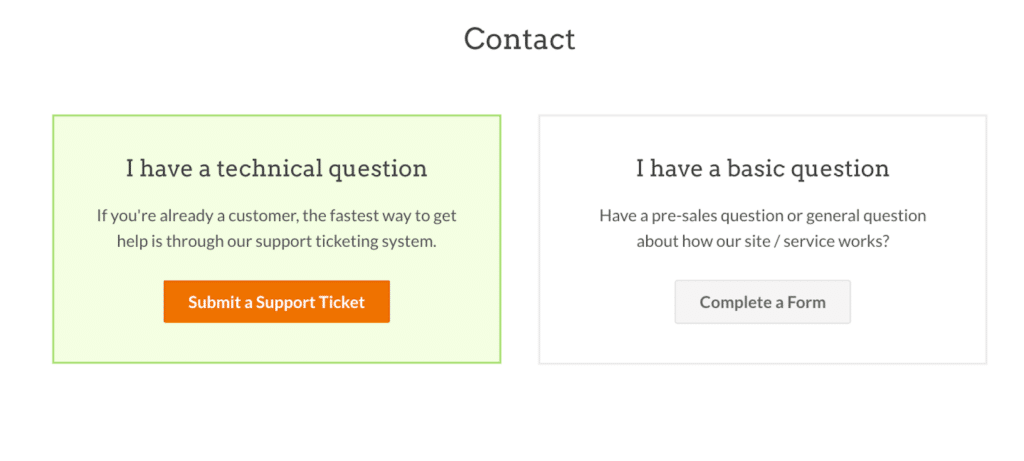
Changing your mailer can feel fiddly, but we’re here to help. If you’re on WP Mail SMTP Lite, you can ask on the [WordPress.org support forum](https://wordpress.org/support/topic/wp-mail-smtp-support-policy-3/).
If you’re on any [paid version](https://wpmailsmtp.com/pricing/), log in to your account and [open a ticket](https://wpmailsmtp.com/account/support/) for priority support while you update your settings.
## FAQs about Gmail and less secure apps
Still have questions about the change and what it means for your WordPress emails? Here are the ones we hear most.
#### What happened to Gmail’s “Less secure apps” setting?
Google removed it. Personal Gmail accounts lost the toggle in 2022, and Google Workspace accounts were fully phased out by 2025. Accounts can no longer allow basic username-and-password logins for SMTP or IMAP.
#### Why did Google turn off less secure app access for SMTP?
Plain logins made it easy for attackers to steal passwords. Google now requires safer options like OAuth or App Passwords to protect accounts.
#### How can I send WordPress emails now that less secure apps are gone?
Install WP Mail SMTP and choose the Google / Gmail mailer. Follow the setup wizard to connect your site with OAuth, or use an App Password if you prefer the “Other SMTP” option.
#### How do I create a Gmail App Password for WP Mail SMTP?
Turn on 2-Step Verification for your Google account. Open the App passwords page, type a name like “WP Mail SMTP,” click Create, and copy the 16-character key into the plugin’s password field.
#### Is Gmail OAuth safer than less secure apps for WordPress email?
Yes. OAuth uses short-lived tokens instead of storing your Gmail password in WordPress, which blocks many common attacks.
#### Can I still use port 465 or 587 with Gmail after the change?
Yes. Port 465 (SSL) and 587 (TLS) still work. You just have to sign in with OAuth or an App Password, since plain passwords are no longer accepted.
#### What SMTP services can replace Gmail less secure apps for free?
SendLayer’s free tier, Mailgun’s sandbox, or Brevo’s free plan can send a limited number of emails each month without cost and work well with WP Mail SMTP.
#### How do I fix “SMTP connect failed” after Google blocked less secure apps?
Generate an App Password or switch to the Gmail OAuth mailer in WP Mail SMTP, then update your settings with the new credentials and test again.
#### Are there limits on sending email through Gmail with App Passwords?
Gmail’s usual limits still apply, which is about 500 emails per day on free accounts and 2,000 per day on Google Workspace basic plans. App Passwords do not raise these limits.
## Next, How To Fix Basic Authentication Error for Microsoft Email Accounts
Are you getting an error message stating that basic authentication is disabled when you try to send email via Outlook SMTP?
Microsoft is phasing out Basic Authentication (using your standard username and password) for third-party apps and services that use SMTP to send email, much like Google did with Less Secure Apps.
To continue to use your Outlook or Microsoft 365 account for sending email from apps and software like WP Mail SMTP, you must now use [OAuth (Modern Authentication)](https://wpmailsmtp.com/microsoft-outlook-smtp-how-to-fix-basic-authentication-error/ "OAuth (Modern Authentication)") to log into your account.
[Fix Your WordPress Emails Now](https://wpmailsmtp.com/pricing/)
Ready to fix your emails? [Get started today](https://wpmailsmtp.com/pricing) with the best WordPress SMTP plugin. If you don’t have the time to fix your emails, you can get full White Glove Setup assistance as an extra purchase, and there’s a 14-day money-back guarantee for all paid plans.
If this article helped you out, please follow us on [Facebook](https://facebook.com/wpmailsmtp) and [Twitter](https://twitter.com/wpmailsmtp) for more WordPress tips and tutorials.
**Categories:** Marketing
**Tags:** gmail, gmail smtp
---