


AI Summary
If your WordPress site has visitors from the EU, you’re subject to GDPR whether you know it or not, and whether your business is based in Europe or not.
Most guides to GDPR and WordPress focus on cookie banners and privacy policies. That stuff matters, but there’s a whole side of compliance that gets far less attention: the emails your site sends.
Every time WordPress fires off a password reset, a WooCommerce order confirmation, or a newsletter, it’s processing personal data. That means GDPR applies.
The good news is that most of what you need to do is straightforward once you understand the rules. This guide covers everything: what GDPR requires for email, the difference between transactional and marketing emails, consent, data handling, mailer choice, and the technical setup that keeps you compliant, including how to configure WP Mail SMTP for each requirement.
Note: This is not legal advice. GDPR compliance depends on your specific situation. If you have concerns, talk to a qualified lawyer.
- Does GDPR apply to your WordPress emails?
- The two types of emails your site sends
- Tip for WooCommerce users
- How to collect email consent properly
- What counts as personal data in your emails
- Choosing a GDPR-compliant mailer
- Technical requirements: encryption, authentication, and breach notification
- Email logs and the right to erasure
- How to set up WP Mail SMTP for GDPR compliance
- GDPR email compliance checklist
- FAQs
Does GDPR apply to your WordPress emails?
Ye, if any of your site’s visitors are EU or EEA residents, GDPR applies to how you handle their data, including their email address.
This isn’t limited to EU businesses. A WooCommerce store in the US, a membership site in Australia, a plugin company in Canada: if you have EU customers, GDPR covers how you process their personal data.
An email address is personal data under GDPR. So is a name. So is an IP address. When your site sends an email to a customer or subscriber, it’s processing that data.
That said, GDPR doesn’t stop you from sending emails. It means you need a lawful basis for doing so, and the rules differ depending on what kind of email you’re sending.
Enforcement is real and increasing. Spain’s data protection authority alone has issued over 1,000 fines since GDPR came into force, and email marketing violations are a consistent target. Google was fined €50 million in France for consent failures. An Austrian postal service was fined €9.5 million for failing to handle data subject rights requests properly. These aren’t edge cases but rather they’re the kinds of breaches that happen when data handling hasn’t kept up with the rules.
If you’re a US-based site owner, it’s also worth knowing that GDPR is significantly stricter than CAN-SPAM, the US federal law that governs commercial email. CAN-SPAM allows opt-out marketing (you can email people until they unsubscribe). GDPR requires opt-in consent before you send. If you have EU visitors, US compliance alone isn’t enough.
The two types of emails your site sends
Your WordPress site sends two fundamentally different types of emails, and GDPR treats them differently.
Transactional emails
Transactional emails are triggered by something the user does. Order confirmations, shipping notifications, password resets, account alerts, contact form replies. These emails are expected and users want them.
Under GDPR, you generally don’t need separate consent to send transactional emails. The lawful basis is either “performance of a contract” (the user bought something, so you’re completing that transaction) or “legitimate interest” (sending a password reset is clearly in the user’s interest).
But there’s a catch. The moment you add promotional content such as product recommendations, discount codes, and “you might also like” sections, you’ve changed the character of the email and may need consent for that portion.
The safest approach is to keep transactional emails strictly transactional. If you want to market to customers after a purchase, use a separate email with proper consent in place.
For a deeper look at the rules around transactional emails, see our full guide to GDPR best practices for transactional emails.
Marketing emails
Marketing emails are different. If you’re sending newsletters, promotional campaigns, or any email whose primary purpose is to sell or promote, you need explicit consent from the recipient before you send it.
Pre-ticked boxes don’t count. Bundled consent (hiding email marketing permission inside terms and conditions) doesn’t count. Consent has to be freely given, specific, and easy to withdraw.
How to collect email consent properly
If you send marketing emails to EU subscribers, getting consent right from the start is where everything else builds from.
What valid consent looks like
The subscriber has to actively opt in by checking an unchecked box, not a pre-ticked one. The consent has to be specific to email marketing, not buried in a general privacy agreement. And it has to be clearly explained: who they’re signing up to hear from and what kind of emails they’ll receive.
You also need to be able to prove that consent was given. That means recording when it happened, what the form said, and where the subscriber signed up. If you can’t produce consent records during an audit, it’s as if the consent never existed.
Double opt-in
Double opt-in isn’t legally required under GDPR, but it’s the most defensible approach. When someone signs up, they receive a confirmation email and only get added to your list after clicking to confirm. This creates a clear audit trail and filters out fake or mistyped addresses.
Unsubscribing has to be easy
Withdrawing consent must be as easy as giving it. Every marketing email needs a working unsubscribe link. When someone unsubscribes, process it promptly — delays are both a compliance risk and a trust issue.
Forms on your site
Every form that collects an email address needs to be clear about what that address will be used for. Contact forms and newsletter signup forms have different purposes, so they need different consent language.

If you’re using WPForms, you can add a GDPR consent field directly to any form, disable IP tracking, and turn off cookie collection, all from the form settings, no code required.
What about your existing email list?
If you built your list before GDPR came into force in 2018 (or collected addresses without a clear opt-in) you may have a problem. Consent collected without GDPR-standard language (unchecked box, clear explanation of what subscribers were signing up for) doesn’t count.
The safest path is a re-permission campaign: send an email to your existing list asking people to actively opt back in, and remove anyone who doesn’t. It’s uncomfortable because your list will shrink. But it’s better than a fine, and the people who do re-confirm are far more engaged than legacy contacts who barely remember signing up.
Purchased email lists
Don’t use them. GDPR consent has to be specific to your organisation and people consenting to hear from one company haven’t consented to hear from you. You can’t buy your way to a valid mailing list under GDPR.
Data subject rights and response times
Under GDPR, your subscribers and customers have the right to access, correct, or delete the data you hold about them. When someone makes a request, you have one month to respond. Document every request and how it was handled as this is the kind of thing that comes up in audits.
What counts as personal data in your emails
Under GDPR, personal data is any information that can identify a person, directly or indirectly. For email purposes, that includes:
- Names and email addresses
- IP addresses
- Purchase history linked to an account
- Account details in the body of the email
This data exists in your email logs, your database, and potentially your third-party mailer’s servers. All of it falls under GDPR.
Data minimization
GDPR’s data minimization principle means you should only collect and process the data you actually need. If your contact form doesn’t need a phone number, don’t collect one. In email terms, don’t include more personal information in your messages than the transaction requires. An order confirmation doesn’t need to repeat the customer’s full account history.
Retention periods
You can’t keep personal data indefinitely. GDPR requires you to decide how long you’ll retain data and delete it when you no longer need it.
For email marketing lists, this means reviewing inactive subscribers periodically and removing people who haven’t engaged in a long time. For email logs, it means not keeping them longer than necessary for your business purposes. (More on this in the email logs section below.)
Choosing a GDPR-compliant mailer
This is the piece most WordPress site owners overlook. When you send emails through an external service such as SendLayer, Amazon SES, Mailgun, Gmail, or any other SMTP provider, you’re sharing personal data with a third party.
Under GDPR, if you transfer personal data to a third party for processing, you need a data processing agreement (DPA) with them. A DPA is a contract that sets out how the third party will handle that data, what security measures they have in place, and what happens in the event of a breach.
Most reputable email service providers offer DPAs,usually in their privacy or legal documentation. If a provider doesn’t offer one, that’s a red flag worth taking seriously.
Where is the data stored?
If your email data is stored on servers outside the EU or UK, the transfer needs to be legally covered. Some providers have EU data centers you can opt into. Others rely on Standard Contractual Clauses (SCCs) to legitimize data transfers. Check your provider’s data residency options if this is a concern for your users.
Which mailers keep logs?
Many external mailers keep logs of emails sent through their service. These logs contain personal data. Under GDPR’s right to erasure, if a user asks you to delete their data, you need to be able to handle that across every system — including your mailer.
Know which of your mailers keeps logs and how to delete them if needed. Our WP Mail SMTP GDPR compliance docs cover the major mailers and their logging behavior.
Technical requirements: encryption, authentication, and breach notification
GDPR requires that personal data be kept secure including when it’s in transit. For email, that means two things.
TLS encryption
Your emails should be sent over TLS (Transport Layer Security) connections. This encrypts the email in transit so it can’t be intercepted.
WordPress’s default wp_mail() function doesn’t guarantee TLS encryption. When you use WP Mail SMTP with a reputable mailer, emails are sent through secure, encrypted connections by default.
Email authentication: SPF, DKIM, and DMARC
Email authentication isn’t just a deliverability feature, it’s a security and compliance one. These three protocols verify that emails claiming to come from your domain actually originated from you, protecting your domain from being spoofed.
- SPF tells receiving mail servers which servers are authorized to send email on behalf of your domain.
- DKIM adds a cryptographic signature to each email, proving it hasn’t been altered in transit.
- DMARC sets a policy for what happens when emails fail SPF or DKIM checks, and sends you reports so you can monitor what’s being sent in your name.
Without proper authentication, someone could send emails that appear to come from your domain — phishing your customers using your brand. That’s a security failure and a potential GDPR violation, because it puts your users’ data at risk.
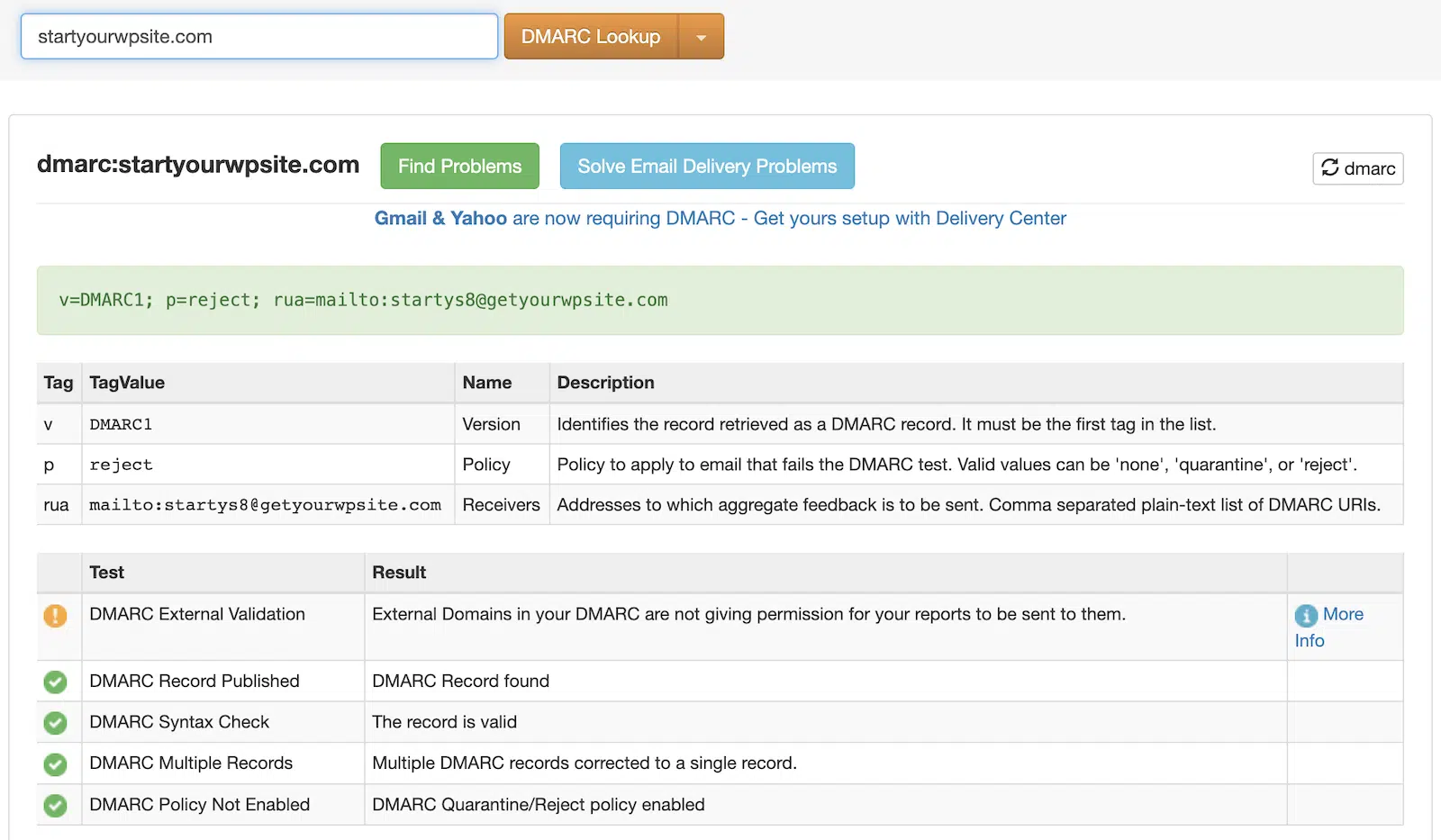
For a full setup walkthrough, see our guide to DMARC, SPF, and DKIM.
Data breach notification
If your email system is compromised and personal data is exposed, GDPR requires you to notify your national supervisory authority within 72 hours of becoming aware of the breach. If the breach is likely to cause high risk to the people affected, you also need to notify them directly.
This is why technical security isn’t optional. Weak authentication, unencrypted connections, and outdated plugins create liabilities, not just deliverability problems. Keep WP Mail SMTP and your chosen mailer up to date, and use the built-in email test to verify your authentication is working correctly.
Why WordPress default email fails on both counts
WordPress uses PHP’s mail() function by default. This sends email directly from your web server, with no guaranteed authentication and often no TLS. Emails sent this way fail to arrive more often than you’d think — which means your legally required transactional emails (password resets, WooCommerce orders) may never reach your users.
WP Mail SMTP replaces this with a proper SMTP connection through your chosen mailer, with encryption and authentication configured correctly.
Email logs and the right to erasure
GDPR gives people the right to have their personal data deleted: the “right to be forgotten.”
If a user requests deletion of their data, you need to handle it across your entire email setup:
- Your WordPress database (customer accounts, form entries, order records)
- Your email marketing list
- Email logs stored by WP Mail SMTP
- Logs held by your mailer service
WP Mail SMTP Pro includes an email log that records what was sent, when, and to whom. This is useful for compliance documentation as it creates an audit trail, but it also means you need a retention policy for the log data itself.
You can configure WP Mail SMTP to automatically purge logs after a set period, or manually delete records when handling individual erasure requests.
How to set up WP Mail SMTP for GDPR compliance
Here’s a step-by-step walkthrough of the WP Mail SMTP settings that matter for GDPR compliance.
Steps 1 and 2 below for connecting a mailer and sending a test email are available in the free version of WP Mail SMTP. Steps 3 through 6 (email logging, data deletion, email controls, and smart routing) require WP Mail SMTP Pro.
Step 1: Connect a GDPR-compliant mailer
If you’re still using WordPress’s default PHP mail, the first step is connecting a proper mailer. WP Mail SMTP supports all the major providers: SendLayer, Amazon SES, Mailgun, Brevo, Gmail, Outlook, and more.
From your WordPress dashboard, go to WP Mail SMTP > Settings > General.

Under Primary Connection, select your mailer and follow the setup steps. Each mailer connects via API or SMTP credentials, and WP Mail SMTP walks you through the process.
Once connected, your emails go through a proper, authenticated SMTP connection instead of PHP mail.
Before you choose your mailer: Check that your provider offers a data processing agreement. Most major providers (SendLayer, Amazon SES, Mailgun, Brevo) do. If you’re using Gmail or Google Workspace, Google’s data processing terms apply.
Step 2: Send a test email and verify your setup
After connecting your mailer, go to WP Mail SMTP > Tools > Email Test and send a test to your own email address.
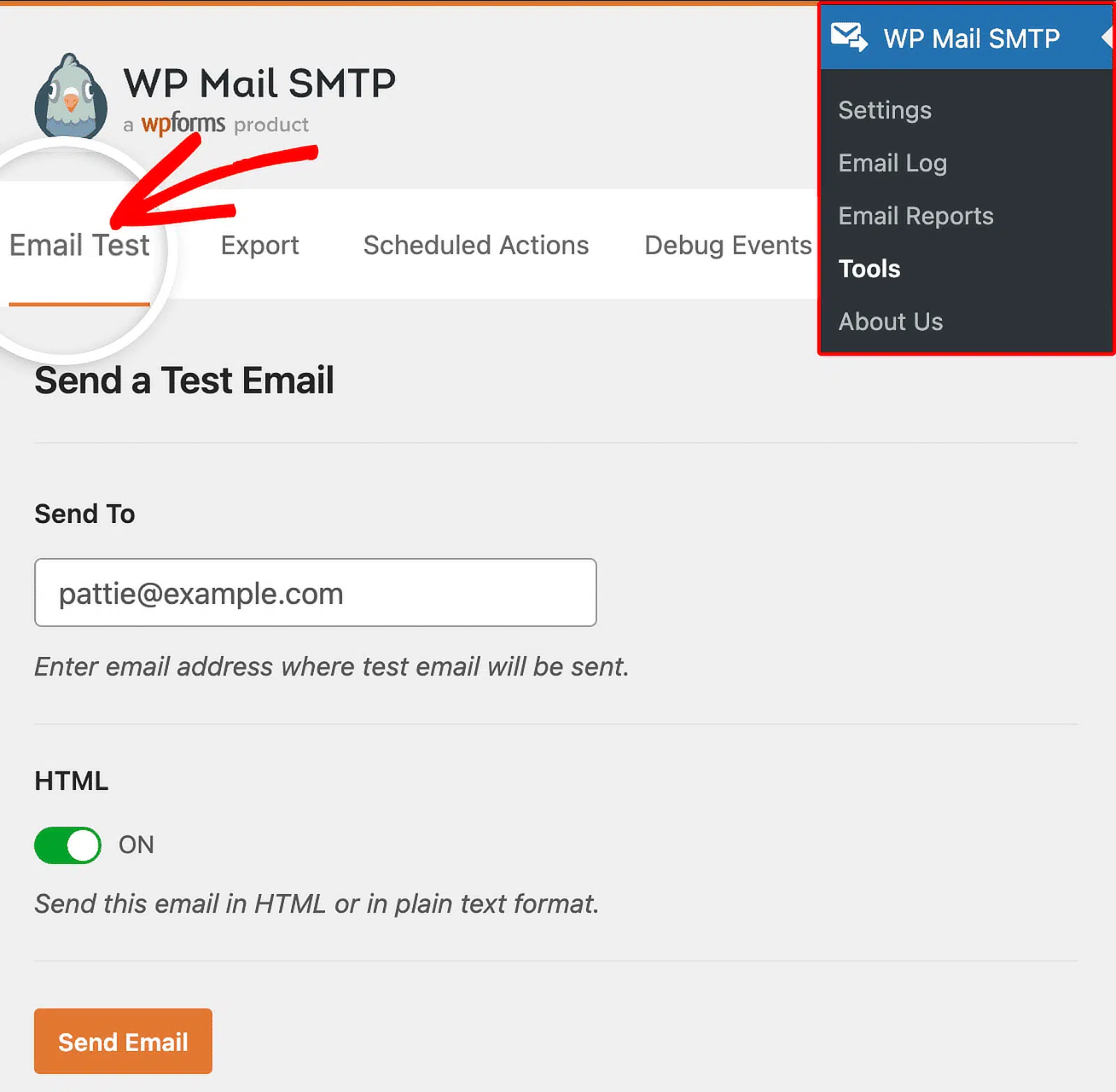
Check that the email arrives, then open the email headers (in Gmail: three dots > Show original; in Outlook: File > Properties) and look for:
- DKIM-Signature — confirms DKIM is passing
- spf=pass — confirms SPF is passing
- dmarc=pass — confirms DMARC is passing
If any of these are missing or failing, WP Mail SMTP’s Email Test results page will flag the issue and tell you what to fix.
Step 3: Configure email logging
WP Mail SMTP Pro feature. Email logging is available on Pro plans and above. Upgrade to Pro →
WP Mail SMTP Pro’s email log gives you a full record of every email your site sends — essential for compliance documentation.
Go to WP Mail SMTP > Email Log to see the log. From WP Mail SMTP > Settings > Logs, you can configure:
- Log emails — toggle on to start recording
- Log email content — records the full email body (useful for compliance, but consider your data minimization obligations)
- Retention period — set how many days logs are kept before automatic deletion

Set a retention period that reflects your actual business needs. Keeping logs indefinitely isn’t compliant — pick a period, document it in your privacy policy, and stick to it.
Step 4: Handle data deletion requests
Requires email logging (Pro). You can only search and delete email records if logging is enabled.
When a user exercises their right to erasure, you’ll need to delete their email records from WP Mail SMTP’s log.
In WP Mail SMTP > Email Log, search for the user’s email address, select their records, and use the bulk delete option to remove them.
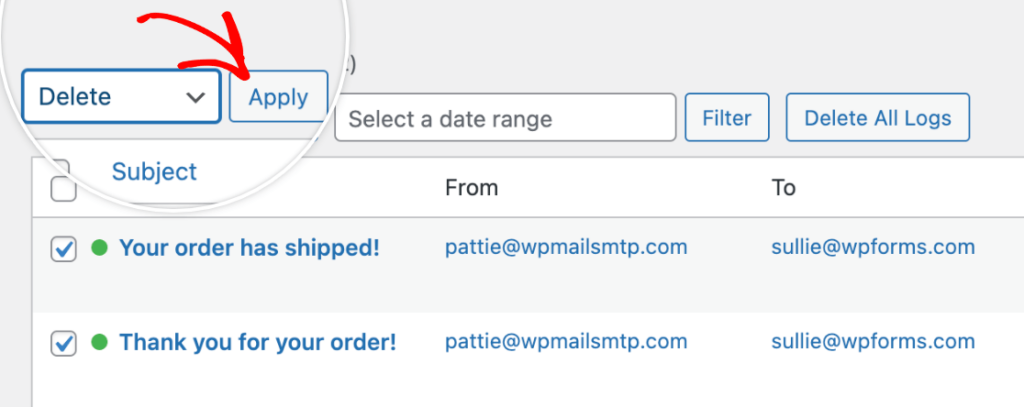
Make sure you also handle deletion at your mailer level. Check your mailer’s documentation for how to delete sent email records.
Step 5: Review your email controls
WP Mail SMTP Pro feature. Email Controls are available on Pro plans and above. Upgrade to Pro →
WP Mail SMTP Pro’s Email Controls feature lets you manage which types of emails WordPress sends from your site, and through which connection.
Go to WP Mail SMTP > Settings > Email Controls to see a list of email types by plugin and core WordPress — WooCommerce order emails, comment notifications, user registration, and more.

This is useful for compliance in two ways:
- You can disable email types your site doesn’t need (data minimization, ie. if you’re not using a feature, don’t send its emails).
- You can route different email types through different mailers,for example, transactional WooCommerce emails through SendLayer and separate account notifications through a different connection.
Step 6: Set up a backup connection
WP Mail SMTP Pro feature. Smart Routing and backup connections are available on Pro plans and above. Upgrade to Pro →
WP Mail SMTP Pro’s Smart Routing lets you set a backup connection that kicks in automatically if your primary mailer fails. This matters for GDPR because if your password reset email doesn’t arrive, users can’t access their account — and that’s a service failure with privacy implications.
Go to WP Mail SMTP > Settings > Connections to add a backup connection and configure Smart Routing.

Step 7: Check your mailer’s GDPR documentation
Once your mailer is connected, take 10 minutes to locate and review their GDPR/DPA documentation. You need to confirm:
- A data processing agreement is available (and accept it if required)
- You know where data is stored and whether it leaves the EU/UK
- You understand their log retention settings and how to delete logs if needed
The most popular providers and where to find their DPA documentation:
| Provider | DPA documentation |
|---|---|
| SendLayer | Available in their privacy documentation |
| Amazon SES | AWS Data Processing Addendum |
| Mailgun | Available in Sinch/Mailgun legal terms |
| Brevo | Available in their GDPR documentation |
| Google Workspace | Google Workspace DPA (automatically accepted with Workspace terms) |
GDPR email compliance checklist
Use this to audit your current setup.
Consent and lists
- ☐ Marketing emails only go to people who have actively opted in
- ☐ Consent records are stored (when, where, what they agreed to)
- ☐ Every marketing email has a working unsubscribe link
- ☐ Unsubscribes are processed promptly
- ☐ Inactive subscribers are reviewed periodically
Data handling
- ☐ Privacy policy is up to date and linked in your emails
- ☐ You only collect data fields you actually need
- ☐ You have a defined data retention policy and follow it
- ☐ You can respond to data access and erasure requests within one month
Technical setup
- ☐ WordPress emails go through WP Mail SMTP (not PHP mail)
- ☐ Emails are sent over TLS encryption
- ☐ SPF, DKIM, and DMARC records are set up and passing
- ☐ Email log retention is configured in WP Mail SMTP
- ☐ You know which mailers keep logs and how to delete records
Third-party mailers
- ☐ You have a DPA with your email service provider
- ☐ You know where your mailer stores data and whether it leaves the EU/UK
FAQs
Does GDPR apply if I’m not based in the EU?
Yes. If you have visitors or customers who are EU or EEA residents, GDPR applies to how you handle their data, regardless of where your business is located.
Do I need consent to send transactional emails?
No, not usually. Transactional emails like order confirmations, password resets, and shipping notifications are covered by “legitimate interest” or “performance of a contract.” You don’t need separate marketing consent for them. But keep them strictly transactional because adding promotional content changes the picture.
Is an email address personal data under GDPR?
Yes. An email address that can identify an individual is personal data. So is a name, an IP address, and any purchase history attached to an account.
What is a data processing agreement?
A DPA is a contract between you and any third party processing personal data on your behalf. If you use an external SMTP service or email platform to send emails, you need a DPA with them. Most reputable providers offer these in their legal or privacy documentation.
Does WP Mail SMTP store personal data on Awesome Motive’s servers?
No. WP Mail SMTP stores all plugin data on your own site. Awesome Motive doesn’t hold your email data.
What happens if I don’t comply with GDPR?
Fines can reach €20 million or 4% of global annual turnover, whichever is higher. In practice, enforcement typically starts with a warning or reprimand before escalating to financial penalties. The more immediate risk for most small businesses is damage to customer trust.
Do I need an unsubscribe link in transactional emails?
Not strictly required for purely transactional emails, since they’re not sent on a consent basis. Including a link to your privacy policy in all email footers is recommended practice.
Can I use Gmail as my WordPress mailer?
Yes, but check Google’s data processing terms if you have EU users. Gmail and Google Workspace process data on Google’s servers. For high-volume sending, a dedicated transactional email service like SendLayer is more reliable and easier to keep GDPR-documented.
Does GDPR apply to B2B emails?
Yes. Work email addresses like [email protected] identify an individual, so they count as personal data. The rules are slightly more nuanced for B2B. Legitimate interest is more defensible when emailing business contacts about relevant products or services, but consent is still the safest approach. When in doubt, get explicit opt-in.
Can I use a purchased email list?
No. GDPR consent must be specific to your organisation and people consenting to receive email from another company haven’t consented to receive email from you. You can’t buy a valid mailing list under GDPR.
What should I do with an old email list collected before GDPR?
If your list was built without GDPR-standard consent (unchecked opt-in box, clear explanation of what people were signing up for), you’re in uncertain territory. The safest option is a re-permission campaign: email the list explaining what you send and asking people to actively opt back in, then remove anyone who doesn’t respond. Your list will shrink, but the remaining contacts are compliant and significantly more engaged.
What’s the difference between GDPR and CAN-SPAM?
CAN-SPAM is the US federal law governing commercial email. It allows opt-out marketing: you can send until someone asks you to stop. GDPR requires opt-in consent before you send your first marketing email. If you have EU visitors, US compliance alone is not enough. GDPR applies on top.
What happens if my email provider gets hacked?
If a breach exposes personal data, GDPR requires you to notify your national supervisory authority within 72 hours. If there’s high risk to the people affected, you need to notify them directly too. This is why keeping your plugin and mailer up to date, and having a DPA in place with your provider, matters — the DPA should set out each party’s obligations in the event of a breach.
This guide covers the email-sending side of GDPR compliance. For full WordPress GDPR compliance, including cookies, analytics, and privacy policies, see WPBeginner’s ultimate guide to WordPress and GDPR compliance.
Next, Maximize Your Email Deliverability
Getting your emails GDPR-compliant is one half of the picture. The other half is making sure they actually reach the inbox. The same technical setup that protects your compliance (proper authentication, a reputable mailer, encrypted connections) also has a big impact on whether your emails land in the inbox or the spam folder. If you want to go further, our guide to WordPress email deliverability best practices covers everything from sender reputation and list hygiene to subdomains and segmentation.
Ready to fix your emails? Get started today with the best WordPress SMTP plugin. If you don’t have the time to fix your emails, you can get full White Glove Setup assistance as an extra purchase, and there’s a 14-day money-back guarantee for all paid plans.
If this article helped you out, please follow us on Facebook and Twitter for more WordPress tips and tutorials.
