


AI Summary
If you’re looking for a dedicated email service to handle your WordPress email needs, Mailjet is one of the options you’ll come across pretty quickly. But does it actually deliver for WordPress sites? That’s what this review is here to answer.
I’ve been testing Mailjet with WordPress to see how it holds up for the emails that matter most: order confirmations, password resets, and contact form notifications. The kind your users notice immediately when they don’t show up.
Here’s the short version. Mailjet works well for small to mid-sized WordPress sites. That said, there are real trade-offs worth knowing before you commit, particularly around deliverability on lower-tier plans and automation depth.
In this Mailjet review, I’ll walk you through the pricing, deliverability, features, and setup so you can decide if it’s the right email solution for your WordPress site.
Mailjet Overview
Before we get into the details, here’s a quick snapshot of what Mailjet offers:
What makes Mailjet different from most email services is that it doesn’t force you to pick between marketing and transactional email. Both live in the same account, the same dashboard, and use the same sending infrastructure. For WordPress site owners running a WooCommerce store, or any site that sends both campaign emails and automated order or account emails, that’s a meaningful convenience.
Mailjet also sits in an interesting position in the market. It’s more marketing-friendly than Mailgun (its sibling under Sinch), but more developer-capable than beginner-focused tools like Mailchimp. It lands somewhere in the middle, which is exactly where a lot of WordPress site owners sit.
Throughout this review, I’ll walk you through what that means in practice, including how WP Mail SMTP makes the WordPress side of the setup much simpler than doing it manually.
Fix Your WordPress Emails With Mailjet
Let’s take a closer look at who Mailjet is best for and whether it’s the right choice for your WordPress site.
Who Should Consider Mailjet?
After testing Mailjet with WordPress and going through dozens of user reviews, I have a clear picture of who gets the most value from this platform and who might be better served elsewhere.
Mailjet works well if you’re:
- Running a WordPress site that sends both marketing emails and transactional messages like order confirmations, password resets, or membership alerts
- Managing a WooCommerce store and need reliable WooCommerce email notifications without juggling two separate platforms
- Part of a marketing team that collaborates on email campaigns. Mailjet’s real-time editing is genuinely useful here.
- A developer or agency managing multiple client sites. The subaccounts feature keeps everything cleanly separated.
- Comfortable following a short technical setup, or willing to use WP Mail SMTP to simplify it
- Looking for a generous free tier to test deliverability before committing to a paid plan
Mailjet has built a solid reputation for reliability, and that matters when your business depends on emails actually reaching people.
You might want to consider alternatives if you’re:
- A solo blogger who just needs basic transactional emails. Simpler options like SendLayer will cost less and take less time to configure.
- Relying heavily on advanced marketing automation. Mailjet’s workflows work, but they don’t go as deep as ActiveCampaign or Klaviyo.
- Expecting phone or live chat support on a lower-tier plan. That’s available only at Premium, and only if you subscribe to a sending tier of 50,000 emails per month or more.
- Sending low volume on a tight budget. At that scale, competitors like Brevo offer more features at a similar price point.
Mailjet Features and Benefits
Choosing an email service provider comes down to one question: will it reliably get your emails to the inbox? But beyond deliverability, the features you get in the process matter too, especially when you’re running a WordPress site with real business requirements.
Here’s what stood out after putting Mailjet through its paces.
One Platform for Marketing and Transactional Email
Most email platforms make you choose a lane. Tools like Mailchimp are built for campaigns. Postmark is built purely for transactional email. Mailjet handles both, from weekly newsletters to order confirmations and password resets, under one account, one dashboard, and one API key.
For WooCommerce store owners, that’s a genuine convenience. Your promotional emails and your order notification emails live in the same place, use the same sending infrastructure, and appear in the same analytics view.
Connecting to WordPress via API
When you connect Mailjet through WP Mail SMTP, the plugin uses Mailjet’s API rather than a traditional SMTP connection. That matters because API-based sending is faster, more reliable, and sidesteps the firewall restrictions that often cause WordPress email delivery failures in shared hosting environments.
The setup needs two things from your Mailjet account: an API Key and a Secret Key. You paste both into WP Mail SMTP, save your settings, and the connection is live. No code, no server configuration.
Real-Time Team Collaboration on Email Templates
This is Mailjet’s most distinctive feature, and one you genuinely won’t find at this price point elsewhere. Multiple users can edit the same email template at once, leave comments, lock sections to prevent accidental changes, and track edits as they happen. Think Google Docs, but for email.
It’s worth being honest about who this actually helps. If you’re a solo WordPress site owner, the feature is irrelevant to you. But if you’re an agency managing client campaigns, or part of a marketing team where designers, copywriters, and approvers all touch the same email, it can eliminate hours of back-and-forth.
Drag-and-Drop Email Builder With AI Assistance
Mailjet’s email editor (also known as Passport) lets you build responsive emails without touching any code. You get 70+ templates as a starting point, with blocks for images, buttons, videos, countdown timers, and dynamic content sections that display different content to different recipients.
More recently, Mailjet added an AI assistant and an AI Template Generator directly inside the editor. You provide the campaign details, and it drafts a branded email in seconds. That’s useful for teams that produce high email volume and need to move fast.

One important note for WordPress users: these templates are for Mailjet marketing campaigns. They’re not applied to transactional emails sent through WP Mail SMTP. For custom WordPress email templates, you’ll want a dedicated WordPress email customizer plugin.
Backup Connections Through WP Mail SMTP
Mailjet’s own WordPress plugin locks you into a single sending provider. WP Mail SMTP removes that constraint. You can configure a backup mailer, such as SendLayer, Amazon SES, or SMTP.com, that activates automatically if Mailjet experiences downtime or you hit a sending limit.
That kind of failover protection is easy to overlook until the day your primary mailer goes down during a WooCommerce sale or a membership renewal cycle. Having a backup already configured means your emails keep going out without any manual intervention.
Marketing Automation
Mailjet’s automation builder lets you create workflows triggered by subscriber behavior. That includes a welcome sequence when someone joins your list, a re-engagement email after a period of inactivity, or a drip campaign following a product purchase.
The builder is visual and requires no technical knowledge. That said, it’s worth setting the right expectations. Mailjet’s automation covers the fundamentals well, but it doesn’t match the depth of platforms like ActiveCampaign or Klaviyo.
Complex multi-branch logic and advanced behavioral scoring aren’t its strong suit. Automation is also locked behind the Premium plan, so Essential users won’t have access to it.
Email Analytics and Delivery Visibility
Mailjet surfaces real-time data on every email you send, including open rates, click-through rates, bounces, unsubscribes, and spam complaints. The Statistics Dashboard gives you a campaign-level view, while Click Maps show you exactly where recipients are clicking inside each email.
A bot activity filter is also included, which removes non-human interactions from your stats. That’s a useful detail that keeps your open rate data from being inflated by email scanners and security tools.
When you’re using WP Mail SMTP, the delivery status for WordPress emails (sent, delivered, bounced) is visible directly inside your WordPress dashboard via the built-in email logs, without needing to log into Mailjet separately.
Email Validation
Before you send to a list, Mailjet can verify whether the addresses on it are real and active. This reduces bounce rates, protects your sender reputation, and keeps your list clean without requiring a third-party tool.
Email validation is available from the Essential plan and above. The free plan doesn’t include it.
How Much Does Mailjet Cost?
Mailjet’s pricing is built around email volume, not the size of your contact list. That makes it an interesting option if you have a large audience but send at a moderate frequency. Here’s how the plans break down at the base 15,000 emails per month tier (prices current as of 2026):
Mailjet Plan Comparison
| Plan | Price/Month | Emails/Month | Contacts | Key Inclusions |
|---|---|---|---|---|
| Free | $0 | 6,000 | 1,000 | API & SMTP, email editor, basic stats, form builder |
| Starter | $9 | 8,000 | 2,000 | Brand Kit, 1 subaccount, online support (first month only) |
| Essential | $17 | 15,000 | Unlimited | Segmentation, no Mailjet logo, AI content tools, email validation (500 credits) |
| Premium | $27 | 15,000 | Unlimited | Automation, A/B testing, landing pages, advanced stats, team management, priority support |
| Custom | Quote | 900k+ | Unlimited | Dedicated IP strategy, deliverability services, account manager, custom subaccounts, dedicated technical account manager, custom email validations |
A Few Pricing Details Worth Knowing
Unused credits don’t roll over: Whatever emails you don’t send in a billing cycle are gone. If your sending volume fluctuates month to month, this can mean you’re regularly paying for capacity you’re not using.
Dedicated IPs are only available on 100,000+ email plans: On the Premium plan at lower volumes, you’re on shared IP infrastructure. For most small WordPress sites, this isn’t a problem, but it’s worth knowing if deliverability is a top priority for you.
Volume-based pricing scales upward: The $17 and $27 prices shown are base rates for 15,000 emails per month. As your sending volume increases, the plan price goes up too. Mailjet’s pricing page lets you slide to your target volume and see the exact cost before you sign up.
No money-back guarantee: Unlike some competitors, Mailjet doesn’t offer refunds on prepaid plans (monthly or annual). The only exceptions are double-billing or a service outage caused by Mailjet’s own technical failure. If you’re on an annual plan and decide to switch providers mid-term, that payment is gone. This makes the free plan a genuinely important first step to test the product thoroughly before upgrading.
How Mailjet’s Pricing Compares
If pure transactional email is all you need, SendLayer and Postmark offer more predictable per-email pricing with a stronger focus on deliverability. If you want marketing and automation on the same platform at a lower entry price, Brevo is worth considering, and its free plan includes automation that Mailjet locks behind its Premium plan.
What sets Mailjet apart is its combination of volume-based pricing, unlimited contacts on paid plans, and the ability to handle both marketing and transactional email without paying for two platforms.
Is Mailjet Reliable for WordPress Emails?
Deliverability is the only metric that ultimately matters for transactional email. Your emails either reach the inbox or they don’t. Here’s an honest look at where Mailjet stands.
Independent testing across 65,733 emails recorded a Mailjet inbox placement rate of 76.11%. For context, Validity’s Email Deliverability Benchmark puts the global average inbox placement rate for 2025 at 87.2%. Mailjet’s 76.11% falls more than 11 percentage points below that benchmark, a gap worth acknowledging, especially if deliverability is your top priority.
The main factor behind this is shared IPs. On plans below the 100,000 emails per month threshold, you’re on shared infrastructure. Your sender reputation is partially tied to how other senders on that same IP pool behave. It’s also the reason marketing emails on lower-tier Mailjet plans are more likely to land in Gmail’s Promotions tab rather than the primary inbox.
Dedicated IPs are available starting at 100,000 emails per month. If inbox placement is non-negotiable for you at lower volumes, platforms like Postmark or SendLayer are worth comparing.
IP Reputation and Deliverability Safeguards
That said, Mailjet has solid safeguards in place:
- Domain authentication built into onboarding: SPF, DKIM, and DMARC are required before you can send from a custom domain
- Automatic hard-bounce handling and suppression: Bounced and unsubscribed addresses are filtered without manual work
- Spam-complaint monitoring: Visibility into rates so you stay within the thresholds Gmail, Yahoo, and Outlook now enforce
- Email validation from Essential onward: Verify addresses before sending
- Bot-activity filtering in analytics: Removes non-human opens and clicks from your stats
When using WP Mail SMTP, the delivery status for every WordPress email (sent, delivered, bounced) is visible directly inside your dashboard without logging into Mailjet separately.
Mailjet Support and Documentation
Support quality is one area where Mailjet’s tiered approach is most visible and most consequential. What you get depends entirely on which plan you’re on.
| Support Type | Free & Starter | Essential | Premium (50k+) | Custom |
|---|---|---|---|---|
| Ticket/Online Support | First 30 days only | Available | Available | Available |
| Priority Support | Not available | Not available | Available | Available |
| Live Chat | Not available | Not available | Available | Available |
| Phone Support | Not available | Not available | Available | Available |
| Dedicated Account Manager | Not available | Not available | Not available | Available |
| API Expert | Not available | Not available | Not available | Available |
The standard response time for ticket support is 24 hours. In practice, user reviews consistently flag slower response times than that, particularly for Essential plan users during peak periods.
Self-Service Resources
Where Mailjet does hold up well is its self-service offering:
- Help Center: A well-organized knowledge base covering setup, deliverability, API documentation, and troubleshooting
- AI Chatbot: Available across all plans. It either points you to a relevant help article or helps you submit a ticket.
- Email Academy: Quarterly live training sessions covering deliverability, automation, and campaign optimization. A genuinely useful resource most competitors don’t offer.
- API Documentation: Detailed and developer-friendly, covering all endpoints, webhooks, and integration guides
- Support Languages: Mailjet’s self-service resources are available in English, French, German, and Spanish
If your issue is specifically about connecting Mailjet to WordPress (test email failures, API key errors, DNS configuration), WP Mail SMTP’s support team handles those directly. You won’t need to go through Mailjet at all for the WordPress side of the setup, which removes one layer of back-and-forth.
Mailjet Pros and Cons
Here’s a balanced summary of what works well with Mailjet and where it falls short for WordPress.
👍 Pros
- Generous Free Tier: 6,000 emails per month with no credit card required, enough to run a real test on a live WordPress site before committing to a paid plan
- Volume-Based Pricing: You pay for how many emails you send, not how many contacts you have. Unlimited contacts from the Essential plan upward is a genuine advantage over competitors like Mailchimp.
- Marketing and Transactional Email Under One Roof: One account, one dashboard, one API key. For WooCommerce stores sending both campaign and order emails, that removes real operational friction.
- Real-Time Team Collaboration: Genuinely unique at this price point. Multiple users editing the same email at once, with comments and section locking, is a feature most platforms charge significantly more for.
- GDPR-Compliant by Design: EU data centers, ISO 27001 certification, and double opt-in tools built in. No extra cost for EU data routing.
- Native WP Mail SMTP Integration: API-based connection, backup mailer support, and email logging inside the WordPress dashboard. Setup takes under 20 minutes.
- Email Validation From Essential Onward: Keeps bounce rates low and sender reputation intact without requiring a third-party tool
- Email Academy: Quarterly live training sessions on deliverability and automation. A practical resource most competitors skip entirely.
👎 Cons
- Inbox Placement Lags the Industry Average: 76.11% versus the global benchmark of 87.2%. Shared IPs on lower-tier plans are the primary driver.
- Dedicated IPs Locked Behind High Volume: Only available at 100,000 emails per month or on a Custom plan. Lower-volume senders have no path to a dedicated IP.
- Automation Requires a Premium Plan: Even basic workflow sequences are unavailable on the Essential plan. For a growing WordPress site, that’s an upgrade you’ll be forced into sooner than expected.
- Support Drops Off Sharply on Lower Tiers: Free and Starter plan users lose ticket support after 30 days. Essential users get ongoing ticket support but no live chat or phone support. Urgent issues on lower plans are largely self-service.
- Phone and Live Chat Locked at 50k Premium: Not just any Premium plan. You need the 50,000-emails-per-month tier specifically to unlock those channels.
- Account Activation Takes Time: New accounts undergo manual verification before full sending is unlocked. If you need to get up and running immediately, this friction matters.
- Unused Email Credits Don’t Roll Over: Variable sending volume means you’ll regularly pay for capacity you don’t use
- No Refund Policy: Mailjet doesn’t offer a money-back guarantee on any prepaid plan. If budget certainty matters to you, test on the free tier first before committing.
Is Mailjet the Right Pick for Your WordPress Site?
Mailjet is a solid email service provider, but it’s not the right fit for everyone. If you’re running a WooCommerce store or a WordPress site that sends both marketing campaigns and transactional emails, Mailjet makes a strong case for itself.
But if deliverability is your primary concern and you’re sending below 100,000 emails per month, the shared IP limitation is real. Platforms like Postmark or SendLayer are built specifically for transactional email and deliver stronger inbox placement at lower volumes. If advanced automation is what you need, ActiveCampaign or Klaviyo are in a different league entirely.
Mailjet is likely a good fit if you:
- Run a WooCommerce store or a WordPress site sending both marketing and transactional email
- Want collaborative email building for a team or agency
- Need GDPR-compliant infrastructure without paying extra for EU data routing
Consider alternatives if:
- Deliverability is your top priority and you send below 100,000 emails per month (try SendLayer or Postmark instead)
- You need deep marketing automation with multi-branch logic (ActiveCampaign or Klaviyo are stronger)
- You want the simplest possible setup with zero technical configuration (use the White-Glove setup service)
Mailjet WordPress Integration and Setup Walk-through
There are two ways to connect Mailjet to WordPress: using Mailjet’s own WordPress plugin, or WP Mail SMTP. The difference matters.
Integration Options
Mailjet’s native plugin gets the job done at a basic level, but it locks you into a single mailer with no backup connection, no email logging, and no failover protection. WP Mail SMTP gives you all of that, plus a cleaner setup process and visibility into every email your site sends.
Mailjet Step-by-Step Setup with WP Mail SMTP
Here’s how to get Mailjet working with WP Mail SMTP:
- Install WP Mail SMTP: Add the plugin through your WordPress dashboard (the free Lite version works with Mailjet)
- Create a Mailjet Account: Sign up for Mailjet’s free plan
- Add Your Domain: In Mailjet, add the domain you’ll send from and follow the verification steps
- Set Up DNS Records: Add the TXT record Mailjet provides to your domain’s DNS settings
- Generate an API key: In the Mailjet dashboard, create an API key with sending permissions
- Configure WP Mail SMTP: Select Mailjet as your mailer.

- Paste API key: Then paste in your API key and Secret key

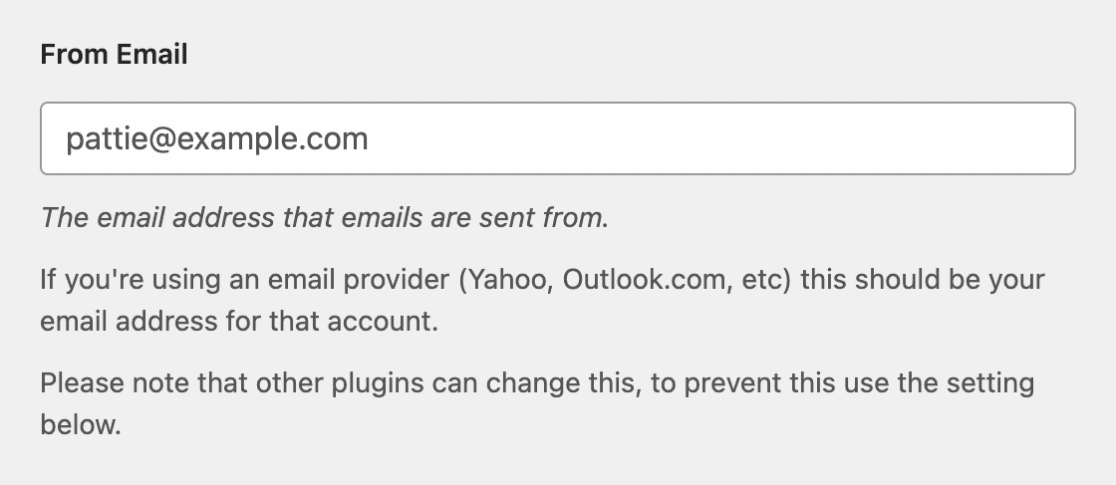
- Set Your From Address: Enter the email address you verified with Mailjet and save your changes.
- Send a Test Email: Use WP Mail SMTP’s built-in test to confirm everything is working
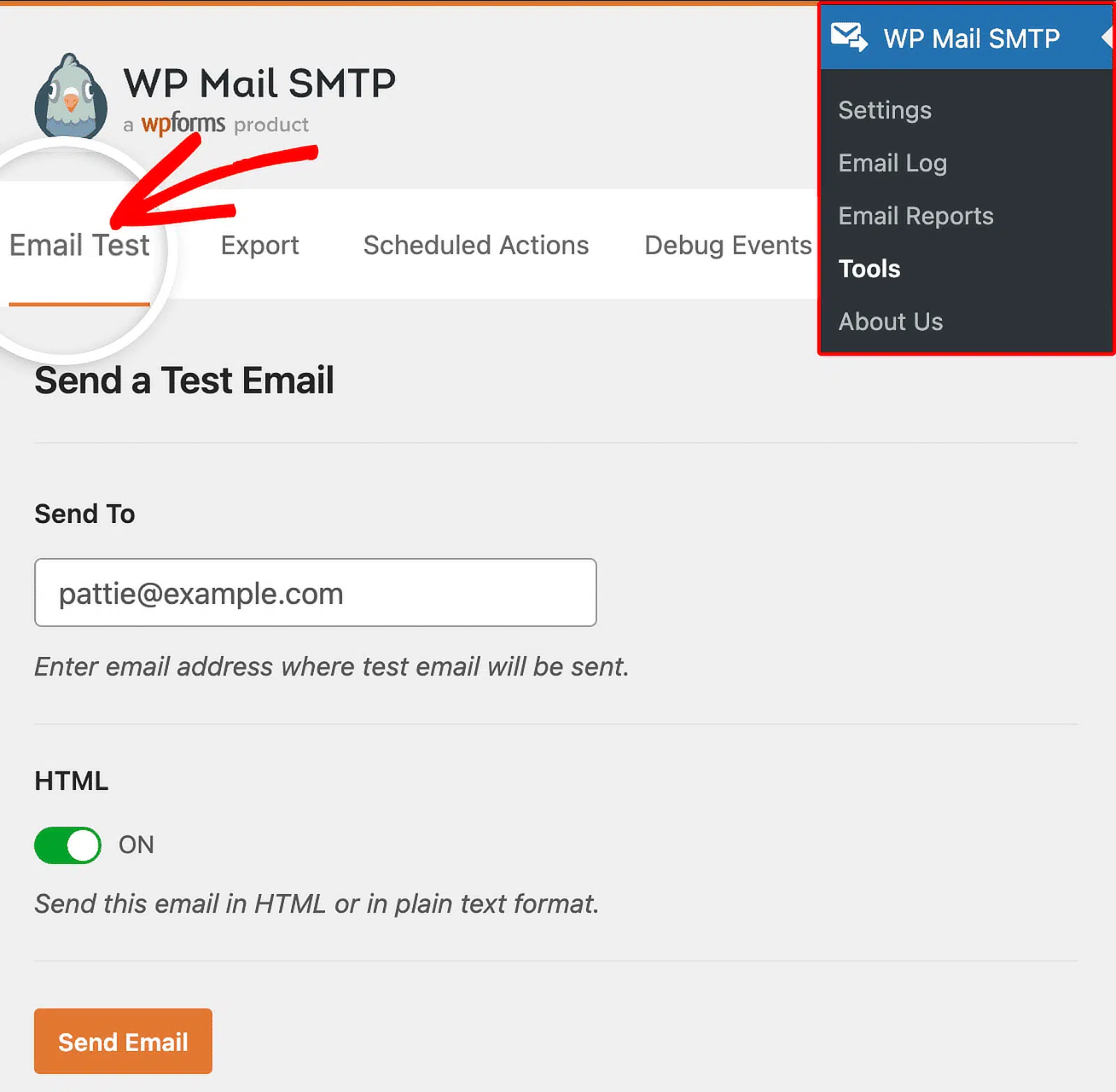
In less than 20 minutes, you’ll have reliable email delivery running from your WordPress site, with a clear view of every message’s delivery status right inside your dashboard.
FAQs – Mailjet Review for WordPress
Here are answers to the most common questions we see about using Mailjet with WordPress.
Is Mailjet really free?
Yes. Mailjet offers a free plan that lets you send up to 6,000 emails per month, with a daily limit of 200. It includes access to the email editor, basic analytics, API, SMTP relay, and contact management. You don’t need a credit card to sign up.
Does Mailjet offer a money-back guarantee?
No. Mailjet doesn’t offer refunds for paid plans except in cases of double-billing or a service outage caused by its own technical failure. That’s where the free plan comes in. It lets you test the product thoroughly before committing to a paid plan.
Is Mailjet good for WordPress?
Yes. Mailjet works well with WordPress when connected through WP Mail SMTP. It reliably handles transactional emails like WooCommerce order confirmations, password resets, and contact form notifications, while also providing a marketing email platform within the same account. Setup takes under 20 minutes using the WP Mail SMTP integration.
How do I connect Mailjet to WordPress?
The easiest way is through an SMTP plugin like WP Mail SMTP. Install the plugin, create a free Mailjet account, verify your sending domain by adding a TXT record to your DNS, generate an API Key and Secret Key inside Mailjet, and paste both into the WP Mail SMTP Mailjet mailer settings. The full process takes under 20 minutes.
Next, Compare SMTP Providers
Not sure if Mailjet is the right fit? Check out our guide to choosing the right SMTP provider for your WordPress site for a side-by-side comparison of all the major mailers and advice on matching the right provider to your needs.
Ready to fix your emails? Get started today with the best WordPress SMTP plugin. If you don’t have the time to fix your emails, you can get full White Glove Setup assistance as an extra purchase, and there’s a 14-day money-back guarantee for all paid plans.
If this article helped you out, please follow us on Facebook and Twitter for more WordPress tips and tutorials.
