


AI Summary
An SMTP relay decides whether your WordPress emails reach the inbox or vanish. Get it wrong and your receipts, password resets, and form notifications quietly disappear.
WordPress has no mail server of its own. It hands every message to whatever your host provides. That’s usually something slow, unauthenticated, or blocked outright.
Below, you’ll learn what an SMTP relay is, how the handoff works, and which port to use.
You’ll also learn why wp_mail() fails on its own. Then you’ll see how Google’s 2 SMTP endpoints differ, plus how to test your relay. Let’s begin!
- What Is an SMTP Relay?
- How SMTP Relay Works
- Why WordPress Needs an SMTP Relay
- When Do You Need an SMTP Relay?
- Which SMTP Relay Port Should You Use?
- What's the Difference Between smtp-relay.gmail.com and smtp.gmail.com?
- Is SMTP Relay Going Away?
- How to Set Up an SMTP Relay on a WordPress Site
- How to Know if Your SMTP Relay Is Working
What Is an SMTP Relay?
An SMTP relay is a mail server that sends your email for you. It accepts your outgoing message, then forwards it to the recipient’s server.
Think of it like dropping a letter at the post office. You hand it to a carrier that already has the routes and the reputation.
That reputation is the part that matters. A relay sends from IP addresses it actively protects. It signs your mail with DKIM. And it negotiates with Gmail and Outlook daily.
Most people use a hosted relay from an email service provider. You get credentials, plug them into your site, and the provider handles delivery.
What’s the Difference Between an SMTP Relay and an SMTP Server?
An SMTP server is the software that sends, receives, and routes mail. An SMTP relay is one job that the server does. It forwards mail from a trusted sender to a domain it doesn’t own.
Every relay is an SMTP server. Not every SMTP server acts as a relay for you.
| SMTP relay | SMTP server | |
|---|---|---|
| Main job | Forwards your mail to other domains | Sends, receives, and routes mail |
| Direction | Outbound only | Inbound and outbound |
| Authentication | Requires your credentials or a trusted IP | Depends on the role it plays |
| Who runs it | Usually a third-party provider | Your host, your provider, or you |
| You need it when | Your site has to send mail reliably | You’re running mail infrastructure |
How SMTP Relay Works
An SMTP relay works in 5 steps. Your site connects, encrypts, and authenticates. Then it hands the message over, and the relay delivers it.
Here’s the sequence:
- Connect. Your site opens a TCP connection to the relay’s hostname on a submission port.
- Encrypt. The connection upgrades to TLS, so credentials aren’t sent in the clear.
- Authenticate. Your site proves who it is with a password, an API key, or an approved IP.
- Transfer. Your site declares the sender and recipients, then sends the headers and body.
- Queue and deliver. The relay accepts the message, signs it with DKIM, and delivers it.

What Happens at Each Step of the Handoff?
The handoff is a plain-text conversation. Reading one makes the whole process click. Here’s a real SMTP session with a relay, trimmed for clarity:
220 smtp.example.com ESMTP ready
EHLO yoursite.com
250-smtp.example.com
250-STARTTLS
250 AUTH LOGIN PLAIN
STARTTLS
220 2.0.0 Ready to start TLS
AUTH LOGIN
235 2.7.0 Authentication successful
MAIL FROM:<[email protected]>
250 2.1.0 Sender OK
RCPT TO:<[email protected]>
250 2.1.5 Recipient OK
DATA
354 Start mail input
(message headers and body go here)
.
250 2.0.0 OK: queued as 4A2F1C
QUIT
Every line starting with a number is the relay answering. The 250 codes mean success, and 235 confirms that your credentials worked.
That final 250 2.0.0 OK: queued line matters most. Before it, delivery is your problem. After it, it’s the relay’s.
Why WordPress Needs an SMTP Relay
WordPress needs an SMTP relay because it has no mail server of its own. By default, it hands mail to PHP, which passes it to your host unsigned and unverified.
Mail providers treat that kind of message as suspicious. It arrives with no proof it came from your domain. Often it comes from an IP shared with hundreds of sites.

What Does wp_mail() Actually Do by Default?
wp_mail() builds your message using the PHPMailer library. It then sends it through PHP’s mail() function. No SMTP connection, no login, no signature.
That default path fails in 4 specific ways:
- No authentication. Nothing proves the message came from your domain.
- No DKIM signature. Receiving servers can’t verify the content wasn’t altered.
- Mismatched envelope sender. The technical sender often doesn’t match your From address, so SPF alignment fails.
- Shared IP reputation. You inherit the reputation of every other site on your server.
An SMTP plugin like WP Mail SMTP fixes this by hooking into phpmailer_init and switching PHPMailer to SMTP. Here’s the core of what that hook does:
add_action( 'phpmailer_init', function ( $phpmailer ) {
    $phpmailer->isSMTP();                          // stop using PHP mail()
    $phpmailer->Host       = 'smtp.example.com';   // your relay hostname
    $phpmailer->Port       = 587;                  // submission port
    $phpmailer->SMTPSecure = 'tls';                // encrypt the connection
    $phpmailer->SMTPAuth   = true;                 // authenticate
    $phpmailer->Username   = getenv( 'SMTP_USER' );
    $phpmailer->Password   = getenv( 'SMTP_PASS' );
} );
Why Does Shared Hosting Make This Worse?
Shared hosting makes it worse for 2 reasons. Your host blocks the ports mail needs and shares your sending IP with strangers.
I’ve watched one spammy neighbor get a whole shared IP range blocklisted. A dozen innocent sites went down with it.
Most hosts block outbound port 25 to stop that abuse. Some throttle mail to a few hundred messages an hour. Others silently drop anything PHP tries to send.
A relay routes around all of it. Your mail leaves over an authenticated connection on a port hosts don’t block. The sending IP belongs to a provider that defends it.
When Do You Need an SMTP Relay?
You need an SMTP relay once your site sends email someone is waiting for. Password resets, receipts, and form notifications all qualify.
Set one up in these cases:
- Your site sends any transactional email at all
- Test emails from WordPress fail or never arrive
- Your emails land in spam instead of the inbox
- You’re on shared hosting, where port 25 is usually blocked
- You need delivery logs to prove a message was sent
- You send more than a handful of messages a day
You can skip a relay in one narrow case. If your site is purely static, nothing needs to send. No forms, no accounts, no store.
Which SMTP Relay Port Should You Use?
Use port 587 with STARTTLS. It’s the standard submission port, it’s encrypted, and hosts rarely block it.
| Port | Encryption | Use it when | Blocked on shared hosting? |
|---|---|---|---|
| 587 | STARTTLS | Almost always. The default choice. | Rarely |
| 465 | Implicit TLS | Your provider or host prefers it | Sometimes |
| 2525 | STARTTLS | 587 and 465 are both blocked | Rarely |
| 25 | Usually none | Server-to-server relay only. Not for your site. | Almost always |
Port 587 is the message submission port defined in RFC 6409. Port 465 uses implicit TLS, so encryption starts before any commands are sent. RFC 8314 documents it.
Port 2525 isn’t in any RFC. Providers offer it as an unofficial fallback, and it works because firewalls generally ignore it.
What’s the Difference Between smtp-relay.gmail.com and smtp.gmail.com?
They’re 2 separate Google services, and they authenticate differently. smtp-relay.gmail.com is the Google Workspace relay for apps and devices. smtp.gmail.com is the Gmail SMTP server, which sends as one mailbox.
Mixing them up is the most common Google SMTP mistake I see.
| smtp-relay.gmail.com | smtp.gmail.com | |
|---|---|---|
| What it’s for | Apps, sites, and devices sending for your domain | Sending as one Gmail or Workspace mailbox |
| Requires Workspace? | Yes | No |
| Authenticates by | Approved IP address, or SMTP credentials | Mailbox credentials only |
| Send as | Any address on your verified domain | Only that mailbox address |
| Sending limits | Higher, set per Workspace account | Lower, set per mailbox |
The relay endpoint authenticates by IP range or domain. That suits a server sending for many addresses. The Gmail endpoint ties every message to one mailbox login.
Google documents the current limits in its SMTP relay guide. Check there rather than trusting a number in a blog post, because Google adjusts these caps.
Is SMTP Relay Going Away?
No. SMTP relay is not going away, and Google’s relay service is still fully supported.
The confusion comes from a real change that people half-remember. Google retired the “less secure apps” sign-in method for Workspace accounts.
That change killed one way of logging in with a plain account password. It did not remove SMTP relay. Modern relays authenticate with app passwords, OAuth, API keys, or approved IPs instead.
The same pattern played out at Microsoft, which has been retiring basic authentication for SMTP. Again, the protocol stayed, and the weak login method went.
How to Set Up an SMTP Relay on a WordPress Site
Set up an SMTP relay in 4 steps. Pick a provider and verify your domain. Then install an SMTP plugin and add your credentials.
What Do You Need Before You Start?
Gather these first:
- A domain you send from, not a free Gmail or Yahoo address
- Access to your DNS records, for SPF and DKIM
- An account with an SMTP relay provider
- Administrator access to your WordPress site
Then work through it:
- Pick a relay provider. Match the plan to your actual monthly volume, not your best-case scenario.
- Verify your sending domain. The provider gives you DNS records to add. Adding them lets the relay sign mail as you.
- Install an SMTP plugin. Go to Plugins » Add New Plugin, search for the WP Mail SMTP plugin, then click Install Now and Activate.
- Enter your relay details. Add the host, port, encryption type, and credentials from your provider.

WP Mail SMTP handles steps 3 and 4 with a setup wizard. It also ships with built-in mailers for the major providers. Choosing a mailer beats entering raw SMTP details. The host and port get filled in for you.
How to Know if Your SMTP Relay Is Working
Send a test email, then read the message headers. You want 3 passes: acceptance, SPF, and DKIM.
WP Mail SMTP includes a test email feature for testing SMTP and mailer connections. To send a test email, go to WP Mail SMTP » Tools and open the Email Test tab. Enter the recipient’s email address in the Send To field.
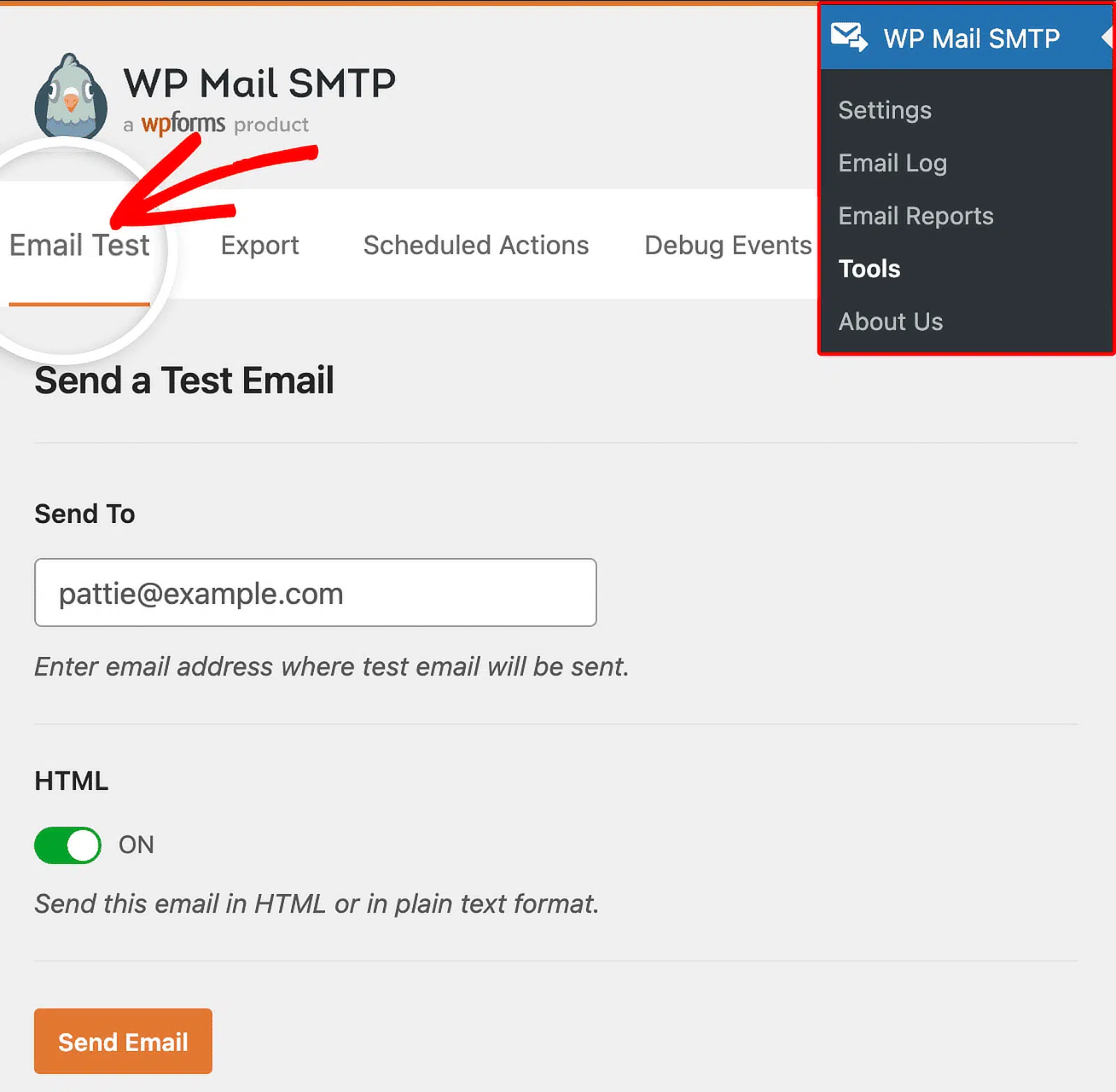
Once done, click the Send Email button. If your setup is correct, you’ll see a Success! message.

A test that only says “sent successfully” isn’t enough. That confirms the relay accepted your message, not that a real inbox did.

Open the test email you received, view the original message, and look for:
Received:shows your relay’s hostname. Confirms the mail went through the relay, not PHP.spf=pass. Your DNS authorizes the relay to send for your domain.dkim=pass. Your message carries a valid signature.dmarc=pass. SPF or DKIM aligns with your From domain.
If the test fails, the cause is almost always one of 3 things:
- Wrong port or encryption. Try port 587 with STARTTLS, then port 465 with TLS.
- Rejected credentials. Regenerate the app password or API key and re-enter it.
- Host blocking the connection. Ask your host whether outbound SMTP is filtered, then try port 2525.
Frequently Asked Questions
Is there a free SMTP relay?
Yes. Most relay providers include a free tier. Expect a few hundred to a few thousand messages a month. Free plans are fine for a small site’s form notifications and receipts. Check whether the free tier includes DKIM signing and logs, because some strip both.
Does Office 365 allow SMTP relay?
Yes. Microsoft 365 supports SMTP relay 2 ways. Use smtp.office365.com for authenticated client submission, or a connector for higher volume. Microsoft has been retiring basic authentication, so use modern auth or an app password.
Is an SMTP relay secure?
An SMTP relay is more secure than the default WordPress mail path. It encrypts the connection with TLS, requires authentication, and signs your mail with DKIM. Use port 587 or 465. Store credentials outside your theme files, and rotate them after any compromise.
How many emails can you send through an SMTP relay?
Limits depend on your provider and plan. Free tiers run a few hundred a month. Paid plans reach millions. Relays also enforce a sending rate, not just a monthly cap. Check both before a big send.
Do you still need SPF and DKIM if you use an SMTP relay?
Yes, and they matter more, not less. A relay can only sign as your domain if your DNS authorizes it. Add the SPF and DKIM records your provider gives you. Add a DMARC record once both pass.
Next, Set Up Your WordPress SMTP Settings
Now that you know how a relay works, the next step is wiring it into your site. Our guide to WordPress SMTP settings walks through the exact fields and mailer options. It also covers the settings that keep your mail out of spam.
Ready to fix your emails? Get started today with the best WordPress SMTP plugin. If you don’t have the time to fix your emails, you can get full White Glove Setup assistance as an extra purchase, and there’s a 14-day money-back guarantee for all paid plans.
If this article helped you out, please follow us on Facebook and Twitter for more WordPress tips and tutorials.
