


AI Summary
Order confirmation emails are one of the most important touchpoints you’ll have with your customers. They’re opened more than almost any other message you send, because buyers genuinely want to see them.
These emails let buyers know their order went through, and they’re a golden opportunity to reinforce trust, build excitement, and even encourage repeat purchases.
You don’t need to be a design or copywriting expert to create effective order confirmation emails. By focusing on the right elements, you can leave a lasting impression. In this post, I’ll walk you through 10 of the most effective order confirmation email examples I’ve come across, show you what to include, and give you copy-paste templates you can adapt for your own store.
Order Confirmation Emails: Examples & Templates
Order confirmation emails are a key part of the customer experience. They set the tone for your customer’s entire journey, and a confirmation designed with the customer in mind can reassure buyers, reduce order-related questions, and strengthen your brand’s image.
What to Include in an Order Confirmation Email
Before the examples, here’s the anatomy of a confirmation email that does its job. The best ones cover all of these:
- A clear, reassuring subject line. Confirm the order right in the subject so customers see it at a glance, for example “Your order is confirmed” or “We’ve got your order.”
- An order number. The single detail customers look for most, and the reference they’ll quote if they contact support.
- An itemized order summary. Each product with name, quantity, and price, ideally with images so buyers can verify the purchase.
- The total and payment method. Subtotal, discounts, taxes, shipping, and the final amount charged, with no ambiguity.
- Shipping or delivery details. The address, delivery estimate, and a tracking link or button where available.
- Clear next steps. What happens now, and when to expect the next update.
- A support link. An easy way to get help or manage the order.
- A brand touch. A thank-you, a bit of personality, or a small next-purchase nudge to turn a receipt into a relationship.
1. River Island
Subject line: We’ve got it

This order confirmation email from River Island does a great job of keeping everything clear and professional. Its straightforward design serves its purpose perfectly for a smooth post-purchase experience.
It acknowledges the order immediately, reassures the customer about the next steps, and includes all the essential details, such as the order number, delivery estimate, and payment information.
What I like in this order confirmation email
- The subject line, “We’ve got it,” is short and reassuring, instantly letting the customer know their order has been received and is in process.
- The email provides an order number, estimated delivery date, and a collection address upfront. This transparency keeps customers informed and builds trust.
- Each item in the order is listed with a name, SKU, size, and price. The visual layout, including product images, helps customers quickly verify their purchase.
- The subtotal, discounts, and total paid are displayed clearly, ensuring there’s no confusion about the charges. The tone is also polite and customer-focused.
2. DoorDash
Subject line: Order Confirmation for [Name] from Ozzy’s Apizza

This DoorDash order confirmation email stands out for its personalized and user-friendly design. It starts with clearly acknowledging the order, followed by an estimated delivery time to set expectations.
With actionable buttons like “Track Your Order” and links to view the receipt or get help, the email makes it simple for users to access the necessary information.
What I like in this order confirmation email
- The estimated delivery time is prominently displayed in a large, easy-to-read format, which keeps the user informed about when to expect their order.
- The “Track Your Order” button is bright and hard to miss, making it easy for customers to check on their delivery with a single click.
- A breakdown of the total cost, payment method, and receipt link ensures that customers have all financial details at their fingertips.
- The star rating system to review the store is a great way to encourage users to share their experience, fostering trust and accountability.
3. Crocs
Subject line: We got your order. (You have great taste!)

The Crocs order confirmation email includes a helpful order tracker that visually displays the order’s status, giving customers a quick overview of where their purchase stands.
The design is minimal yet informative, providing all the necessary details like billing and shipping addresses, a breakdown of the costs, and product specifics.
What I like in this order confirmation email
- The visual tracker is a standout feature. It shows the order’s current stage, whether confirmed, shipped, or delivered, so customers know exactly what to expect.
- The email includes a straightforward payment summary showing applied discounts, taxes, and the total amount, making it easy to verify charges.
- With clickable options like “Cancel Your Order” and “View Order Details,” it empowers customers to manage their purchases effortlessly.
- The inclusion of a barcode specifically for returns is a smart addition, simplifying the process for customers visiting physical stores.
4. Postmates
Subject line: Your Friday morning order with Postmates

The Postmates order confirmation email has a simple, no-frills design emphasizing clarity and function. It provides all the essentials upfront, including the order summary, total cost, and delivery details.
The “Rate Order” button stands out, encouraging user feedback. A subtle promotion line adds value, while practical options like downloading a PDF receipt and accessing support make this email highly user-friendly.
What I like in this order confirmation email
- The email lists every cost component, including taxes, fees, and promotions, so there’s no ambiguity about what the customer is paying for.
- Featuring a prominent “Rate Order” button invites users to share their experience, which helps build trust and improve services.
- Links for “Contact Support” and “My Orders” are conveniently placed, making it easy to resolve any issues quickly.
- Including a “Download PDF” link for the receipt adds a professional touch and simplifies record-keeping for users.
5. Recess
Subject line: A Recess shipment from order #69550 is on the way

The Recess order confirmation email takes a playful approach to customer communication. The header text immediately grabs attention, while the colorful design aligns perfectly with the brand’s quirky personality.
Essential details, like the shipping and billing addresses, payment method, and a prominent “Track My Order” button, are all included, ensuring the email is both fun and functional.
What I like in this order confirmation email
- The humorous reference to “carrier pigeons” adds a creative touch that reflects the brand’s identity while keeping the message lighthearted.
- The pastel background and floating cloud elements make the email visually appealing without overwhelming the reader, and the “Track My Order” button is easy to spot.
- All necessary information, from shipping and billing addresses to the payment method, is displayed in a clear and concise format.
- Signing off with “love, the humans that make Recess” adds a personal touch that makes the email feel warm and relatable.
6. Haoma
Subject line: Thank you for your order!

The Haoma order confirmation email stands out with its minimal yet meaningful design. It begins with a heartwarming message, “You just planted 1 tree!” connecting the purchase to a positive environmental impact.
The layout is clean and simple, making the details, from the order summary to shipping and billing information, easy to follow. It also includes a visually appealing “Track Your Order” button for convenience.
What I like in this order confirmation email
- The acknowledgment of planting a tree with the order creates an emotional connection, reinforcing Haoma’s commitment to sustainability.
- The email uses a clean design with clear sections for order details, shipping information, and billing, making it easy to navigate.
- The tone and visuals align with Haoma’s earthy and natural brand identity, from the color scheme to the messaging style.
- Addressing the recipient as “Citizen of Earth” and thanking them personally makes the email feel warm and inclusive.
7. Ipsy
Subject line: Welcome to Refreshments, Freshie. Your order is confirmed.

The Ipsy order confirmation email is fun, vibrant, and engaging from the very start. It pairs a catchy welcome message with visually appealing graphics that instantly grab attention.
What makes it stand out is the added section, “Here’s What to Expect Once the Party Starts,” which provides clear steps about future shipments and subscription management.
What I like in this order confirmation email
- The casual, friendly language like “Do a Little Dance” and “Freshie” makes the email feel personal and upbeat, perfectly aligning with Ipsy’s branding.
- All key details such as order summary, shipping info, and payment method are laid out in an easy-to-read format, minimizing any confusion.
- The “Here’s What to Expect” section is a smart touch, helping customers understand their membership benefits and how to manage their subscriptions.
- The prominent “See How It Works” button invites customers to learn more, increasing the likelihood of them exploring their subscription benefits further.
8. Patagonia
Subject line: Confirmation of Your Order US650005000

The Patagonia order confirmation email strikes a balance between simplicity and clarity while maintaining the brand’s outdoor-focused identity.
The header image reinforces their adventurous theme, and the text below immediately reassures the customer by stating that the order is being processed and providing information about upcoming shipping updates.
What I like in this order confirmation email
- The bold outdoor image at the top of the email instantly connects with Patagonia’s adventurous spirit and appeals to their customer base.
- The email reassures the customer by clearly stating the order status and next steps, reducing any potential uncertainty.
- By inviting customers to sign up for text updates, the email provides a convenient way to stay informed and connected with their purchase.
- The “Order Status” button stands out with a simple call-to-action, making it easy for customers to check on their purchase with one click.
9. Etsy
Subject line: Your Etsy Purchase from TheHeartDepartmentCo (6500600)

Etsy’s order confirmation email stands out through a simple progress tracker, ensuring buyers know what stage their order is in.
The email includes details about the seller and their shop, which adds a personal touch and reinforces the trust factor between the buyer and seller.
What I like in this order confirmation email
- The visual tracker at the top gives a clear picture of where the order is in the process, which is great for managing customer expectations.
- Including the seller’s name, photo, and shop information adds a human element, making the transaction feel more personal and trustworthy.
- The email provides a detailed breakdown of the order, including the item description, price, and shipping costs, which leaves no room for confusion.
- The option to easily contact the seller fosters communication, which is crucial for resolving questions or concerns about handmade or custom items.
10. Postable
Subject line: Postable Order

The Postable order confirmation email opens with a friendly acknowledgment of the order and provides an estimated timeline for the delivery process.
It combines essential details like the order summary, total cost, and an easy cancellation process with a fun, illustrative design.
What I like in this order confirmation email
- The cheerful illustration at the top adds personality and aligns perfectly with Postable’s friendly tone, making the email more enjoyable to read.
- The email includes specific timelines for printing and delivery, so customers know exactly what to expect, reducing unnecessary follow-ups.
- Offering a straightforward way to cancel an order within 30 minutes shows they prioritize customer satisfaction and flexibility.
- The breakdown of the item, price, and total cost is easy to scan, ensuring no confusion about what was purchased.
Copy-Paste Order Confirmation Email Templates
Ready to write your own? Here are 4 order confirmation email templates you can copy and adapt. Replace the placeholders in braces (like {customer_name} and {order_number}) with your own merge tags or details.
1. Standard order confirmation template
Subject line: Your order is confirmed, {customer_name}! (Order #{order_number})
Hi {customer_name},

Thanks for your order! We're happy to confirm we've received it
and it's now being processed.

Order number: {order_number}
Order date: {order_date}

Order summary:
{item_list_with_quantities_and_prices}

Subtotal: {subtotal}
Shipping: {shipping_cost}
Total charged: {order_total} to {payment_method}

We'll send another email with tracking details as soon as your
order ships. Need anything? Just reply to this email or visit
{support_link}.

Thanks again,
The {business_name} team
2. Ecommerce order with shipping template
Subject line: We’ve got your order, {customer_name}! It’s on the way soon
Hi {customer_name},

Great news, your order is confirmed and we're getting it ready
to ship.

Order #{order_number}, placed on {order_date}

{item_list_with_images_and_prices}

Shipping to:
{shipping_address}

Estimated delivery: {delivery_estimate}
Total: {order_total} ({payment_method})

You'll get a tracking link the moment your package leaves our
warehouse. Track your order anytime here: {tracking_link}

Thank you for shopping with {business_name}!
3. Digital product or download template
Subject line: Your {product_name} is ready to download
Hi {customer_name},

Thanks for your purchase! Your order is confirmed and your
download is ready.

Order number: {order_number}
Item: {product_name}
Total: {order_total} ({payment_method})

Download your files here: {download_link}

Your download link is also available anytime in your account
at {account_link}. If you have any trouble accessing your files,
reach us at {support_email}.

Enjoy,
The {business_name} team
4. Service or booking confirmation template
Subject line: Your booking with {business_name} is confirmed
Hi {customer_name},

Your booking is confirmed. Here are the details:

Confirmation number: {order_number}
Service: {service_name}
Date and time: {appointment_datetime}
Location: {location_or_link}
Total: {order_total} ({payment_method})

Need to reschedule or cancel? You can manage your booking
here: {manage_booking_link}.

We look forward to seeing you!
The {business_name} team
Ensure Your Order Confirmation Emails Get Delivered
A great template only works if the email actually reaches the inbox. Out of the box, WordPress sends emails using PHP mail, which isn’t reliable. Many hosting providers don’t fully support it, and even when emails do go out, they’re often flagged as spam.
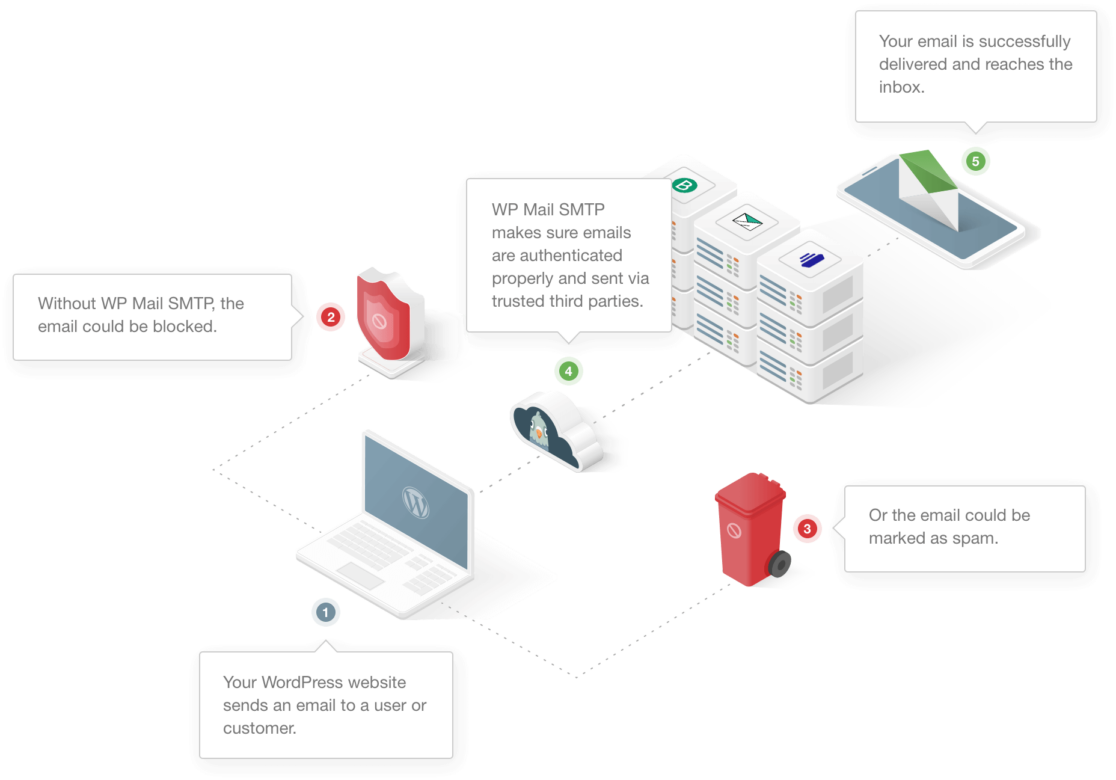
WP Mail SMTP fixes this by connecting your WordPress site to an SMTP mailer service like Gmail, SendLayer, or SMTP.com, so your emails are authenticated and land in your customers’ inboxes.
Bonus Tip: Order Summary Emails from WPForms
If you’re a small business owner or someone managing purchases online, order summary emails help your buyers feel confident and informed about their transactions.
With WPForms, you can enable this feature directly within the form builder and customize your form to include essential order details like items purchased, payment amounts, and buyer information.
To get started, once you’ve created your order form, click on the Total field and toggle on the Enable Summary option to include the total breakdown for your customer.

Then, go to Settings » Notifications to configure your order confirmation email.

Select Add New Notification, then click the Show Smart Tags link next to the Send To Email Address field to customize it.
After that, choose Email from the dropdown menu so an email notification is sent to whatever email your customer entered in your order form.

You can then customize the email subject, from name, from email, and reply-to fields using Smart Tags, and select the {all_fields} smart tag to send the order summary to the customer.

Ready to build your own order form and start sending confirmation emails? Get started today.
Create Your WordPress Form Now
FAQs about Order Confirmation Emails
Order confirmation emails are a popular topic among our readers. Here are answers to some common questions.
How do I write an order confirmation email?
An order confirmation email should include the order number, a list of items purchased, payment details, and the buyer’s billing and shipping information. Start with a friendly thank-you message and include any next steps, such as shipping updates or tracking links. Keep it clear and easy to read, with a structure that makes every essential detail easy to find. The templates above give you a ready-made starting point.
What should an order confirmation email template include?
A good template covers a reassuring subject line with the order number, a thank-you line, an itemized order summary, the subtotal and total charged, the payment method, shipping or delivery details, clear next steps, and a support link. Use merge tags or placeholders for the details that change with each order so the template fills in automatically.
Does order confirmation mean payment went through?
Not always. An order confirmation email typically means your order has been placed successfully, but payment processing depends on the payment method used. Some systems confirm the order even if payment hasn’t yet cleared, so it’s best to double-check your payment receipt or bank statement.
How do you respond to an order confirmation email?
If you need to reply, keep your message polite and to the point. If you have a question or need to update your order, mention the order number and clearly state your request. Most businesses include a contact link or email address for order support in the confirmation email.
How long should I wait for an order confirmation email?
Order confirmation emails are usually sent within minutes of completing a purchase, though depending on the business it might take up to an hour. If you don’t receive it after that, check your spam folder or contact the company to confirm your order.
Is an order confirmation email a receipt?
Not necessarily. While an order confirmation email confirms the details of your purchase, a receipt is more formal and typically includes proof of payment. Many businesses send both, with the receipt issued once the payment is fully processed.
