


AI Summary
The WordPress Abilities API is a standard way for plugins to tell AI tools what they can do. It landed in WordPress 6.9. I wired it up to WP Mail SMTP and asked an AI to read my email logs. It answered in seconds.
Until now, there was no shared way for outside tools to see what your site could do. Every plugin spoke its own language. An AI agent had to guess, or you had to write custom code.
In this guide, you’ll learn what abilities are and how they apply to AI tools. You’ll also see exactly what WP Mail SMTP and WPForms let AI read.
Most of this needs no code. There’s a section for developers near the end too.
What is the WordPress Abilities API?
The WordPress Abilities API is a central registry where plugins, themes, and WordPress core declare what they can do. Each declared capability is called an “ability.”
An ability is one clear unit of functionality. Think “read the last 10 emails” or “get this month’s sending stats.” Every ability has four parts:
- Input: the data it needs to run
- Output: the data it returns
- Execute: the action it performs
- Permission: the check for who’s allowed to run it

The registry is both machine-readable and human-readable. So an AI agent, another plugin, or a developer can look it up and understand it. WordPress stores every ability in one place, called the WP_Abilities_Registry.
How does the Abilities API work?
The Abilities API works by keeping every ability in one registry that any tool can query. A plugin registers its abilities when WordPress starts up. Each one carries its own rules.
Those rules do three jobs:
- JSON Schema checks the input and output types before anything runs.
- A permission callback confirms the user or tool is allowed to run the ability.
- Metadata flags mark an ability as read-only, destructive, or idempotent, so tools know the consequences.
There’s also a show_in_rest flag. It lets an ability appear on the WordPress REST API when a developer opts in. That keeps exposure deliberate, not automatic.
How do abilities connect to AI agents (the MCP adapter)?
Abilities are available to AI agents through the WordPress MCP Adapter. MCP stands for Model Context Protocol. It’s the shared language that AI tools use to talk to outside systems.
The MCP adapter enables AI tools to access these abilities. It reads your registered abilities and converts them into MCP parts:
- Tools: abilities that run an action
- Resources: abilities that return data to read
- Prompts: ready-made templates for common tasks
It works over HTTP for live sites, or STDIO for local development. Sign-in uses WordPress Application Passwords. Once it’s active, MCP tools like Claude, ChatGPT, Cursor, and VS Code can discover and use your abilities.

Why does the Abilities API matter?
The Abilities API matters because it provides AI with a reliable way into your site. Before, there was no standard. Tools had to scan REST routes or read plugin code to guess what was possible.
Now the payoff is simple:
- One registry to discover: tools find every capability in a single place.
- Read-only by default: most abilities only read data, so they’re safe to expose.
- No custom glue: you skip the bespoke integration each plugin used to need.
- Consistent safety: every ability runs inside the same permission model.
For site owners, that means you can ask an AI real questions about your site. For developers, it means your plugin gets AI support without a separate SDK.
What can WP Mail SMTP do with the Abilities API?
WP Mail SMTP uses the Abilities API to let AI tools read your email data, read-only. A connected assistant reviews your email activity and answers questions. It never sends mail, deletes data, or changes your settings.
Here’s what it exposes:
- Browse and filter logged emails by status, mailer, date, and recipient
- Pull a single email’s full details and content when you need a closer look
- Read sending statistics from your Reports
- Check debug events to help track down a delivery problem
These abilities read from the Email Log and Reports, which are part of WP Mail SMTP Pro. Your site needs WordPress 6.9 or later and WP Mail SMTP 4.9 or later.
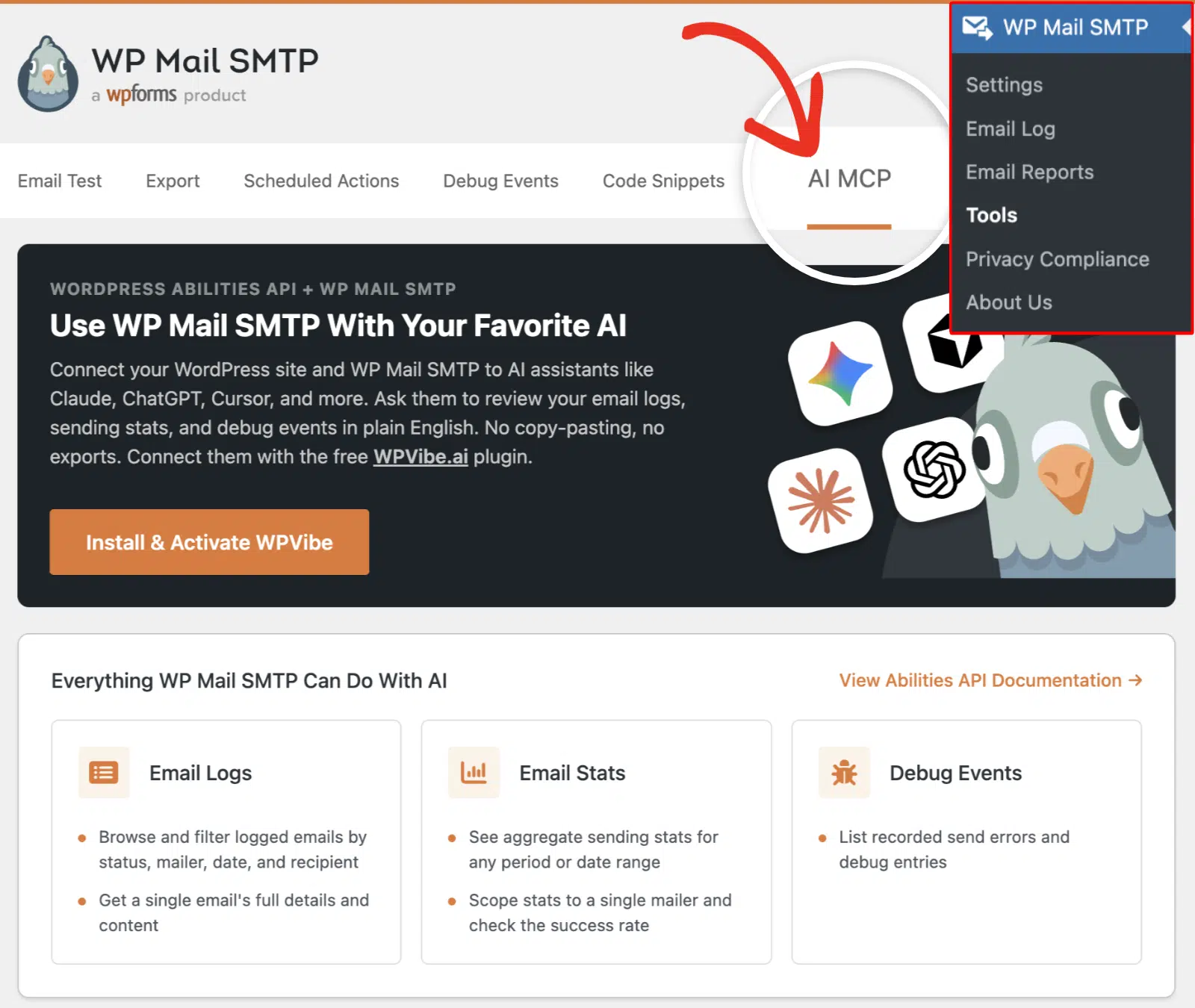
Once it’s connected, you can ask things like “Did my password reset emails send today?” To see it in action, read our guide to monitoring your WordPress email with AI.
What abilities does WPForms expose?
WPForms exposes read and write abilities for your form entries. An AI assistant can create forms, read submissions, summarize them, and answer questions about them.
That opens up quick, useful questions:
- “How many entries came in this week?”
- “Summarize the feedback from my survey form.”
- “Which form gets the most submissions?”

The rules are quite different for WPForms. You can optionally enable write access to allow the assistant to create and manage forms on your site. You’ll simply give a prompt for the type of form you want to create, and it automatically creates it for you.
How to use the Abilities API with WP Mail SMTP
To use WP Mail SMTP with AI assistants, you’ll first need to update the plugin to version 4.9 or later. Then, connect an AI tool. Here are the steps for WP Mail SMTP:
- Update to WordPress 6.9 or later.
- Update to WP Mail SMTP 4.9 or later.
- Go to WP Mail SMTP » Tools, then open the AI MCP tab.
- Install and activate WPVibe, then connect your AI assistant.
That’s the short version. For the full walkthrough with screenshots, follow our guide on connecting your WP Mail SMTP to AI assistants.
How do developers register an ability?
Developers register an ability with the wp_register_ability() function. You call it inside a function hooked to the wp_abilities_api_init action. Here’s a simple example:
add_action( 'wp_abilities_api_init', 'myplugin_register_abilities' );

function myplugin_register_abilities() {
    wp_register_ability(
        'myplugin/get-recent-orders',
        array(
            'label'               => __( 'Get recent orders', 'myplugin' ),
            'description'         => __( 'Returns the 10 most recent orders.', 'myplugin' ),
            'category'            => 'myplugin',
            'input_schema'        => array(
                'type'       => 'object',
                'properties' => array(
                    'limit' => array( 'type' => 'integer' ),
                ),
            ),
            'output_schema'       => array( 'type' => 'array' ),
            'execute_callback'    => 'myplugin_get_recent_orders',
            'permission_callback' => function () {
                return current_user_can( 'manage_options' );
            },
        )
    );
}
What does wp_register_ability() look like?
The function takes two things: a unique name and an array of settings. The name uses a vendor/ability format, like myplugin/get-recent-orders. The settings array defines the rest:
labelanddescription: human-readable names for the abilitycategory: a group the ability belongs toinput_schemaandoutput_schema: JSON Schema for the data in and outexecute_callback: the function that runs the workpermission_callback: the function that grants or denies access
How do permission callbacks keep abilities secure?
Permission callbacks decide who can run an ability. Yours should return a current_user_can() check, so only the right users get through. The example above limits the ability to admins.
Three more layers back it up. JSON Schema rejects input of the wrong type. Metadata flags warn tools when an ability changes data. And show_in_rest keeps REST exposure opt-in rather than automatic.
Frequently Asked Questions
Is the WordPress Abilities API safe?
Yes, safety is built in. Every ability runs a permission callback that checks the user’s rights. JSON Schema validates input before anything runs. Plugins like WP Mail SMTP also keep their abilities read-only, so AI can read data but not change it.
Is the Abilities API the same as the WordPress REST API?
No, they’re different. The REST API exposes data over HTTP endpoints. The Abilities API is a registry of capabilities that many tools can discover, including AI agents. An ability can appear on the REST API, but only when a developer turns on the show_in_rest flag.
Which AI tools can connect to WordPress abilities?
Any tool that speaks the Model Context Protocol. That includes Claude, ChatGPT, Cursor, and VS Code. The WordPress MCP Adapter is what bridges your abilities to these tools.
Next, Connect Your Site to ChatGPT
You now know what the WordPress Abilities API is, how it reaches AI tools, and what your plugins expose through it.
The next step is to use one. My guide on connecting your WordPress site to ChatGPT walks through it, no code required. Once you update to the latest version of WP Mail SMTP and connect your site using a connector like WPVibe, you can ask an assistant about your email logs in plain English.
Ready to build your form? Get started today with the easiest WordPress form builder plugin. WPForms Pro includes lots of free templates and offers a 14-day money-back guarantee.
If this article helped you out, please follow us on Facebook and Twitter for more free WordPress tutorials and guides.
