


AI Summary
MailerSend is a reliable, beginner-friendly transactional email service that works well for most WordPress sites, especially if you want solid deliverability without a steep learning curve.
I’ve spent the past year testing it across multiple WordPress sites to see how it handles the emails your business depends on, as well as other messages that need to reach the inbox every time.
In this MailerSend review, I’ll give you an honest look at its pricing, deliverability, features, and how it compares to alternatives like Mailgun, Postmark, and SendLayer.
The good news? WP Mail SMTP has built-in support for MailerSend, making setup straightforward even if you have no technical experience.
Let’s dig in and see if MailerSend is the right email solution for your WordPress site.
- MailerSend Overview
- Who Should Consider MailerSend?
- Need a Completely Hands-Off Solution?
- MailerSend Features and Benefits
- How Much Does MailerSend Cost?
- Is MailerSend Reliable for WordPress Emails?
- MailerSend WordPress Integration and Setup Walk-through
- MailerSend Support and Documentation
- MailerSend Pros and Cons
- Frequently Asked Questions
MailerSend Overview
Before diving into the details, here’s a quick snapshot of what MailerSend offers:
Throughout this review, I’ll share what I’ve learned from using MailerSend with WordPress, including how WP Mail SMTP makes the setup process significantly easier by handling all the technical plumbing for you.
Fix Your WordPress Emails With MailerSend
Let’s take a closer look at who MailerSend is best for and whether it’s the right choice for your WordPress site.
Who Should Consider MailerSend?
After testing MailerSend and going through user feedback from the wider WordPress community, I’ve got a solid sense of who will benefit most from this service.
MailerSend works well if you’re:
- Running a WordPress site where reliable transactional email matters: contact forms, account emails, and WooCommerce orders.
- Managing multiple sites or brands and need support for multiple sending domains.
- Already using MailerLite for email marketing and want your transactional emails in the same ecosystem.
MailerSend has a good reputation for deliverability and its pricing is among the most competitive in the space, especially at lower volumes.
You might want to consider alternatives if you’re:
- Sending very high volumes and need advanced dedicated IP management out of the box
- Looking for a free tier with higher monthly limits (Mailgun’s free tier allows ~3,000 emails/month via its 100/day cap)
MailerSend Features and Benefits
When evaluating a transactional email provider, the features that matter most are the ones that affect your day-to-day reliability and how easy it is to troubleshoot problems.
Here’s what MailerSend brings to the table:
Email API and SMTP Relay
WP Mail SMTP connects to MailerSend via its API, which is faster and more reliable than a traditional SMTP connection. Once you paste your API token into the plugin settings, it just works.
The API approach bypasses your WordPress host’s mail server entirely, which is often the root cause of WordPress email delivery failures. MailerSend also supports standard SMTP if you need it for a specific integration.
The setup in WP Mail SMTP is minimal: select MailerSend as your mailer, paste your API key, and you’re done. No coding or server configuration required.

Drag-and-Drop Email Builder
MailerSend includes a drag-and-drop email builder that lets you design professional-looking transactional emails without touching any HTML. The builder includes blocks for logos, headers, body text, buttons, and images.

It’s worth noting that these templates aren’t used directly in WordPress emails sent through WP Mail SMTP. The template builder is designed for developers calling the MailerSend API directly in custom applications by referencing a template ID.
If you want to customize the look of your WordPress emails, I recommend using a WordPress email customizer plugin to control your templates from inside your dashboard.
Multi-Provider Flexibility (Inside WP Mail SMTP)
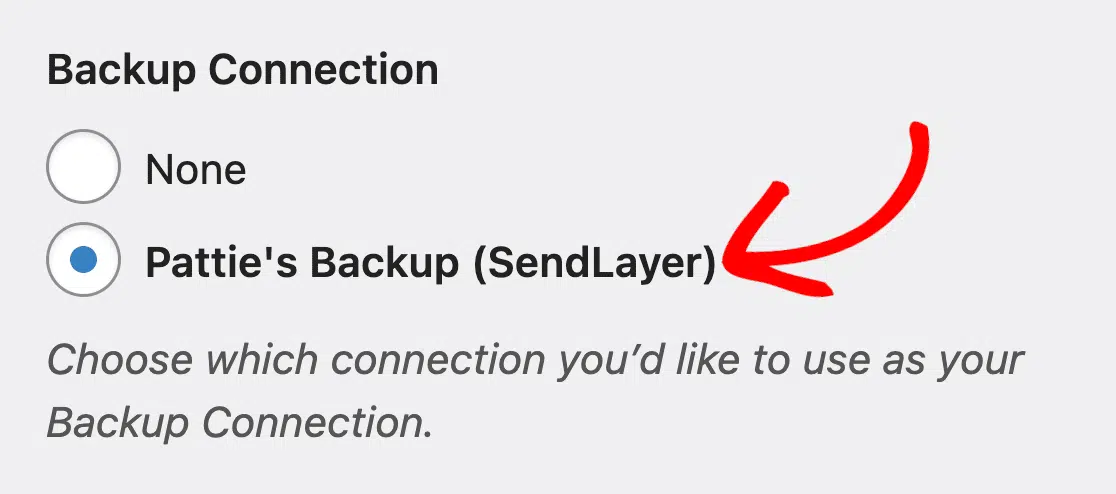
MailerSend has its own WordPress plugin, but I recommend WP Mail SMTP for most users. One of the biggest reasons: WP Mail SMTP lets you configure a backup mailer that kicks in automatically if your primary provider has an outage.
If MailerSend experiences downtime or you hit a sending limit, WP Mail SMTP can seamlessly route emails through a backup provider like SendLayer, Amazon SES, or SMTP.com. You won’t need to reconfigure anything on your site.
This kind of resilience is hard to overstate if your site depends on order confirmation emails or time-sensitive notifications reaching customers.
Analytics and Email Logs
MailerSend provides real-time activity logs and detailed analytics that let you see exactly what’s happening with every email you send. You can track delivery, opens, clicks, bounces, and spam complaints from the MailerSend dashboard.
WP Mail SMTP surfaces MailerSend’s delivery status (sent, delivered, bounced) directly inside your WordPress dashboard, so you don’t have to log into a separate tool to check whether a customer received their order confirmation.

Email Verification Service
MailerSend includes a built-in email verification tool that checks whether an email address is valid and deliverable before you send to it. This is valuable if you’re building a list or importing contacts. Invalid addresses lead to bounces, and too many bounces damage your sending reputation.
The free plan includes 10 verification credits to get you started. For larger batches, additional credits are available as an add-on. MailerSend also offers a real-time validation API for developers who want to verify addresses at the point of form submission.

How Much Does MailerSend Cost?
MailerSend’s pricing is straightforward and competitive, especially at the lower end of the volume range where most WordPress sites sit. Prices below are current as of 2026.
MailerSend Plan Comparison
| Plan | Monthly Price | Emails Included | Notable Features | COverage Rate | Best For |
|---|---|---|---|---|---|
| Free | $0 | 500/month | API & SMTP, drag-and-drop builder, email support, 10 verification credits | – | Testing and development |
| Hobby | $7 | 5,000/month | No MailerSend branding, additional sender identities, SMS add-on available | $1.50/1k | Small blogs and personal sites |
| Starter | $35 | 50,000/month | Unlimited domains, dedicated account support, 7-day API log retention | $0.90/1k | Growing businesses and stores |
| Professional | $110 | 50,000/month | All Starter features, deliverability consultation, priority support | $0.90/1k | High-volume sites and agencies |
Important Pricing Notes
Annual Savings: Paying yearly saves around 10% on Starter and Professional plans. It’s worth it if you know you’ll be sticking with MailerSend long term.
Free Tier Limits: The free plan’s 500 emails/month is low compared to some alternatives. If your site sends more than that, think WooCommerce order emails, password resets, plus form notifications, you’ll likely need the Hobby plan at minimum.
Is MailerSend Reliable for WordPress Emails?
Deliverability is the only metric that really matters for transactional email. Your emails either reach the inbox or they don’t. Most WordPress email problems come down to poor deliverability rather than anything else.
In my testing across three WordPress sites over the past year, MailerSend consistently delivered emails to the inbox without delays. Order confirmation emails, password resets, and form notifications all arrived timely.
MailerSend enforces the authentication standards that major inbox providers now require:
- SPF and DKIM setup is required before you can send from a custom domain
- DMARC monitoring is built into the dashboard, so you can see your authentication health at a glance
- Bounce and spam complaint rates are tracked and visible, helping you stay within the thresholds that Gmail, Yahoo, and Outlook now enforce
IP Reputation Management
MailerSend manages sending reputation in a way that suits most WordPress site owners without requiring any extra configuration:
- Shared IP Pools: On Free and Hobby plans, your emails use carefully managed shared IPs alongside other MailerSend customers. MailerSend monitors these pools and removes senders who violate their sending standards.
- Dedicated IPs: Available on higher-volume plans, ideal if you’re sending large amounts and want complete control over your sending reputation.
- Suppression Management: MailerSend automatically handles bounces and unsubscribes, keeping your list clean and your reputation intact without manual work on your end.
MailerSend WordPress Integration and Setup Walk-through
Getting MailerSend working with WordPress is one of the easier setups I’ve done among transactional email providers. The process is well-documented and WP Mail SMTP handles most of the complexity.
Integration Options
To connect WordPress to MailerSend, you’ll need an SMTP plugin. MailerSend has its own dedicated WordPress plugin; however, I recommend using WP Mail SMTP for its additional features, such as email logs and a backup connection. It provides native MailerSend support, a clean settings interface, and all the email logging features you’ll need to monitor delivery.
Step-by-Step Setup with WP Mail SMTP
Here’s how to get MailerSend working through WP Mail SMTP:
- Install WP Mail SMTP: Add the plugin through your WordPress dashboard (the free Lite version works with MailerSend)
- Create a MailerSend Account: Sign up at mailersend.com — no credit card required for the free plan
- Add Your Domain: In MailerSend, add the domain you’ll send from and follow the verification steps
- Set Up DNS Records: Add the SPF and DKIM records MailerSend provides to your domain’s DNS settings
- Generate an API key: In the MailerSend dashboard, create an API key with sending permissions
- Configure WP Mail SMTP: Select MailerSend as your mailer and paste in your API token

- Set Your From Address: Enter the email address you verified with MailerSend
- Send a Test Email: Use WP Mail SMTP’s built-in test to confirm everything is working

For full step-by-step directions with screenshots, refer to the WP Mail SMTP MailerSend setup guide.
In my testing, the initial setup takes about 10-15 minutes. Most of that time is waiting for DNS changes to propagate after you add the SPF and DKIM records. WP Mail SMTP’s setup wizard walks you through each step in plain language, which makes a real difference for users who haven’t done this before.
Domain verification is usually the trickiest part for non-technical users, but MailerSend provides clear instructions for all major hosting providers, and WP Mail SMTP’s support team can help if you get stuck.
MailerSend Support and Documentation
| Support Type | Free and Hobby Plans | Starter Plan | Professional Plan |
|---|---|---|---|
| Email/Ticket Support | Available | Available | Available |
| Dedicated Account Support | Not available | Included | Included |
| Priority Support | Not available | Not available | Included |
| Deliverability Consultation | Not available | Not available | Included |
Every MailerSend plan includes email/ticket support, which handles most questions WordPress users have. The free and Hobby tiers don’t include a dedicated account rep, but the documentation is thorough enough that most issues are self-solvable.
The Starter plan adds a dedicated account support contact. That’s a real upgrade if you’re running a business site and need faster turnaround on issues. Professional plan users also get a deliverability consultation, which is valuable if you’re troubleshooting inbox placement problems or scaling up your email volume.
If you’re using WP Mail SMTP and run into issues with MailerSend, WP Mail SMTP’s support team can help with WordPress-specific problems and point you toward the right MailerSend support channel for anything on their end.
MailerSend Pros and Cons
Here’s a balanced summary of what’s great about MailerSend for WordPress and where it falls short:
👍 Pros
- Clean, Intuitive Dashboard: One of the most beginner-friendly interfaces in the transactional email space (built by a team with over a decade of email UX experience)
- Affordable Pricing: The Hobby plan at $7/month for 5,000 emails is one of the lowest entry prices among reputable providers
- Reliable Deliverability: Proper authentication standards enforced from day one, with DMARC monitoring built in
- Built-In Email Verification: Validate addresses before sending to protect your sender reputation
- Multiple Sending Domains: Manage several domains from one account, which is great for agencies or multi-site operators
- Email Split Testing: A/B test subject lines and content to optimize your transactional emails over time
- Works Great With WP Mail SMTP: Native support makes setup quick and keeps your email logs visible in WordPress
👎 Cons
- Limited Free Tier: 500 emails/month is lower than Mailgun’s free tier (~3,000/month equivalent via its 100/day limit). You’ll hit the cap quickly on an active site.
- Advanced Deliverability Tools Cost More: Dedicated IPs and deliverability consultations are only available on higher-tier plans
- Professional Plan Jumps in Price: The gap between Starter ($35) and Professional ($110) is significant. Mid-range sites may find neither tier fits perfectly.
For most WordPress sites, MailerSend hits the sweet spot between simplicity, price, and reliability. The Hobby plan covers small-to-medium sites well, and the dashboard is genuinely easier to navigate than most alternatives.
WP Mail SMTP’s native MailerSend integration makes setup fast, and having your email logs inside WordPress means you’re not constantly switching between tools to check delivery status.
MailerSend is likely a good fit if:
- You manage multiple WordPress sites or sending domains from one account
- You already use MailerLite and want your transactional and marketing emails under one roof
- You want email verification included without paying for a separate tool
Consider alternatives if:
- You need a more generous free tier (try Mailgun’s 100 emails/day plan, or SendLayer’s $5 Starter for low-cost paid sending)
- You want the simplest possible setup without any technical configuration (try the White-Glove setup service)
- You need advanced deliverability tools like inbox placement testing on a mid-range budget
Ready to give MailerSend a try? Here’s how to get started:
- Download WP Mail SMTP (the free Lite version works with MailerSend)
- Sign up for MailerSend’s free plan at mailersend.com
- Follow the WP Mail SMTP MailerSend setup guide to connect everything
- Send a test email to confirm delivery is working correctly
Within 20 minutes you’ll have reliable email delivery running from your WordPress site, with a clear view of every message’s delivery status right inside your dashboard.
FAQs – MailerSend for WordPress
Here are answers to the most common questions we see about using MailerSend with WordPress.
Is MailerSend free?
Yes. MailerSend has a free plan that includes 500 emails per month with no credit card required. It includes API and SMTP access, the drag-and-drop email builder, and 10 email verification credits. The free plan is best for testing or very low-volume sites. For most active WordPress sites, the Hobby plan at $7/month (5,000 emails) is the most practical starting point.
Is MailerSend good for WordPress?
Yes. MailerSend works well with WordPress when connected through WP Mail SMTP. It reliably handles transactional emails like WooCommerce order confirmations, password resets, and contact form notifications. The clean dashboard makes it one of the more beginner-friendly options for WordPress users who aren’t comfortable with complex developer tools. Setup takes about 15–20 minutes using the WP Mail SMTP setup guide.
Does MailerSend have good deliverability?
Yes. MailerSend enforces SPF, DKIM, and DMARC authentication from the start and maintains strict standards for bounce and complaint rates on its shared IP pools. In testing, emails consistently arrived within seconds with no notable delivery failures. MailerSend also includes built-in DMARC monitoring so you can spot authentication issues before they affect deliverability.
How do I set up MailerSend in WordPress?
The easiest way is through an SMTP plugin like WP Mail SMTP. Install the plugin, create a free MailerSend account, verify your sending domain by adding SPF and DKIM DNS records, generate an API token in MailerSend, and paste it into the WP Mail SMTP settings. The full process takes about 10-15 minutes. See the WP Mail SMTP MailerSend setup guide for step-by-step instructions with screenshots.
Next, Compare SMTP Providers
Not sure if MailerSend is the right fit? Check out our guide to choosing the right SMTP provider for your WordPress site for a side-by-side comparison of all the major mailers and advice on matching the right provider to your needs.
Ready to fix your emails? Get started today with the best WordPress SMTP plugin. If you don’t have the time to fix your emails, you can get full White Glove Setup assistance as an extra purchase, and there’s a 14-day money-back guarantee for all paid plans.
If this article helped you out, please follow us on Facebook and Twitter for more WordPress tips and tutorials.
