


AI Summary
If you’re weighing Resend pricing against your current mailer, the monthly figure is the easy part. What matters more is what happens when you outgrow it.
Resend’s pricing page looks simple. But the free plan imposes a daily cap that can break busy WordPress sites. The marketing plans also bill on a completely different unit.
In this review, you’ll learn what Resend actually costs, how good its delivery really is, and where it falls short.
You’ll also see what Resend runs on under the hood, which surprised me, and who should pick something else instead.
What is Resend, and who is it built for?
Resend is a transactional email service built for developers, launched in 2023 by a team led by Zeno Rocha. It competes with SendGrid and Mailgun on developer experience rather than features.
The pitch is a clean API and modern tooling. Resend leans hard into React Email, its own library for building templates as React components.
That focus tells you who it’s for:
- Developers shipping transactional email inside a SaaS app
- React and Next.js teams who want templates in code, not a drag-and-drop builder
- Small projects that need a few thousand emails a month for free
It also tells you who it isn’t for. There’s no drag-and-drop campaign builder to speak of, and no inbound email parsing.

What does Resend actually run on?
Resend sends through Amazon SES. You can verify that yourself in two commands, without an account.
dig +short TXT send.resend.com
# "v=spf1 include:amazonses.com ~all"

dig +short MX send.resend.com
# 10 feedback-smtp.us-east-1.amazonses.com.
Resend’s own sending subdomain authorizes Amazon SES to send on its behalf. The bounce-handling MX record points to an SES endpoint in us-east-1.
You don’t even need the command line to see it. Resend shows you the same hostnames during domain setup.
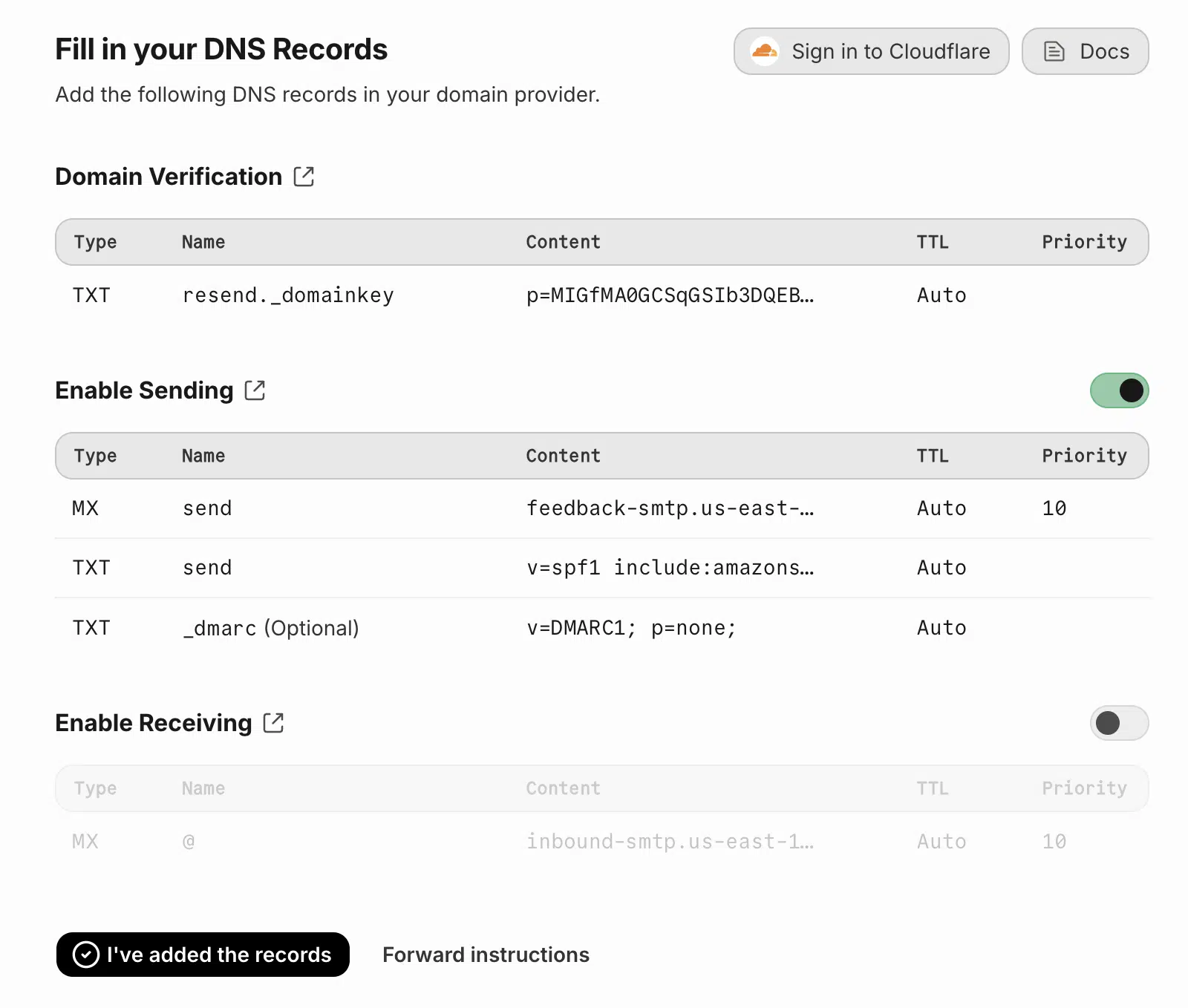
The MX record it asks you to add is feedback-smtp.us-east-1.amazonses.com. The SPF record is v=spf1 include:amazonses.com. Resend isn’t hiding this.
None of the Resend reviews ranking today mention this. It matters for two reasons, and they pull in opposite directions.
The good news is that SES is mature infrastructure with a long delivery record. You’re not betting your email on a startup’s homemade mail servers.
The catch is what you pay for that. I’ll put real numbers on it below.
There’s a second implication that matters more than the price. On any plan without a dedicated IP, you share sending IPs with Resend’s other customers.
That cuts both ways. A well-managed shared pool often beats a new dedicated IP, because it already has warm reputation. But you inherit your neighbors’ behavior too.
Resend only sells dedicated IPs above 3,000 emails a day, at $30 a month. Below that volume, you’re on the shared pool whether you like it or not.
How much does Resend cost in 2026?
Resend costs nothing for the first 3,000 emails per month, then starts at $20 per month for 50,000 emails. Here are all transactional tiers as listed on Resend’s pricing page.
| Plan | Price/mo | Emails/mo | Daily cap | Domains | Overage |
|---|---|---|---|---|---|
| Free | $0 | 3,000 | 100/day | 1 | None, sending pauses |
| Pro | $20 | 50,000 | None | 10 | $0.90 per 1,000 |
| Pro | $35 | 100,000 | None | 10 | $0.90 per 1,000 |
| Scale | $90 to $1,150 | 100,000 to 2.5M | None | 1,000 | $0.90 down to $0.46 per 1,000 |
| Enterprise | Custom | 3M+ | None | Flexible | Custom |
Every plan keeps logs for 30 days. Dedicated IPs cost an extra $30 a month, and Resend only offers them for volumes above 3,000 emails a day.

What does the free plan actually allow?
The free plan allows 3,000 emails per month, but no more than 100 per day. The daily cap is the part that catches people out.
Do the math and 100 a day works out to roughly 3,000 a month anyway. So the monthly figure is close to decorative.
For a small blog with contact form notifications, 100 a day is plenty. For a WooCommerce store, it isn’t.
A single busy sales day can produce more than 100 emails on its own. Order confirmations, shipping notices, and password resets all draw from the same bucket.
You also get just 1 verified domain on the free plan. If you run multiple sites, you’ll need the Pro plan.
What happens when you hit your sending limit?
On the free plan, sending pauses. On paid plans, you’re charged $0.90 per extra 1,000 emails.
Resend doesn’t auto-upgrade you or bill a surprise overage on the free tier. That’s genuinely good design and worth crediting.
But a pause is still an outage. Your customers stop getting receipts and password resets until the next window opens.
How does Resend compare to using Amazon SES directly?
Resend typically costs several times more than using SES directly. Since Resend appears to rely on Amazon SES infrastructure for delivery, the comparison is unusually direct.
| Route | Effective cost per 1,000 emails |
|---|---|
| Amazon SES | $0.10 |
| Resend Pro ($20 for 50,000) | $0.40 |
| Resend Pro ($35 for 100,000) | $0.35 |
| Resend overage | $0.90 |
That’s a 3.5x to 9x premium over raw SES. The markup buys you real things: a usable dashboard, event logs, webhooks, React Email, and no AWS console.
Whether that’s a fair trade depends on your volume. At 5,000 emails a month, the difference is cents, so pick on developer experience. At 500,000, it’s hundreds of dollars a month, and worth a second look.
Is Resend’s deliverability any good?
Resend benefits from SES infrastructure, though deliverability still depends heavily on your domain reputation and setup.
It also supports proper domain authentication with SPF and DKIM, per its domain setup docs.
The bigger factor is you, not your mailer. Your sending domain’s reputation and list hygiene move inbox placement far more than the logo on the API.
That’s the part most reviews skip. Switching from a bad setup on SendGrid to a bad setup on Resend changes nothing.
If you want a real answer for your own site, test it. I’ve written a walkthrough for that in how to test email deliverability, which covers spam scoring and inbox placement checks.

What deliverability tooling do you get?
You get event logs, webhooks, and delivery status tracking in the dashboard. Enough to answer “did this email arrive?” for a single message.
Here’s what’s included:
- Event logs for sends, deliveries, opens, clicks, and bounces
- Webhooks to push those events into your own system
- Domain verification with SPF and DKIM records
- Suppression handling for bounces and complaints
That covers the basics well. Resend’s dashboard is genuinely nicer to use than SendGrid’s.
What’s missing next to Postmark or Mailgun?
Resend lacks inbound email parsing, deeper reputation tooling, and long log retention. Those gaps show up as you scale.
| Capability | Resend | Postmark | Mailgun |
|---|---|---|---|
| Inbound email parsing | No | Yes | Yes |
| Log retention | 30 days | 45 days | 30+ days, plan-dependent |
| Email validation API | No | No | Yes |
| Separate transactional streams | Limited | Yes | Yes |
| Dedicated IP | $30/mo, above 3,000/day | Included on higher plans | Available |
If you need to receive and parse email, Resend can’t do it. Postmark and Mailgun both can.
Does Resend work well with WordPress?
Resend works with WordPress through WP Mail SMTP, which includes a dedicated Resend mailer. You connect it with an API key rather than SMTP credentials.
Setup takes about 10 minutes and runs in 4 steps:
- Create a Resend account and verify your sending domain
- Add the SPF and DKIM records Resend gives you to your DNS
- Generate an API key in the Resend dashboard
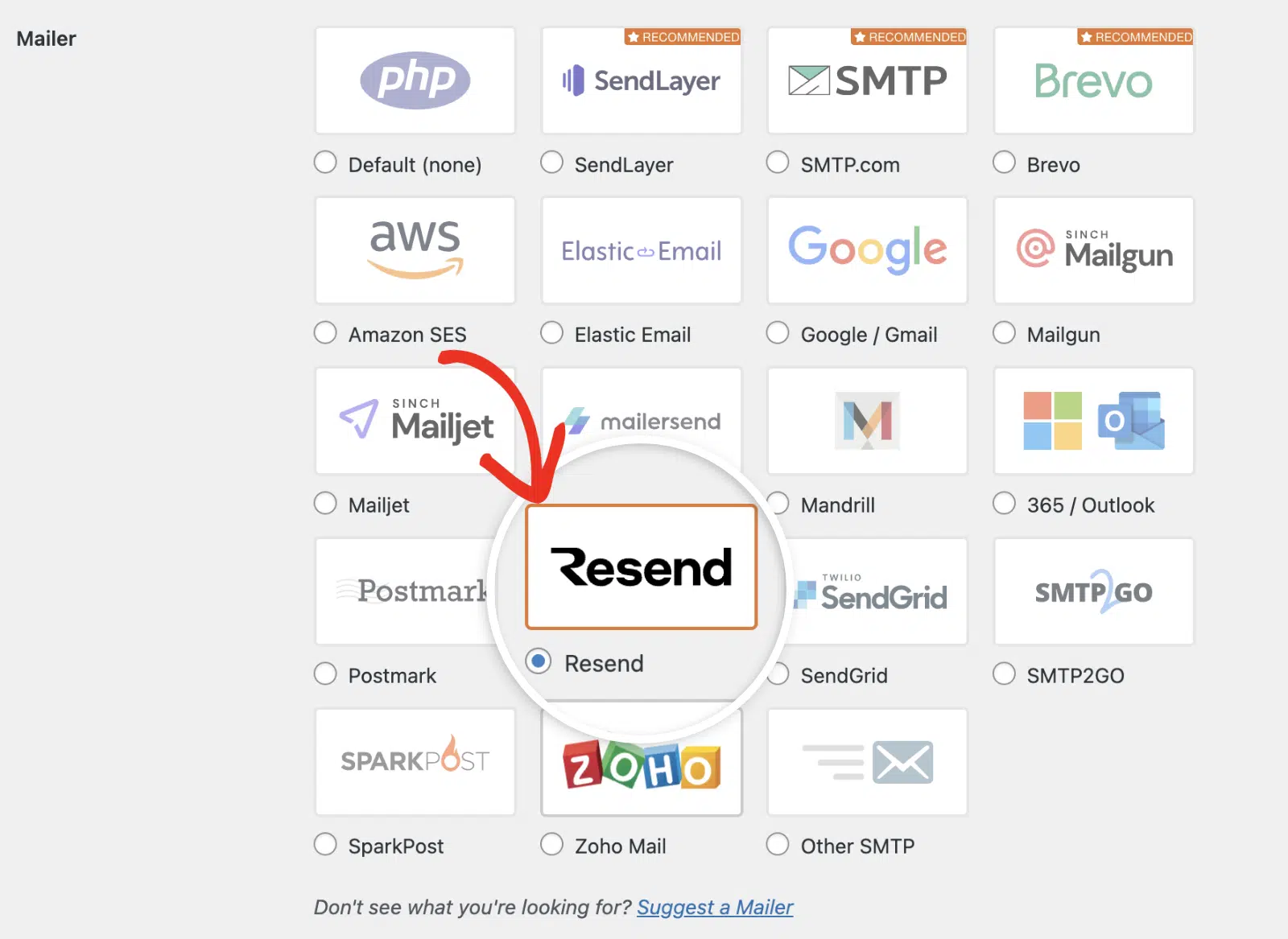
- Once done, log in to your WordPress admin area and go to WP Mail SMTP » Settings. Then select the Resend mailer.
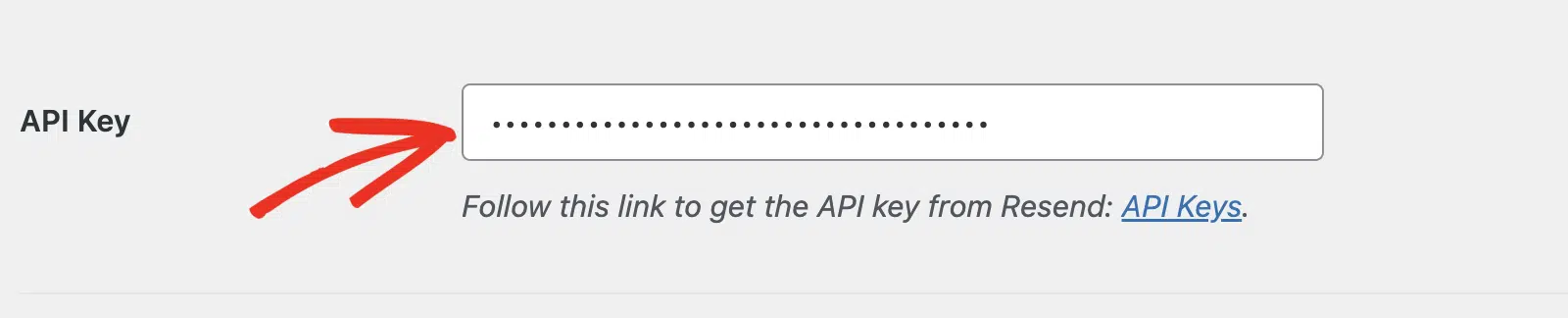
- After that, scroll down and paste the key in the API Key field.
I’ve written the full walkthrough, with screenshots for every DNS record, in how to send WordPress emails with Resend. Rather than repeat those steps here, I’ll flag the two things that trip people up.
First, the 100-a-day free cap. WordPress sends more email than people expect, including admin notices, user registrations, and plugin alerts.
Second, DNS propagation isn’t instant. Domain verification can sit pending for a few hours, and your test emails will fail until it clears. You’re looking for a green Verified status in Resend before you test.
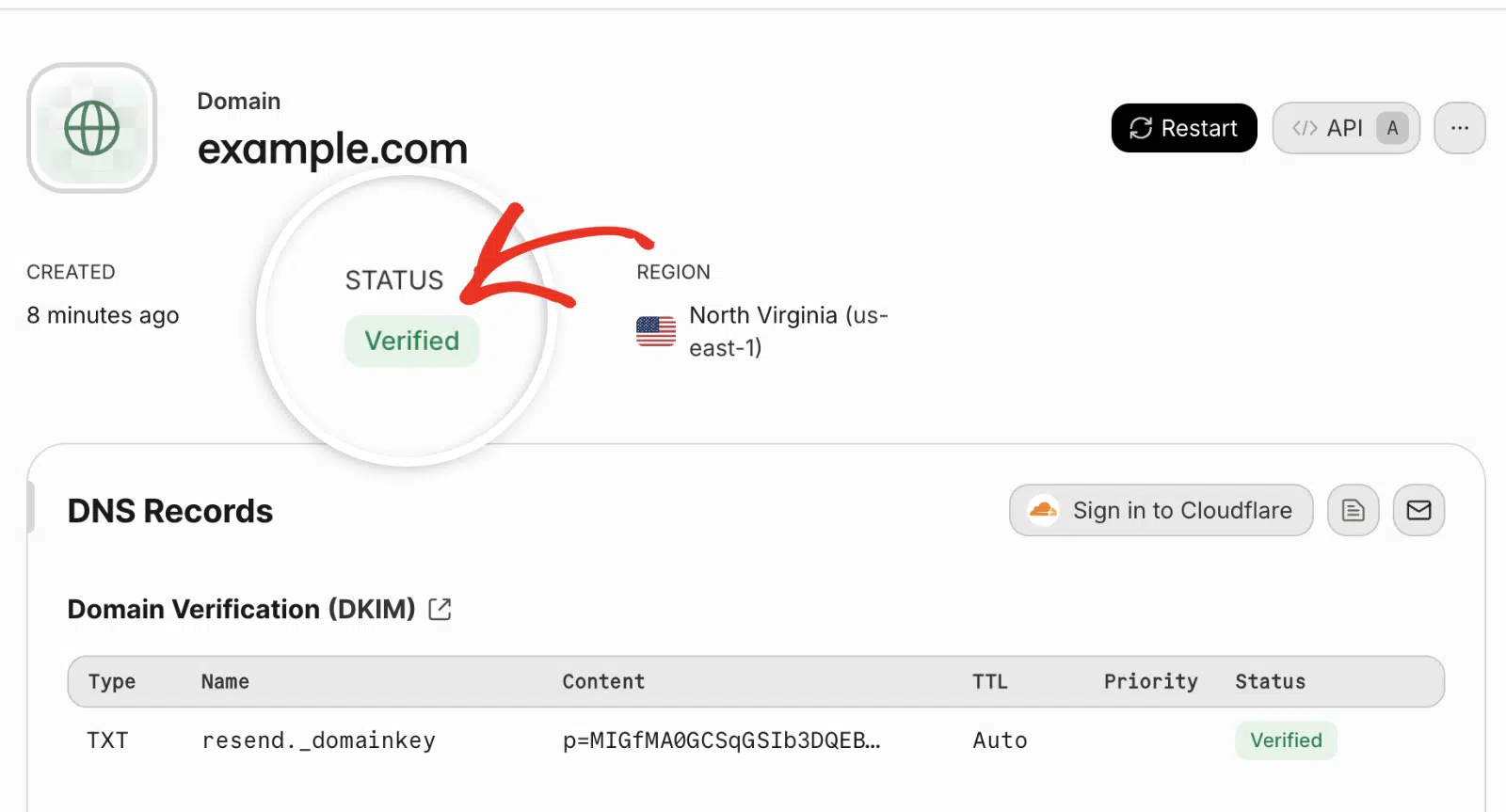
Notice the region on that screen: North Virginia (us-east-1). It’s the same region as the SES endpoint in the DNS records above.
What are Resend’s biggest limitations?
Resend’s main limits are its strict policy on bulk outreach, its short log retention, and its youth as a company. None are dealbreakers, but all three should factor into your decision.
Can you use Resend for newsletters or cold email?
You can send newsletters through Resend’s marketing plans, but cold email is prohibited. Its acceptable use policy governs what you can send. The terms of service also require you to have “obtained all necessary consents and permissions from recipients”.
That’s a reasonable stance for a provider protecting a shared IP pool. Most quality transactional providers take the same line.
Just don’t sign up planning to run cold outreach. You’ll lose the account, and possibly your transactional email with it.
That last part is the real risk. If your receipts and password resets share an account with a cold campaign, one policy strike takes down both.
Is 30-day log retention enough?
For most sites, 30 days is enough to debug a delivery problem. It isn’t enough for compliance records or disputes.
Chargeback disputes and account arguments routinely reach back further than a month. If someone claims they never got a receipt in March, a 30-day window won’t help you in May.
WP Mail SMTP stores its own email logs in your WordPress database. You keep them as long as you want, which sidesteps the retention limit entirely.
Who should use Resend, and who should skip it?
Pick Resend if you’re a developer sending transactional email from a modern JavaScript stack. Skip it if you need inbound parsing, cold outreach, or the lowest possible cost at high volume.
Resend is a good fit if you:
- Build with React or Next.js and want templates as components
- Send under 50,000 transactional emails a month
- Value a clean API and readable docs over a long feature list
- Want a free tier that pauses instead of billing you
Look elsewhere if you:
- Need to receive and parse inbound email
- Send high volume and care about cost per thousand
- Run a WooCommerce store that can exceed 100 emails a day on the free plan
- Need log retention beyond 30 days for compliance
What are the best Resend alternatives?
The strongest Resend alternatives are Postmark for transactional reliability, Mailgun for infrastructure features, and SendLayer for WordPress simplicity.
| Alternative | Best for | Free tier |
|---|---|---|
| Postmark | Fast, reliable transactional delivery | 100 emails/mo |
| Mailgun | Validation, inbound parsing, infrastructure | Trial only |
| SendGrid | Scale plus marketing in one place | 100 emails/day |
| SendLayer | WordPress sites wanting fast setup | 200 emails |
| Amazon SES | Lowest cost, if you’ll handle AWS | 3,000 emails/mo for 12 months |
For a fuller breakdown, see my comparison of transactional email providers.
FAQs on Resend Review
Here are answers to the most common questions we see about using Resend with WordPress.
Is Resend free?
Resend offers a free plan with 3,000 emails per month, capped at 100 per day. You also get 1 verified domain and 30 days of logs. Sending pauses when you hit the cap rather than charging an overage.
Is Resend just a wrapper for Amazon SES?
Resend sends through Amazon SES, which you can confirm from its DNS records. But it adds its own API, dashboard, event logs, webhooks, and React Email library. You’re paying roughly 4 times the raw SES rate for that layer.
Does Resend have good deliverability?
Resend’s delivery rests on Amazon SES infrastructure, which has a strong track record. It supports SPF and DKIM authentication for your own domain. Your sending reputation and list quality still matter more than your choice of provider.
Can you use Resend for marketing emails?
Yes, through Resend’s separate marketing plans, which bill by contacts starting at $40 a month. Cold email and unsolicited outreach are against Resend’s terms. Accounts sending cold campaigns risk suspension.
Is Resend good for WordPress?
Resend works well for WordPress through WP Mail SMTP’s built-in Resend mailer. It suits blogs and small sites comfortably. Busy WooCommerce stores should start on a paid plan to avoid the 100-a-day free limit.
Next, Compare Every SMTP Provider
If Resend didn’t quite fit, I’d read my roundup of the best SMTP servers next. It puts Resend side by side with other providers in terms of pricing, free tiers, and setup difficulty. You’ll see which one matches your volume before you commit to verifying a domain.
Ready to fix your emails? Get started today with the best WordPress SMTP plugin. If you don’t have the time to fix your emails, you can get full White Glove Setup assistance as an extra purchase, and there’s a 14-day money-back guarantee for all paid plans.
If this article helped you out, please follow us on Facebook and Twitter for more WordPress tips and tutorials.
