



AI Summary
Email deliverability for WordPress sites comes down to one thing first: replacing the default WordPress mail function with a proper SMTP setup. Everything else, including domain reputation, authentication, and monitoring, builds on that foundation. If your password reset emails, order confirmations, and contact form notifications aren’t reaching the inbox, the SMTP fix solves it most of the time.
This guide covers the full deliverability picture for WordPress, in roughly the order you should think about it. You don’t need to implement all of it to see results, but switching to SMTP alone makes the biggest single difference. The rest is about keeping your emails landing in the inbox over time.
In 2026, deliverability matters more than ever. Gmail tightened its enforcement of bulk sender rules in November 2025, moving from temporary deferrals to permanent rejections for non-compliant emails. Microsoft and Yahoo apply similar rules. The steps below aren’t optional anymore. They’re the baseline.
- What is email deliverability for WordPress?
- Delivery rate isn't the same as inbox placement
- 1. Use an SMTP plugin (the #1 fix)
- 2. Understand domain reputation
- 3. Set up email authentication
- 4. Comply with bulk sender requirements
- 5. Monitor your email deliverability
- 6. Troubleshoot common deliverability issues
- 7. Advanced techniques for improving deliverability
- Frequently asked questions
Fix Your Email Deliverability Issues Now
Fix Your Deliverability Issues Now
What is email deliverability for WordPress?
Email deliverability is whether your emails reach the inbox or get filtered into spam. For WordPress site owners, this matters because your site automatically sends emails without your direct intervention.
These emails fall into two main categories:
- Transactional emails: password reset notifications, order confirmations, shipping updates, and form submission notifications. They’re triggered by specific user actions on your site.
- Marketing emails: newsletters, promotional offers, and updates you send to your subscriber list.
Good email deliverability means all these messages reach your users’ inboxes. Poor deliverability leads to missed password resets, lost orders, and a breakdown in communication with your customers.
The rest of this guide walks through the key factors that affect deliverability for WordPress sites and the practical steps you can take to improve it.
Delivery rate isn’t the same as inbox placement
When your sending platform reports an email as “delivered,” that means the receiving server accepted it without rejection. That’s it. It says nothing about where the email ended up. It could be in the inbox. It could be in spam. It could be filtered into a Promotions tab the recipient never checks. It could be silently dropped after acceptance.
Inbox placement is the metric that actually matters. It’s the percentage of sent emails that reach a visible inbox where someone might read them.
The two numbers can be very different. Hostinger analyzed 1 billion emails through their platform in January 2026 and found only 43.9% were successfully delivered, with the rest blocked by spam and virus filters. Validity’s 2025 benchmark report measured global inbox placement at 87.2%, but that figure only covers marketing emails sent through established platforms.
Both numbers are accurate within scope. Together they tell you something useful: senders on dedicated, reputation-managed infrastructure are mostly fine. Senders on generic setups (default WordPress sending, shared hosting, unauthenticated domains) are in much rougher waters.
If you’ve never measured your own inbox placement, your sending platform’s “delivered” count is probably hiding bad news. The rest of this guide covers how to close that gap.
1. Use an SMTP plugin (the #1 fix)
The most common reason emails fail to deliver from a WordPress site is the default email setup. Out of the box, WordPress uses the PHP mail() function to send emails. While it works in some cases, it’s often unreliable and leads to deliverability issues.
The biggest problem with PHP mail() is its lack of authentication. When you send an email through it, the message doesn’t include the authentication protocols that modern email systems expect.
Because of this, emails sent through PHP mail() have a much lower delivery rate than properly configured SMTP. They’re often blocked entirely by Gmail, Microsoft, and Yahoo, all of which require proper email authentication.
PHP mail() also relies on your server’s configuration to send emails. If your hosting provider hasn’t set up the server correctly (which is often the case), your emails may fail to send entirely without you realizing.
SMTP (Simple Mail Transfer Protocol) is a proper email-sending protocol that includes authentication, gives better delivery rates, and provides more control over how your site sends emails.
| Feature | Default WordPress (PHP mail()) | SMTP |
|---|---|---|
| Authentication | Limited | Strong |
| Deliverability | Lower | Higher |
| Reliability | Inconsistent | Consistent |
| Scalability | Poor | Excellent |
| Error Reporting | Limited | Detailed |
Using an SMTP plugin like WP Mail SMTP solves many email deliverability issues at the source. It’s the first step I’d recommend to any WordPress site owner experiencing email problems.
How do you choose the right SMTP provider?
WP Mail SMTP works with any SMTP provider, but some are better suited for sites that send a high volume of email.
SendLayer offers reliable deliverability and integrates easily with WordPress. It’s specifically designed for sites that send transactional emails.
Other solid options for use with WP Mail SMTP:
| Mailers available in all versions | Mailers in WP Mail SMTP Pro |
|---|---|
| SendLayer | Amazon SES |
| SMTP.com | Microsoft 365 / Outlook.com |
| Brevo | Zoho Mail |
| Google Workspace / Gmail | |
| Mailgun | |
| Postmark | |
| SendGrid | |
| SparkPost | |
| Other SMTP |
Free providers like Gmail are an option for low-volume sites, though they have hourly and daily sending limits to be aware of.
When choosing a provider, consider your sending volume, the types of emails you’re sending (transactional, marketing, or both), and any specific features you need, such as detailed email analytics or automation capabilities.
How do you implement SMTP in WordPress?
- Install and activate the WP Mail SMTP plugin on your WordPress site.
- Configure the plugin with your SMTP provider’s details.
- Send a test email to verify the setup.
If you run into a “could not connect to SMTP host” error during setup, our guide on fixing the SMTP host connection error covers the most common causes.
SMTP best practices
To get the most out of your SMTP setup, always use TLS encryption. TLS encrypts the connection between your server and the recipient’s, and modern email providers require it.
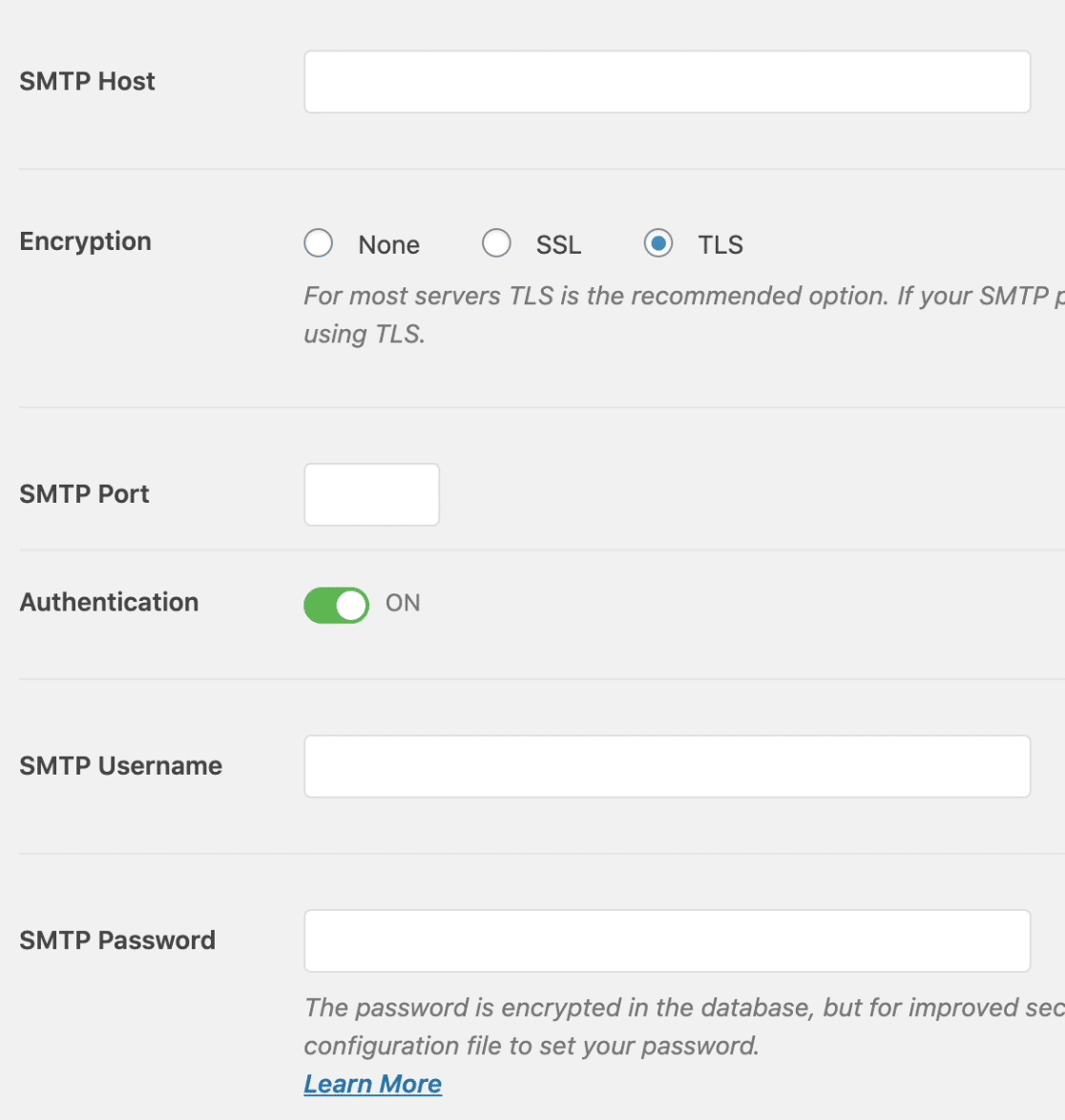
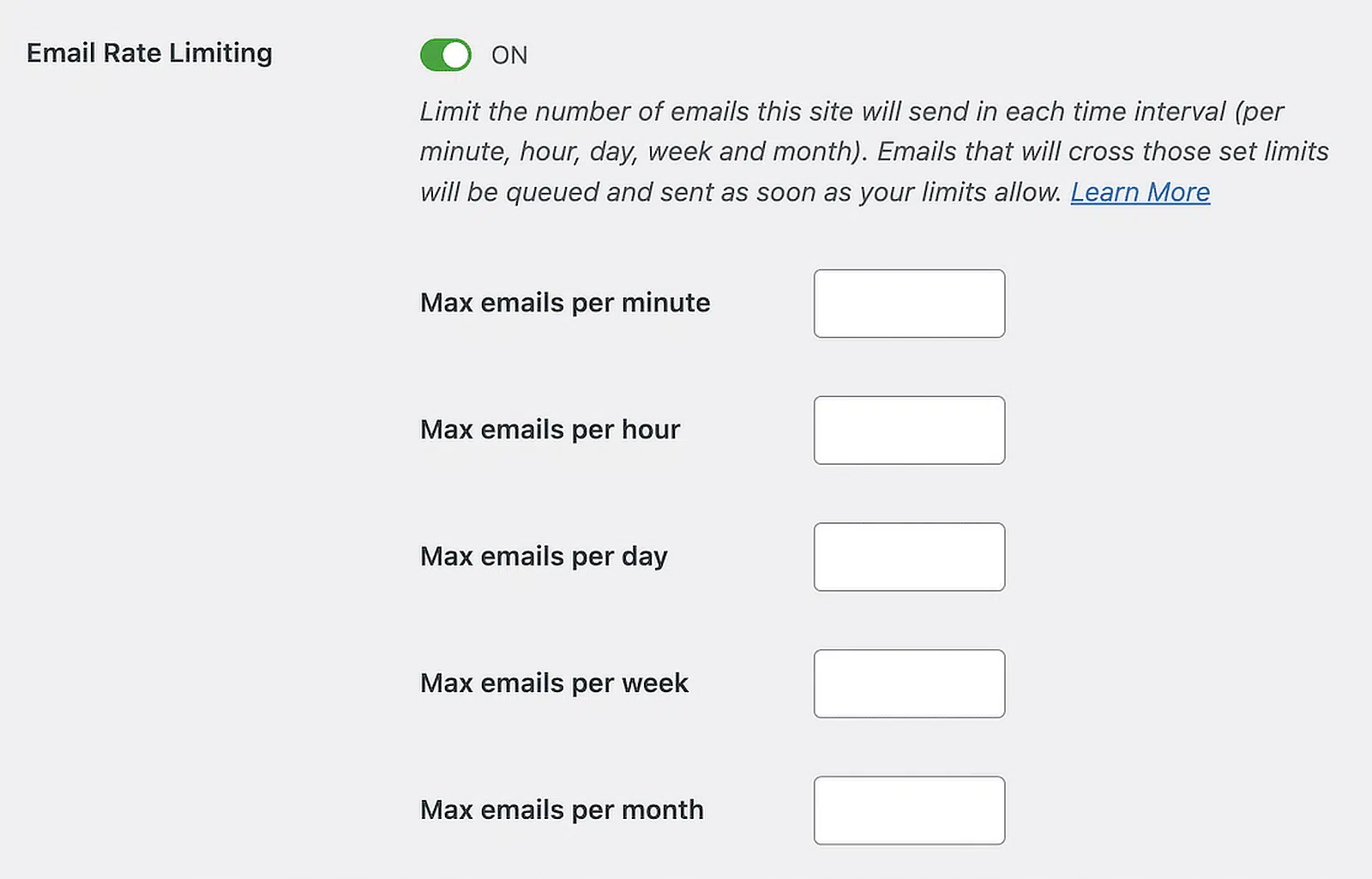
Monitor your sending limits. Most SMTP providers have restrictions on how many emails you can send in a given period. Exceeding these limits can result in temporary blocks or even account suspension.
WP Mail SMTP Pro lets you set rate limits in the plugin settings so you don’t accidentally exceed your provider’s allowance.
2. Understand domain reputation
Domain reputation is your sender’s track record with email providers. They use it to decide whether your emails go to the inbox, the spam folder, or get rejected outright.
The main factors that affect domain reputation are:
- Spam complaint rate
- Bounce rate
- Engagement metrics (opens, clicks, replies)
- Sending volume and consistency
- Authentication setup
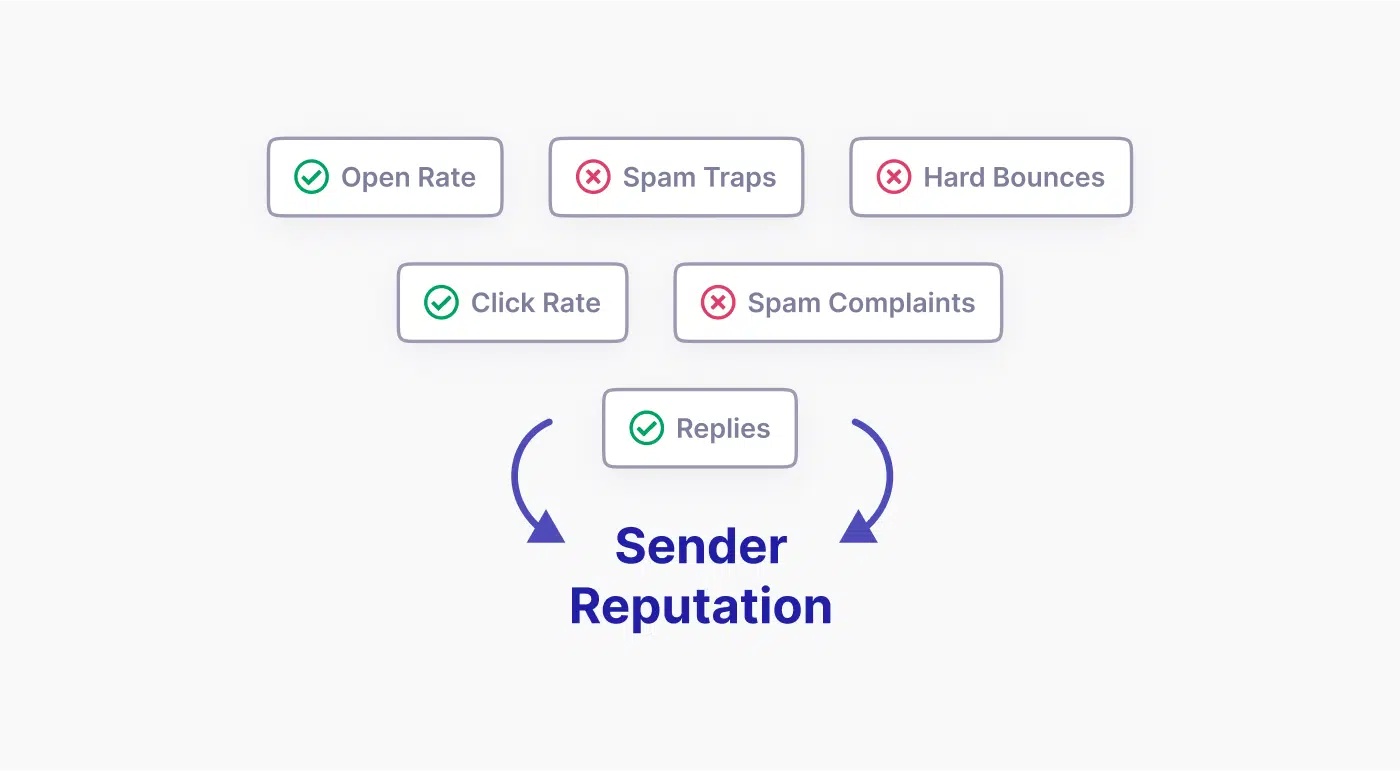
Each factor is something you can monitor and improve. For a deeper look at how to measure each one, see our guide on how to verify your domain reputation.
Domain reputation vs IP reputation
Mail providers track both your domain reputation and your sending IP reputation when deciding what to do with your emails.
Domain reputation follows your domain forever. It’s the one you actively manage. IP reputation depends on the physical server your email is sent from. Most senders share an IP with several other users, so your IP reputation can be affected by what other senders do too.
If your shared IP gets a bad reputation, you can usually fix it by asking your provider for a different IP, switching providers, or moving to a dedicated IP for full control. For most WordPress sites on shared SMTP services, domain reputation is what you actively manage.
How do you check your domain reputation?
Each email provider calculates reputation differently, but several free tools give you a useful view:
- Google Postmaster Tools shows how Gmail views your domain. Gmail is one of the largest email providers globally with around 30% market share, so being in good standing with Google matters for most senders.
- Sender Score gives you a score for both your domain and IP, with 80+ generally indicating good standing.
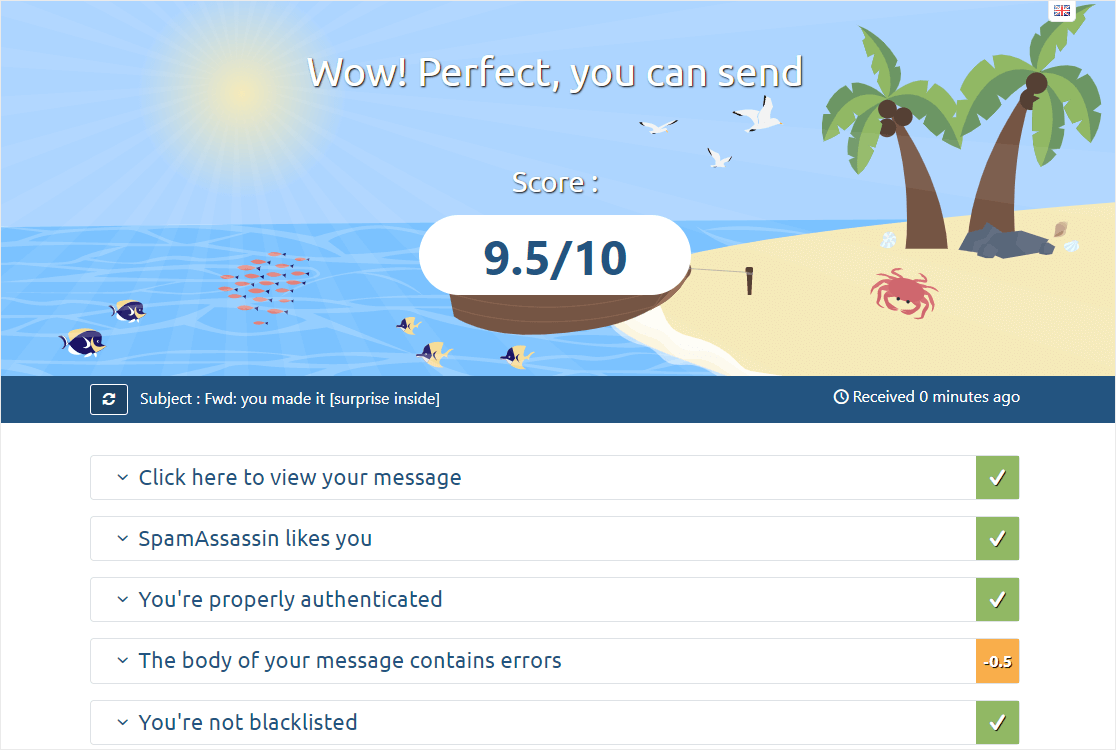
- Mail Tester scans individual emails for issues and checks reputation data.
3. Set up email authentication
Even if you’re using SMTP to send emails, you need to authenticate them properly. Email authentication proves your emails are legitimate and haven’t been tampered with in transit.
The three authentication methods are SPF (Sender Policy Framework), DKIM (DomainKeys Identified Mail), and DMARC (Domain-based Message Authentication, Reporting & Conformance).
SPF
SPF works like a guest list for your domain. It specifies which servers are allowed to send email on your behalf. When a receiving server gets an email claiming to be from you, it checks whether the sending server is on your SPF list.
DKIM
DKIM adds a cryptographic signature to your emails. The signature lets receiving servers verify that the email content hasn’t been altered between when you sent it and when they received it.
DMARC
DMARC ties SPF and DKIM together. It tells receiving servers what to do when an email fails SPF or DKIM checks: reject it, quarantine it, or let it through. DMARC also provides aggregate reports so you can see who’s trying to send emails pretending to be from your domain.
For bulk senders, DMARC alignment matters too: the From domain must match either the SPF domain or the DKIM domain. Without alignment, DMARC fails even if SPF and DKIM both pass on their own.
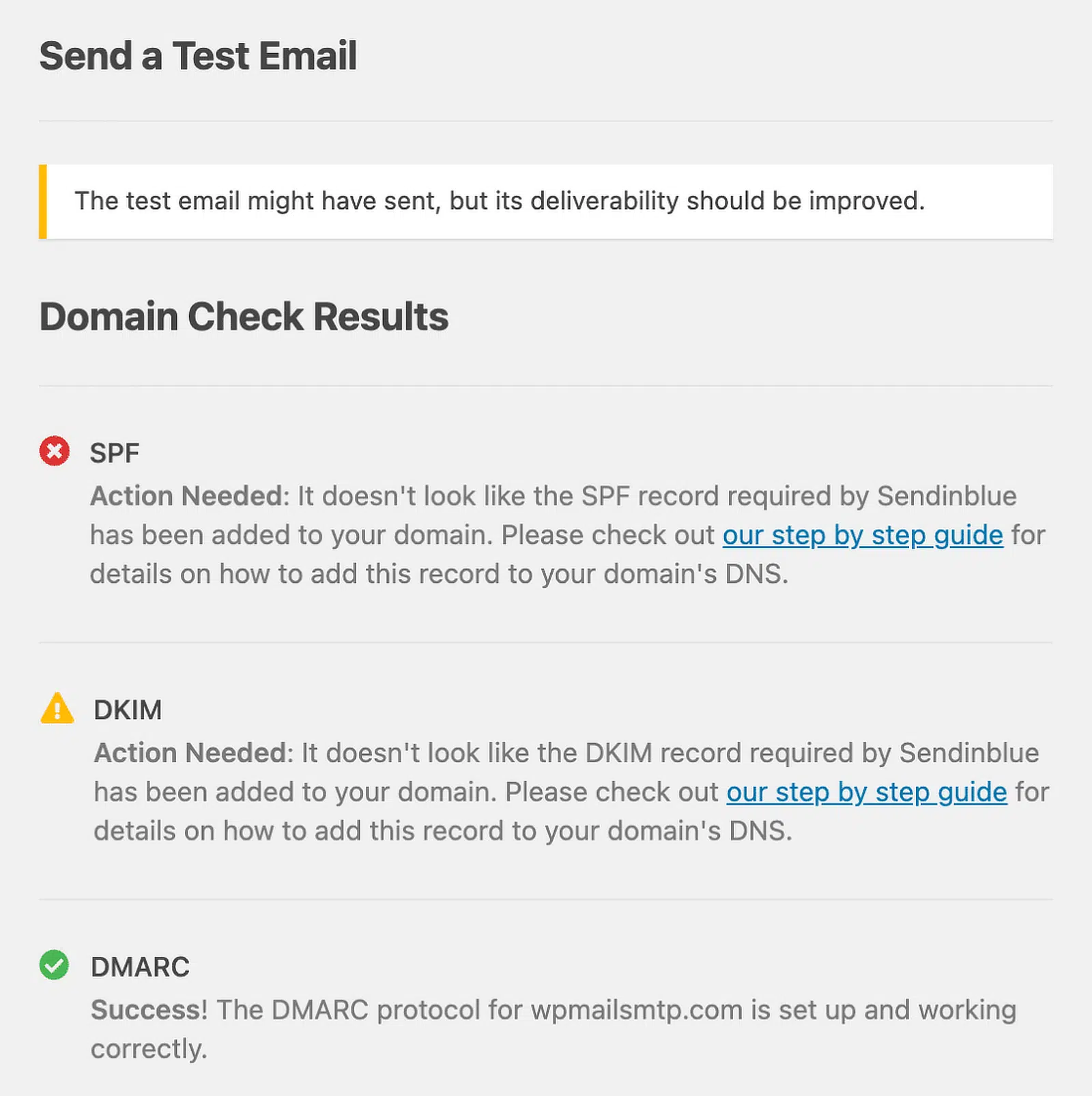
WP Mail SMTP has an email testing feature that checks whether these methods are set up correctly.
How do you set up email authentication?
Setting up authentication involves adding specific DNS records for your domain. The process:
- Generate the records: your email service provider can generate the required SPF, DKIM, and DMARC records for you.
- Add the records to your DNS: done through your domain registrar or hosting provider.
- Verify the setup: use free tools like MXToolbox to check that the records are working correctly.
For step-by-step setup help, see our guides on how to create a DMARC record and fixing multiple SPF records.
Beyond improving deliverability, proper authentication protects your domain from being used in phishing attacks.
4. Comply with bulk sender requirements
Since 2024, Gmail, Yahoo, and Microsoft have enforced specific sender requirements for inbox placement. The rules apply to everyone, but bulk senders (anyone sending 5,000 or more emails a day to personal accounts) face stricter requirements.
All senders need:
- SPF or DKIM authentication
- Valid forward and reverse DNS (PTR) records
- TLS for transmitting email
- A spam complaint rate below 0.3%, with 0.1% as the working target for stable senders
Bulk senders also need:
- Both SPF and DKIM (not just one)
- DMARC, with the From domain aligned to either SPF or DKIM
- One-click unsubscribe headers on marketing emails (RFC 8058)
Since November 2025, Gmail has issued permanent 550 rejections for emails that fail these checks, instead of temporary deferrals. Microsoft has applied similar enforcement since May 2025. Failing the requirements doesn’t mean delayed delivery anymore. It means rejected delivery.
For the full picture, see our guide on Gmail’s bulk sender requirements. If you’re already seeing emails blocked, our guide on Gmail blocking emails covers the troubleshooting.
If you process card payments through your site, PCI DSS v4.0 also requires DMARC for any organization handling credit card data, so DMARC is now a compliance requirement on top of a deliverability one.
5. Monitor your email deliverability
Once you’ve set up SMTP and authentication, monitor your deliverability regularly. Catching issues early makes them easier to fix.
Use Google Postmaster Tools
If you’re sending any meaningful volume of emails to Gmail users, Google Postmaster Tools is the most important resource. It shows how Gmail views your emails, including spam rates, authentication results, and compliance status.
Google retired the original Postmaster Tools in 2025 and replaced it with Postmaster Tools v2. The old color-coded reputation bars (High, Medium, Low, Bad) are gone. The new dashboard uses a pass/fail compliance model, which makes it much easier to see exactly which sender requirements you’re meeting.
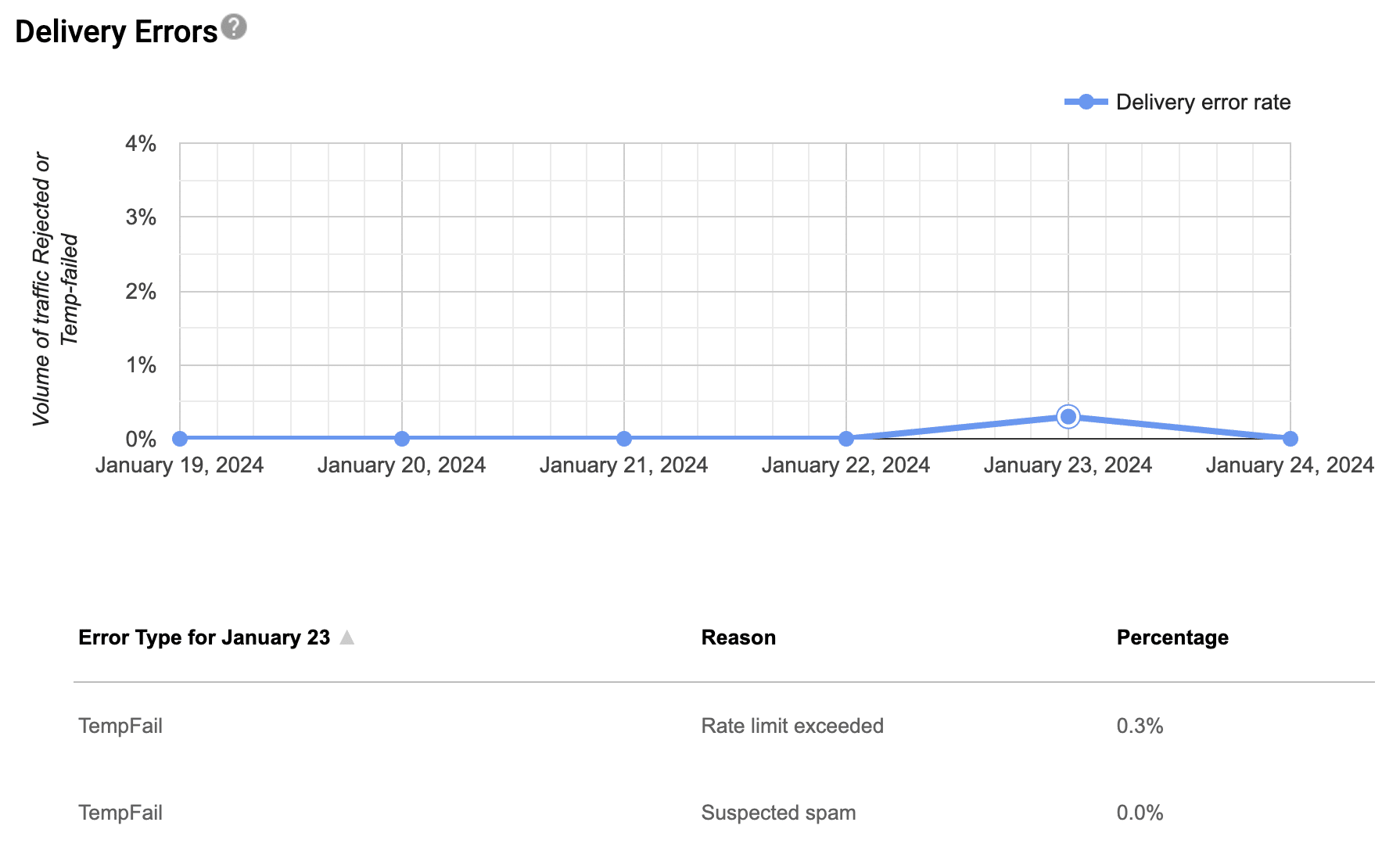
For setup steps, see our tutorial on how to set up Google Postmaster Tools.
The metrics worth watching:
| Metric | What it shows | Target |
|---|---|---|
| Spam complaint rate | Percentage of your emails marked as spam | Below 0.1% (0.3% is the hard ceiling) |
| Compliance status | Pass/fail against Gmail’s sender requirements | All requirements passing |
| Authentication results | SPF, DKIM, and DMARC success rates | Close to 100% |
| Encryption | TLS used on outgoing email | 100% |
Monitor email status with WP Mail SMTP
WP Mail SMTP has built-in email logging features that let you monitor the status of emails sent from your WordPress site directly from your dashboard.
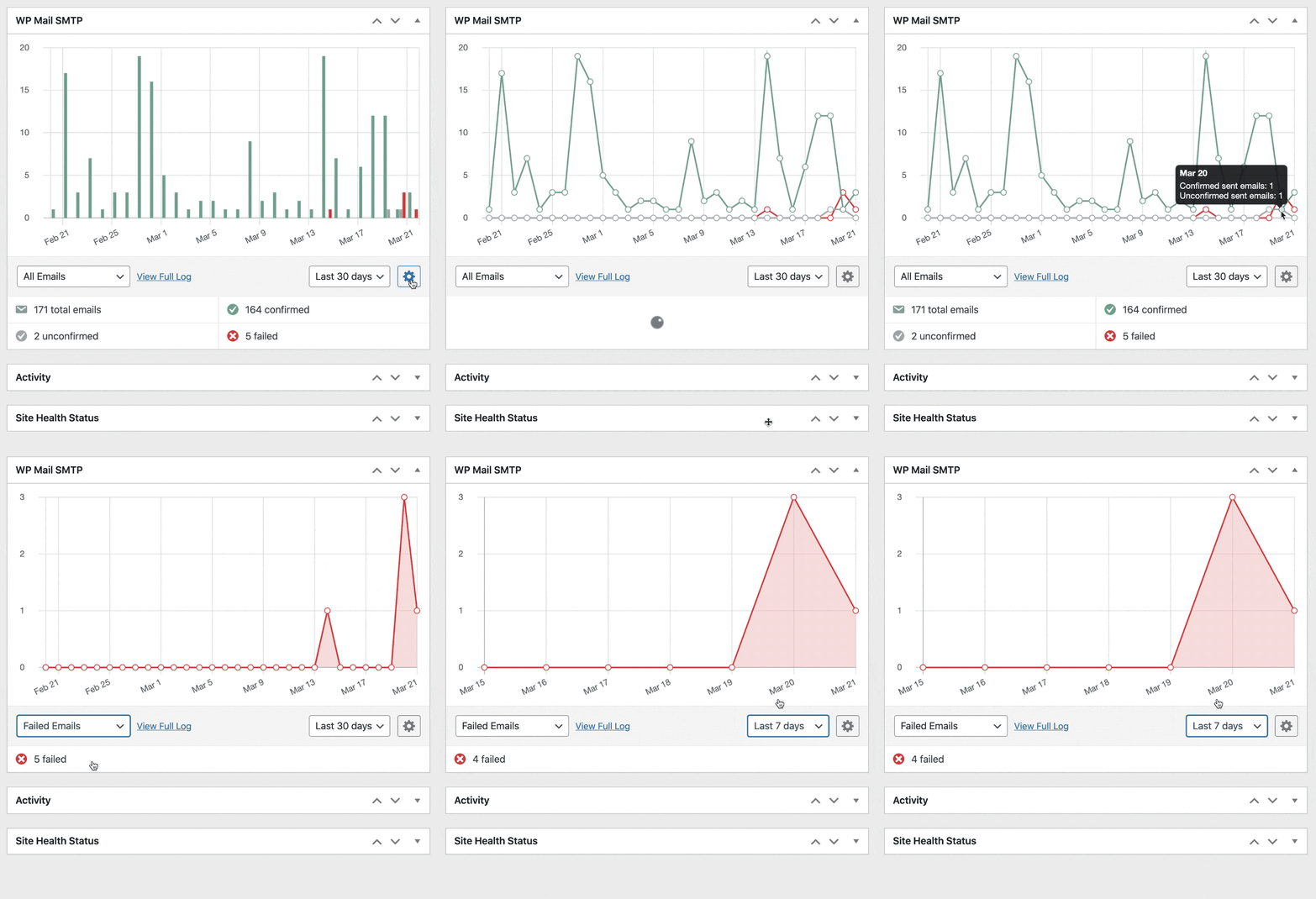
You can see which emails were sent successfully and which failed, plus set up automatic alerts when an email fails to send. This catches deliverability issues early so you can fix them before they affect your customers.
6. Troubleshoot common deliverability issues
Even with the best setup, you’ll occasionally hit deliverability problems. Here’s how to address the most common ones.
High bounce rates
If you’re seeing a lot of bounced emails, start by cleaning your list. Remove invalid email addresses and consider implementing a double opt-in process for new subscribers to ensure addresses are valid from the start.
Some transactional email providers like SendLayer can help you identify which emails are bouncing and why.

You can also use a third-party email verification service to identify and remove invalid emails before you send.
Emails landing in spam folders
If your emails are consistently going to spam, check your authentication setup first. SPF, DKIM, and DMARC misconfiguration is the most common cause.
Next, review your content for common spam triggers: excessive capitalization, too many exclamation points, language that sounds aggressively promotional.
Finally, check whether your sending domain or IP is on a blocklist. Most of the email testing tools mentioned above will show you this. If you’re listed, follow the blocklist’s removal process.
Low open rates
Low open rates can mean deliverability issues or content issues. Start by verifying that your emails are actually reaching inboxes using the monitoring tools above.
If deliverability is fine, focus on subject lines and content relevance. Consider segmenting your list to send more targeted emails.
Inconsistent delivery
If some emails get through and others don’t, it could be due to inconsistent sending patterns. Maintain a regular sending schedule and avoid sudden volume spikes.
Check whether the issue is provider-specific. If only Microsoft 365 emails are failing, you might be hitting the Basic Authentication retirement (Microsoft has been progressively disabling SMTP basic auth since 2022). Our guide on fixing the Microsoft Outlook basic authentication error covers this.
7. Advanced techniques for improving deliverability
Once you’ve nailed the basics, these advanced techniques can push your deliverability further.
Use subdomains for email sending
Creating a separate subdomain for sending emails (e.g., email.yourdomain.com) lets you isolate your email reputation from your main domain.
- Protects your main domain’s reputation
- Allows for more granular control over email authentication
- Makes it easier to track email-specific analytics
- Lets you separate email for different purposes (such as marketing and transactional)
Some email providers like SendLayer support email subdomains by default.
Implement BIMI (Brand Indicators for Message Identification)
BIMI lets you display your logo next to your emails in supporting inboxes (Gmail, Apple Mail, Yahoo, and others). It’s primarily a branding feature, but it also contributes to deliverability by increasing recipient trust.
The catch: BIMI requires DMARC at p=quarantine or p=reject (so it’s only available to senders with mature email authentication). To display your logo in Gmail and Apple Mail, you also need a Verified Mark Certificate (VMC), which is a paid certificate from Entrust or DigiCert. Without a VMC, your logo won’t show in those inboxes even if your DMARC is set up correctly.
Domain warming and IP warming
Domain warming and IP warming are similar concepts but apply to different things:
- Domain warming gradually builds reputation for a brand-new sending domain.
- IP warming gradually builds reputation for a new sending IP, typically a dedicated IP through a transactional email service.
If you’re sending a large volume of emails (typically over 50,000 per month) and have moved to a dedicated IP, you’ll need to warm it up. The same gradual ramp-up helps for new domains too, even on shared IPs.
How to warm up a new domain or IP
- Start with a small, engaged list of subscribers.
- Begin with low volume (e.g., 50–100 emails per day).
- Gradually increase your sending volume over 4 to 8 weeks.
- Monitor your metrics closely during this period.
Best practices during warm-up
- Focus on your most engaged subscribers.
- Send your best, most valuable content.
- Maintain consistent sending patterns.
- Keep a close eye on bounce rates and spam complaints.
Frequently asked questions
Here are answers to some of the most common questions we get about email deliverability.
Do bulk sender requirements apply to my WordPress site?
If you send fewer than 5,000 emails a day to personal Gmail, Yahoo, or Microsoft addresses, the strictest bulk sender requirements don’t apply to you. But everyone needs SPF or DKIM authentication, valid PTR records, TLS, and a spam complaint rate below 0.3%. Setting up all three of SPF, DKIM, and DMARC is best practice regardless of your volume.
How long does it take to see improvements in email deliverability after implementing SMTP?
Many users see immediate improvements after switching to SMTP. Building a strong sender reputation takes longer, usually several weeks to a few months of consistent good practices.
Do I need a dedicated IP address for my WordPress site’s emails?
For most WordPress sites, a shared IP from a reputable email service provider is fine. Dedicated IPs are typically only necessary for high-volume senders (usually over 100,000 emails per month).
How often should I clean my email list?
Clean your list every 3 to 6 months. Remove inactive subscribers and invalid email addresses to maintain a healthy list and reduce bounces.
Can using a free email service (like Gmail) for my WordPress site affect deliverability?
Free email services have hourly and daily sending limits, and you’ll have less control over your authentication setup. For low-volume sites, this is usually fine. For higher volumes, switching to a transactional email service gives you better deliverability and more visibility into delivery issues.
How do images in my emails affect deliverability?
Too many or oversized images can trigger spam filters, and some email clients block images by default. Use a balance of text and images, always include alt text, and keep the overall email size under 100KB where possible.
What’s the impact of using a different From address than my domain?
Using a From address that doesn’t match your domain (e.g., a Gmail address for emails from your business website) can fail SPF checks and look suspicious to email providers. For bulk senders, it also breaks DMARC alignment. Always use an email address on your sending domain.
How does GDPR compliance affect email deliverability?
GDPR is about data protection rather than deliverability, but complying with it tends to lead to better email practices. Only emailing people who explicitly opted in results in more engaged subscribers, which improves deliverability over time.
Next, learn how to fix bulk email errors in WordPress
Even with every best practice in place, you can still hit issues if your site tries to send too many emails at once.
Read our guide on fixing the “error due to unsolicited or bulk email” message in WordPress to keep your site emails flowing.
Ready to fix your emails? Get started today with the best WordPress SMTP plugin. If you don’t have the time to fix your emails, you can get full White Glove Setup assistance as an extra purchase, and there’s a 14-day money-back guarantee for all paid plans.